‘-- ‘-’-
SF-7300
SF-7350
*
QR frame stayAS
Screwdti@r
Cleaningblade
Toner receiver~
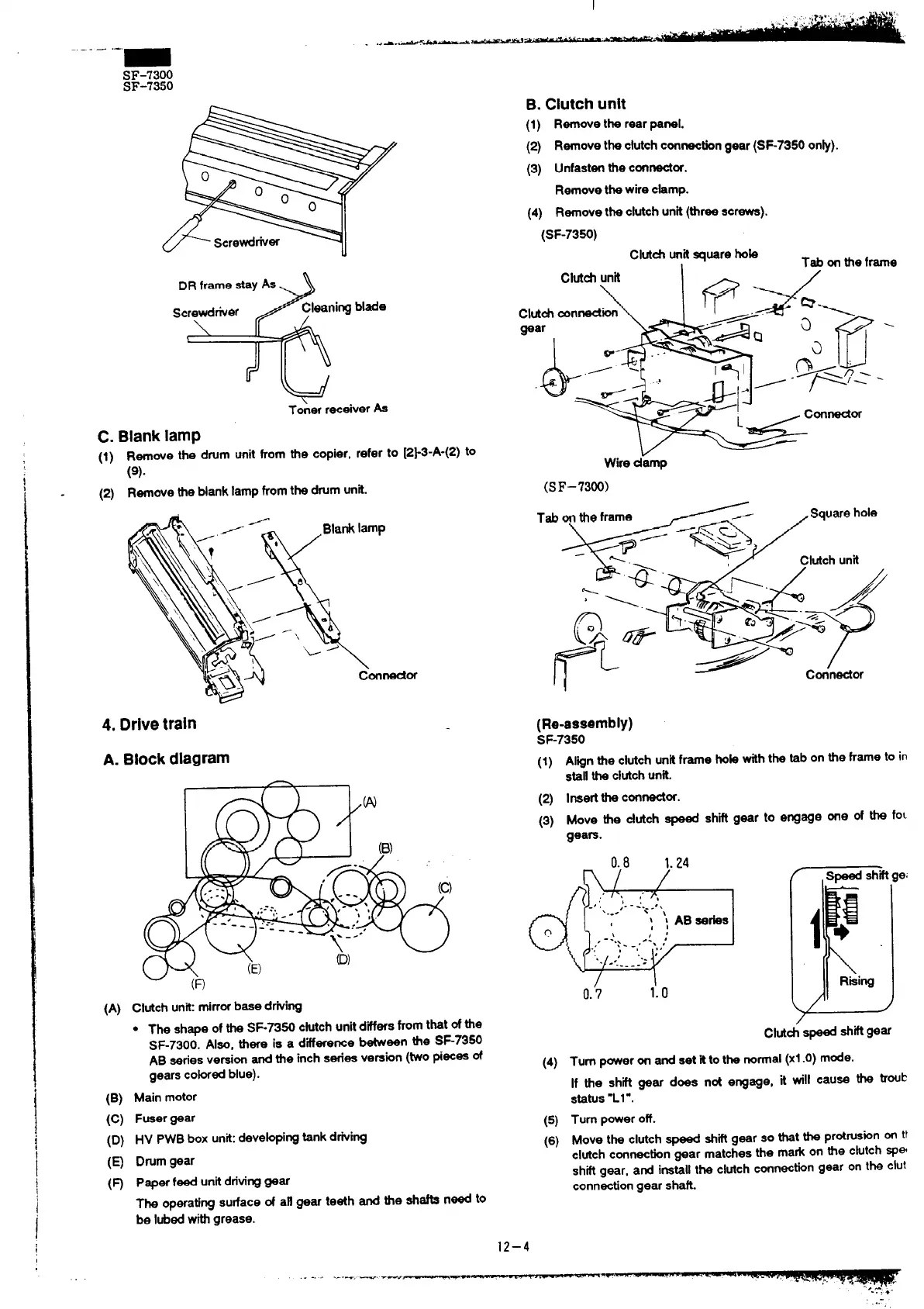
C. Blanklamp
(1)
(2)
Remove the drum unit from the copier, refer to [2}3-A-(2) to
(9).
Remove the blank lampfromthe drumunit.
4. Drivetrain
A. Blockdiagram
I f
-
I
(A)
(B)
(c)
(D)
(9
(m
Clutchunit:mirrorbase d~ing
9
The shape ofthe SF-7350 cfutchunitdiffersfromthat ofthe
SF-7300. Also, there is a difference tieen the SF7350
AB seriesversionand the inch series version(twopieces of
gears cokrredblue).
Main motor
Fueergear
HV PWBbox unit:devekping tank dfiing
Drumgear
P~er feed unitdritinggear
The operatingsurface of afl gear teeth and the shafts need to
be Iubedwithgrease.
B.Clutchunit
(1) Rernovethe reerpenel.
(z) Remove theclutch connacdongear(S~73500nh).
(3) UnfastenMecontior.
Removethe wire chmp.
(4) Rernovetheclutch unit(threescrewe).
(SF-7350)
Clutd
unitsquare hok
I
Tab on the frame
Clut& unh 1- /
\
Wire d;mp
(SF–73W)
(Re-assembly)
SF-7350
(1)
(2)
(3)
Alignthe clutchunitframe hob withthe tab on the frame to in
stallthe clutchunit.
Ineertthe connect~.
Move the clutch speed shift gear to engage one of the foL
gears.
1.24
n ‘j* /
O.i
1:o
(4)
(5)
(6)
Clutd @ ~~ w~
Turn poweron and set fttothe nomal (xl .0) mode.
If the shfi gear does not engage, it will cause the troub
status-Ll ”.
Turn poweroff.
Move the clutchspeed shiftgear so that the Pr~Ws~n ~ tt
clutchconnectiongear matchesthe mark on the clutchspe
shiftgear, and installthe clutchconnectin gear on the clut
connectiongear shan.
12–4
. . ......—e. --—
.—



 To Next Page