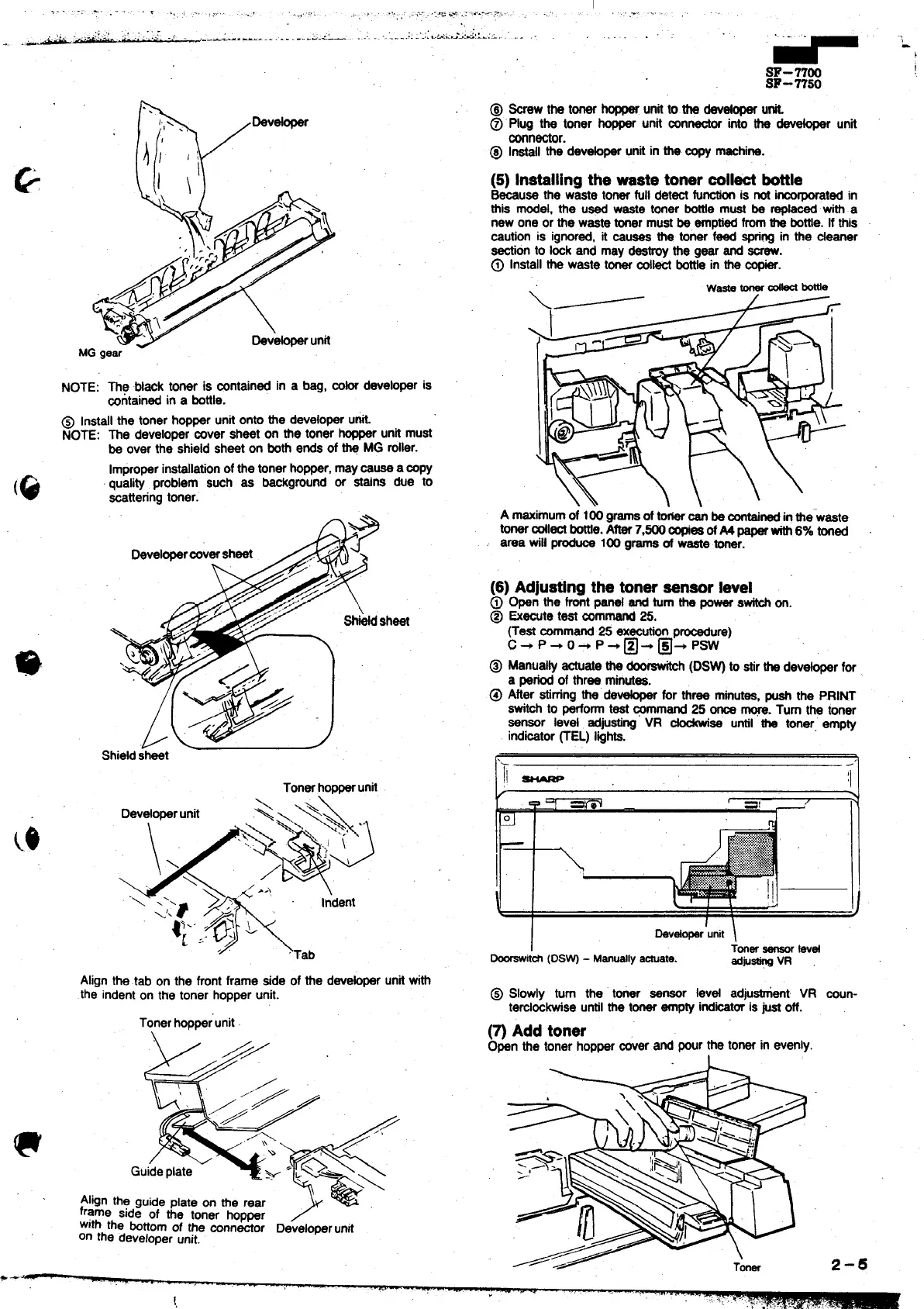
NOTE: The bl=k toner is mntained in a beg, mb developer is
~ntainad in a bottle.
@ Installthe toner hopper unit onto tie developeru&.
NOTE: The developer rover sheet on the toner hopperunit must
be over the shield sheet on bothends of@ MG roller.
Improperinstallationofthe tonerhopper,maymuse a mpy
(Q
quality problem such se background or stains due to
=ttering toner.
sheet
Shidd sheet
Tonerhopparunit
Alignthetab on the tint frame side of the devor unitwith
the indenton the toner hopperunit.
Tonerhoppar’unit
\
r
//
.’
&
“.‘51”>/
/>
f
/;’
Guideplate
: .b&-
.
\
Alignthe guide plate on the rear
@
frame side of the toner hopper
with the bottomof the mnnmor Developerunit
on the developerunit.
w“”’
m-7700
m-7750
(5) Installingthe -ste tonermlW bttle
-use the waste tonerfull det- fu- is not i~ted in
this model, the ua waste toner boti must be @ti with a
new one or the wastetoner mustbe emptiedfromthe bottle.If this
=ution is ignored,it muses the toner feed spri~ in the *aner
-on to Imk and may destroythe gear and -.
@ Installthe waste t- dl~ boti in the *.
A maximumof 100 gramsof~ ~ be sontainedinthewaste
t- ~1~ me. A* 7,500X ofM paper- 6% toned
area will _ 100 gramsof waste toner.
(6) Adjustingthe tonersensorlevel
@
Open the frontpa~ and turnthe power@ on.
@ &Wte test -remand 25.
(Test ~mand 25 ex~on p~ure)
c+ ‘+ ‘+ p+@+@+ ‘w
@ Manua~ astuatethe ~-h (DS~ to stirthe deve~r for
a periodof three mwea.
@ After etirnrrgthe de- for three minutes,pushthe P.RINT
Switti to performtest ~mand 25 m ~. Turn the toner
sensor lev@ ad~eting VR
~ee until the toner, empty
irtdisstor~EL) lights.
I
kd~’unit \
i
~t&
(DS~ - Manuatlytiate.
@ Slowly turn the toner sensor Ievd adjutit VR mun-
temloskwiseuntilthe tonerempty indtitor is@ off.
(~ Add toner
Open the toner hopperrover and Wr the tonerin evenly.
2-6
I
,.



 To Next Page