8
SX68JF100
8-1 8-2
1 CRT CUT OFF
(CUT OFF
BKGD)
Service mode
I
2
C bus data
adjustment
1 Receive E-5CH (Monoscope pattern).
2 Set P-NORM with the remote controller.
3 Turn on the service SW, and select the "CUT
OFF BKGD" mode.
4 Set the screen VR to 0/10.
5 Press “
” key of the remote controller to se-
lect the horizontal centering mode.
9 Turn the screen VR clockwise, and adjust the
first lighting horizontal centering raster to
slightly light.
0 Adjust the CUT OFF data of two other colours,
and coarsely adjust the horizontal centering
to become white. (Note)
q Turn the screen VR in the opposite direction to
the point where the horizontal centering raster
goes out.
Note: Apply the adjustment after aging with
the beam current 1,500 ± 50µA or
more for 30 minutes or more
(On the monocolour screen of white or
green)
w Press “-/--” key of the remote controller to se-
lect the normal mode.
Note:
R CUT OFF UP "1" KEY
DOWN "4" KEY
G CUT OFF UP "2" KEY
DOWN "5" KEY
B CUT OFF UP "3" KEY
DOWN "6" KEY
Data up/down is possible with the
above comparison.
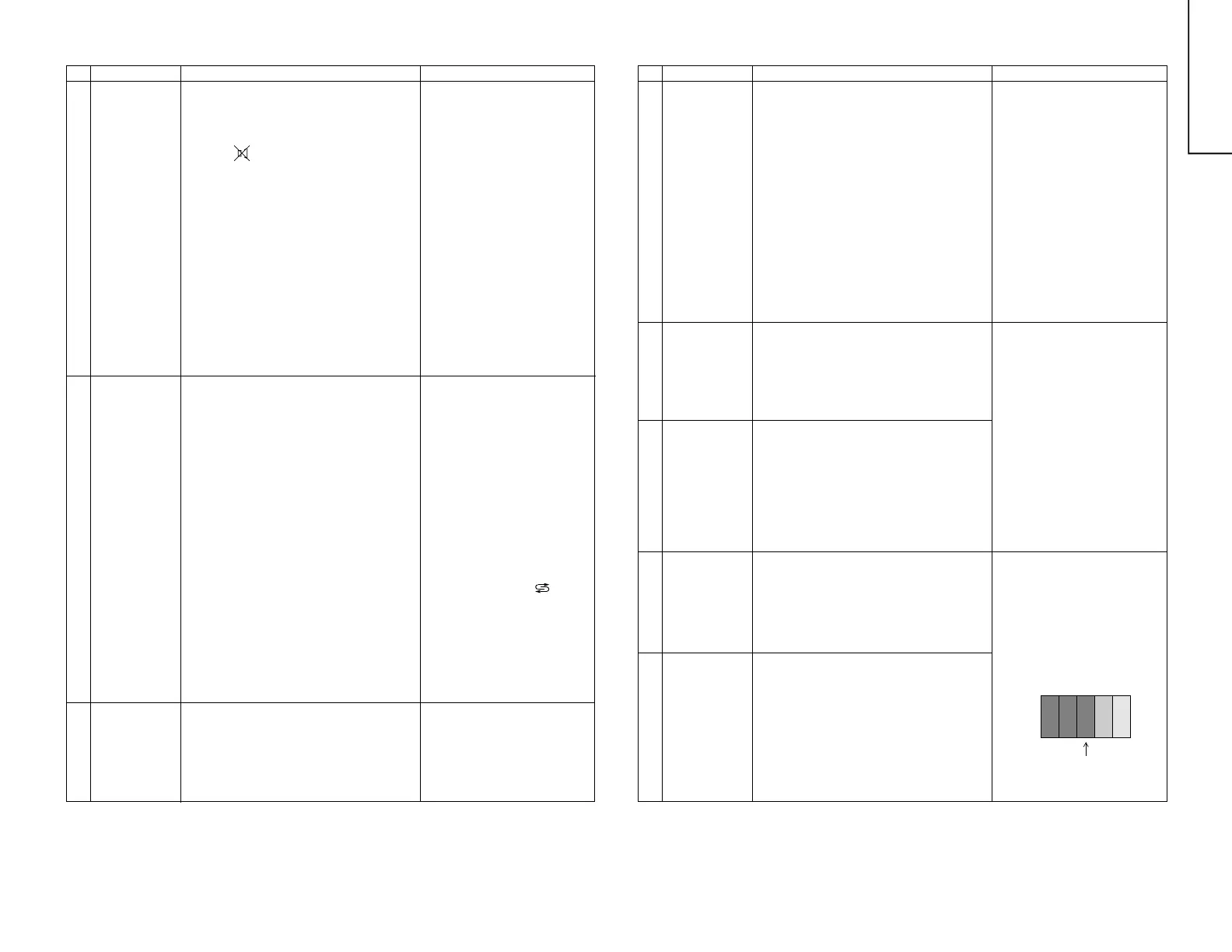
NO. Adjustment part Adjusting procedure and conditions Waveform and others
CUT OFF, BKGD ADJUSTMENT
2-1 White balance
background
(CUT OFF
BKGD)
I
2
C bus
adjustment
(RF Signal)
1 E-5CH (Monoscope pattern) is received.
2 Set P-NOM with the remote controller.
3 Connect the beam ammeter between TP1601
and TP1602.
4 Coarsely adjust the beam current to approx.
1.8 mA with R1633 (sub-contrast VR).
5 Receive the window pattern with AV input.
(PAL burst is generated with the signal gen-
erator.) Select "CUT OFF BKGD mode".
6 With the data of G-drive and B-drive, adjust
the colour temperature 12,300°K of the white
peak to white.
7 Adjust the right dark area of the window to
12,300°K with R-cut off, G-cut off and B-cut off.
8 Readjust the colour temperature at the white
peak.
9 Check 12,300°K at the low white.
Note: Apply this adjustment after aging with
the beam current 1,500 ± 50µA or more
for 30 minutes or more.
(On the white or green monocolour
screen)
* The colour temperature is based on the ship-
ment initial setting table.
* 12300 °K X : 0.272
Y : 0.275
(With Minolta colour analyzer CA-
100)
Note:
G-DRIVE UP "7" KEY
DOWN "
" KEY
B-DRIVE UP "8" KEY
DOWN "0" KEY
Data up/down is possible with the
above comparison.
* Apply R/G/B-CUT and B/G-
DRIVE after verifying that they
are at the initial values.
2-2 White balance
background
(CUT OFF DVD
BKGD)
I
2
C BUS
adjustment
(DVD signal)
1 The window pattern is received with DVD sig-
nal (component signal).
2 Apply the adjustment in the same step as 2-
15 and subsequence above. (12,300°K)
(G-DRIVE, B-DRIVE, R-CUTOFF, G-CUTOFF
and B-CUTOFF)
Apply the adjustment after the end of 2-1.
Note: Use the window pattern of
the signal generator for ad-
justment.
NO. Adjustment part Adjusting procedure and conditions Waveform and others
3 MAX BEAM
R1633
(in the power
unit)
1 Receive E-5CH (Monoscope pattern) with
standard mode.
2 Make the image normal with the remote con-
troller.
3 Connect the beam ammeter between TP1601
and TP1602.
Ammeter full scale: 3mA range
TP1602 is connected at the - side of the am-
meter.
TP1601 is connected at the + side of the am-
meter.
4 Adjust the beam current to 1.8mA ± 20µA with
R1633 (sub-contrast VR).
Note: Apply the adjustment after aging with
the beam current 1,500 ± 50µA or more
for 30 minutes or more.
(On the white or green monocolour
screen.)
SUB CONT SUB-BRIGHT ADJUSTMENT
4-1 Sub-contrast
(SUB CONT.)
I
2
C bus
adjustment
(RF signal)
1 Receive the window pattern with AV input.
2 Make the picture normal with the remote con-
troller.
3 Select the "SUB-CONTRAST" adjustment
mode with the remote controller, and adjust
50% white to 150 ± 5cd.
Note: Use “Y” of Minolta colour
analyzer CA-100.
Note: Us the PAL window pattern
of the signal generator for
adjustment.
(PAL and colour burst are
provided.)
4-2 Sub-contrast
(SUB CONT.
DVD)
I
2
C bus
adjustment
(DVD signal)
1 Select the DVD mode.
2 Receive the signal of the DVD signal genera-
tor. (Component signal)
(Window pattern)
3 Make the picture normal with the remote con-
troller.
4 Select the "SUB-CONTRAST" adjustment
mode (DVD) with the remote controller, and
adjust 50% white to 150 ± 5cd.
5-1 Sub-bright
(SUB BRI)
I
2
C bus
adjustment
(RF signal)
1 Receive the window pattern with AV input.
2 Make the picture normal with the remote con-
troller.
3 Select the "SUB-BRIGHT" adjustment mode
with the remote controller, and adjust the
right dark white area of the window pattern
to 2.7 ± 0.3cd.
Reference
* When E-2CH (Crosshatch pat-
tern) or equivalent signal is re-
ceived,
1 Make the picture normal with the
remote controller.
2 Adjust the 3rd (1 thru 5 from the
left) black of the window pattern
to sink.
5-2 Sub-bright
(SUB BRI DVD)
I
2
C bus
adjustment
(DVD signal)
1 Select the DVD mode.
2 Receive the signal of the DVD signal genera-
tor. (Component signal) (Window pattern)
3 Make the picture normal with the remote con-
troller.
4 Select the "SUB-BRIGHT" adjustment mode
(DVD), and adjust the right dark white area of
the window pattern to 2.7 ± 0.3cd of the win-
dow pattern.
CUTOFF POINT


 To Next Page
 Loading...