104
TaxProgramming
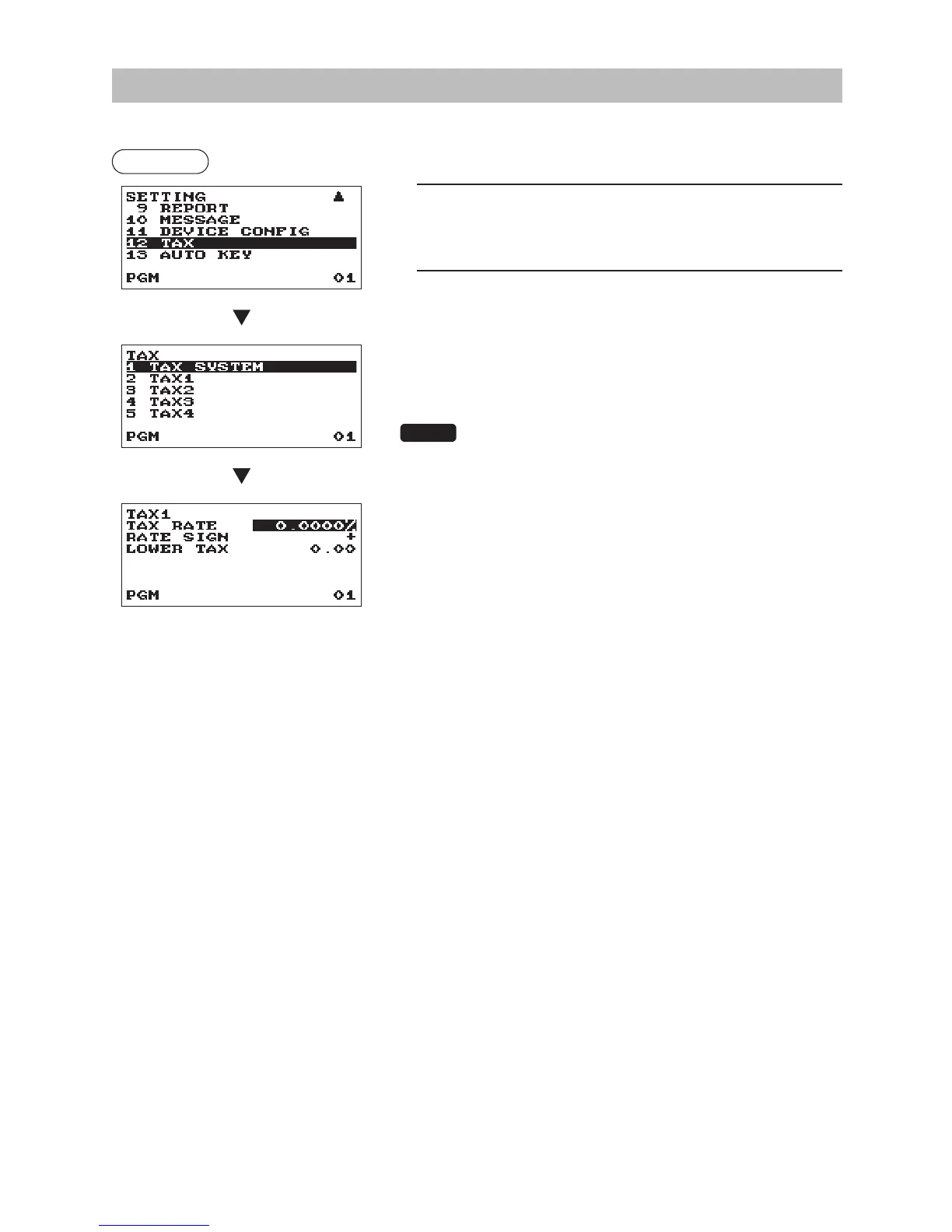
Use the following procedure to select any option included in the tax group:
Procedure
1.
In the SETTING window, select “12 TAX.”
• The TAX window will appear.
2.
Select any option from the following options list:
1 TAX SYSTEM
Tax system
2 TAX1
Tax1
3 TAX2
Tax2
4 TAX3
Tax3
5 TAX4
Tax4
NOTE
If the
D
key is pressed on the tax number selection menu, the
tax rate in the cursor position will be deleted.
■
Taxsystem
•Taxsystem(Usetheselectiveentry)
VAT & TAX 2-4
MANUAL TAX 1-4
MANUAL VAT 1
MANUAL VAT 1-4
AUTO VAT 1-4
AUTO TAX 1-4
■
Tax1through4
•TAXRATE(Usethenumericentry)
Tax rate (max. 7 digits: 0.0000 to 999.9999%)
•RATESIGN(Usetheselectiveentry)
–: Minus rate
+: Plus rate
•LOWERTAX(Usethenumericentry)
Lowest taxable amount (max. 5 digits: 0.00 to 999.99)
• This option is not available in the VAT system.












 To Next Page