ENGLISH
E-10
Preparation for Use
- System Connections -
„
Setting the AM/FM interval
The International Telecommunication Union (ITU) has established
that member countries should maintain either a 10 kHz or 9 kHz
interval between broadcasting frequencies of AM stations and 100
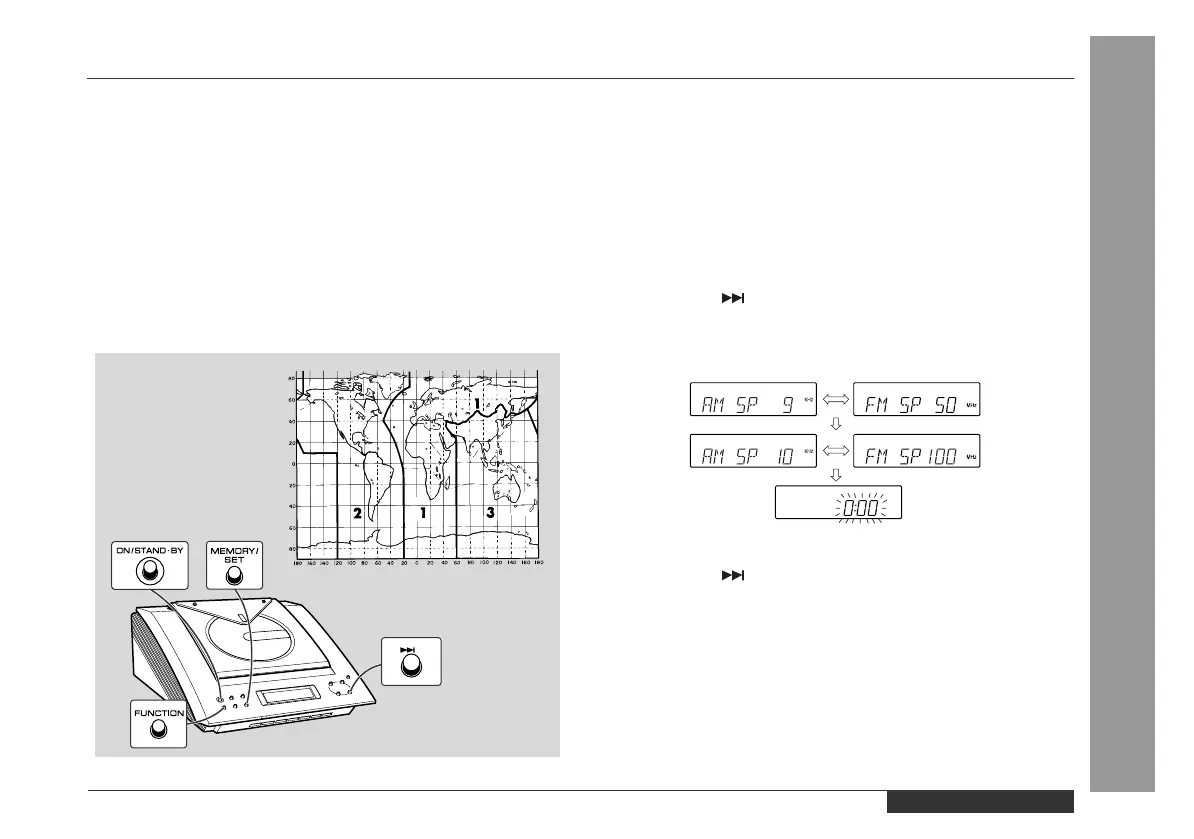
kHz or 50 kHz for FM stations. The illustration shows the 50/9 kHz
zones (regions 1 and 3), and the 100/10 kHz zone (region 2).
This product is not equipped with a span selector. However, it will be
adjusted to a 9 kHz AM (50 kHz FM) interval when shipped from the
factory.
Before using the unit, be sure to set it to the AM/FM tuning interval
(span) used in your area.
To check the tuning span currently selected:
To change from a 9 kHz AM (50 kHz FM) interval to a 10 kHz AM
(100 kHz FM) interval:
To return to a 9 kHz AM (50 kHz FM) interval:
Caution:
z
When the unit is left for a few hours after the span has been
switched and the AC power lead disconnected, the AM span will
be automatically returned to 9 kHz (FM span to 50 kHz). If this
happens, set the span again.
z
When the span is switched, all the memorised stations will be
cancelled.
1 Press the ON/STAND-BY button to turn the power on.
2 Press the FUNCTION button until "AM" appears on the display.
z
If "AM 531 kHz" is displayed, it means that AM stations have
been adjusted for a 9 kHz span and FM stations for 50 kHz
span. If "AM 530 kHz" is displayed, AM stations have been ad-
justed for a 10 kHz span and FM stations for 100 kHz span.
1 Press the ON/STAND-BY button to enter the stand-by mode.
2 Hold down the button and the MEMORY/SET button for at
least 4 seconds. Release the buttons when "AM SP 10 kHz" and
"FM SP 100 kHz" are displayed alternately.
z
The clock display will reappear.
1 Press the ON/STAND-BY button to enter the stand-by mode.
2 Hold down the button and the MEMORY/SET button for at
least 4 seconds. Release the buttons when "AM SP 9 kHz" and
"FM SP 50 kHz" are displayed alternately.
z
The clock display will reappear.


 To Next Page