ENGLISH
E-19
Radio
- Listening to the Radio -
Listening to the Radio
To receive an FM stereo transmission:
Press the FUNCTION (BAND) button to display the "ST" indicator.
z
" " will appear when an FM broadcast is in stereo.
z
If the FM reception is weak, press the FUNCTION (BAND) button
to extinguish the "ST" indicator. The reception changes to mon-
aural, and the sound becomes clearer.
After use:
Press the ON/STAND-BY button to enter the power stand-by mode.
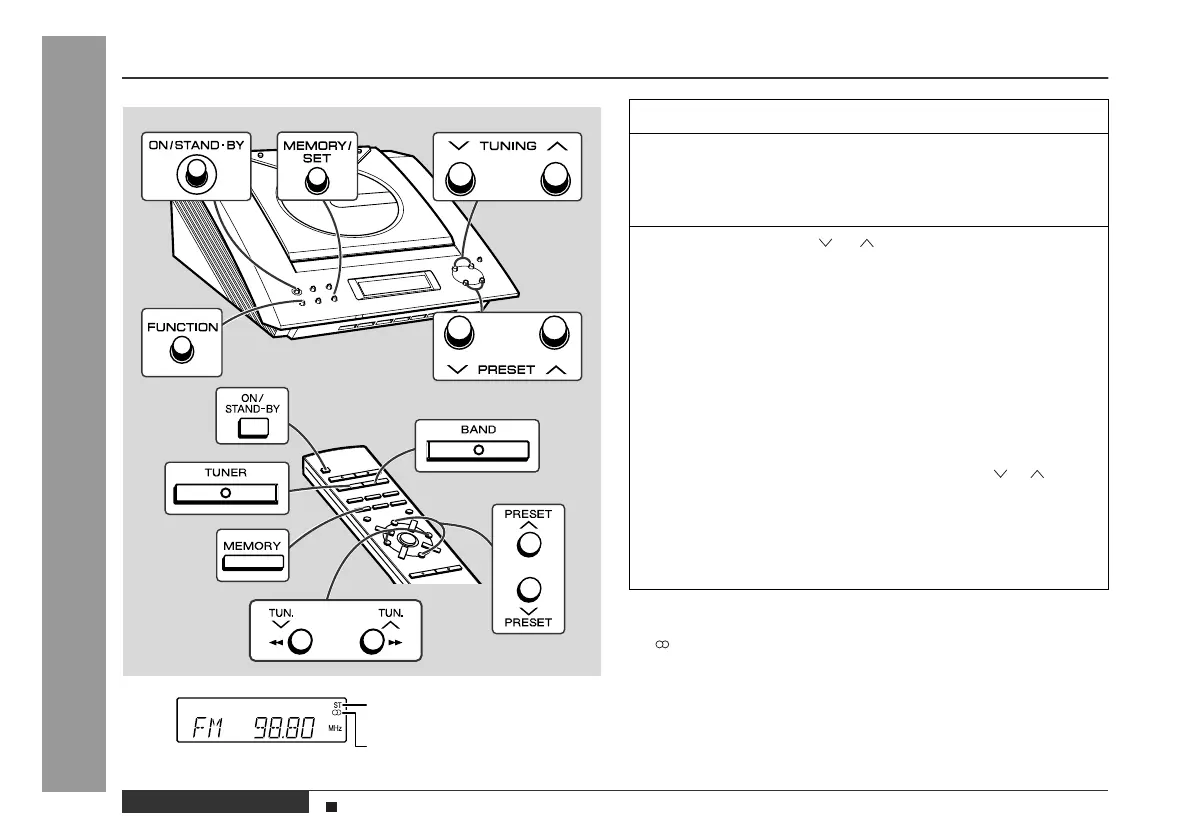
FM stereo mode indicator
FM stereo receiving indicator
1
Press the ON/STAND-BY button to turn the power on.
2
Press the FUNCTION button until "FM" or "AM" ap-
pears on the display.
When operating with the remote control, press the TUNER but-
ton, and then the BAND button to select "FM" or "AM".
3
Press the TUNING ( or ) button to tune in to the de-
sired station.
Manual tuning:
Press the TUNING button as many times as required to tune in
to the desired station.
Auto tuning:
When the TUNING button is pressed for more than 0.5 sec-
onds, scanning will start automatically and the tuner will stop at
the first receivable broadcast station.
Notes:
z
This can be operated by pressing the TUN. ( or ) button
on the remote control.
z
When radio interference occurs, auto scan tuning may stop
automatically at that point.
z
Auto scan tuning will skip weak signal stations.
z
To stop the auto tuning, press the TUNING button again.
Sound Control (See page 13.)


 To Next Page