ENGLISH
E-13
Basic Operation
- Sound Control -
Sound Control
„
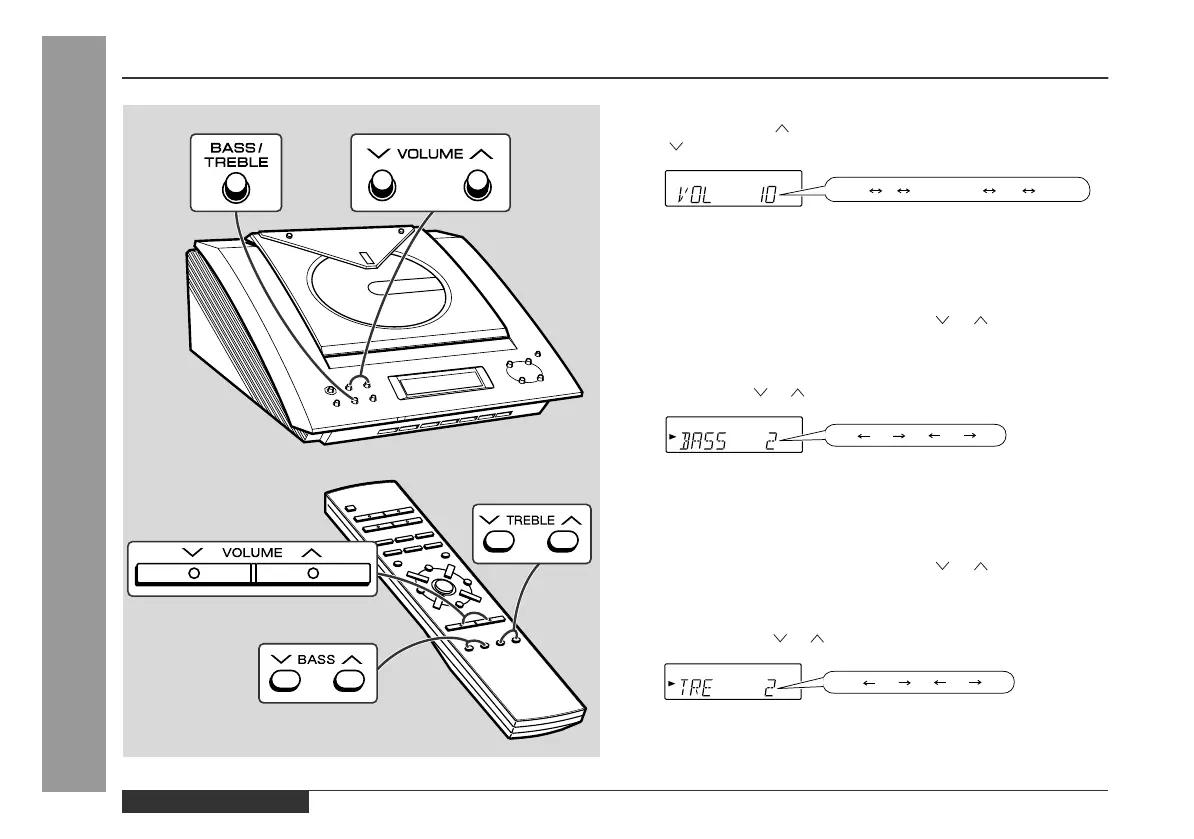
Adjusting the volume
Press the VOLUME button to increase the volume and the VOL-
UME button for decreasing.
„
Adjusting the bass
Main unit operation:
1 Press the BASS/TREBLE button until "BASS" appears on the
display.
2 Within 5 seconds, press the VOLUME ( or ) button to adjust
the bass.
Remote control operation:
Press the BASS ( or ) button to adjust the bass.
„
Adjusting the treble
Main unit operation:
1 Press the BASS/TREBLE button until "TRE" appears on the dis-
play.
2 Within 5 seconds, press the VOLUME ( or ) button to adjust
the treble.
Remote control operation:
Press the TREBLE ( or ) button to adjust the treble.


 To Next Page