ENGLISH
E-23
Advanced Features
- Timer and Sleep Operation -
Timer and Sleep Operation (continued)
„
Sleep operation
To cancel the sleep operation:
Press the ON/STAND-BY button whilst the sleep timer is set.
To confirm the remaining sleep time:
Press the SLEEP button once whilst the sleep timer is set.
The remaining sleep time is displayed for about 3 seconds.
„
To use timer and sleep operation together
Example: To fall asleep and wake to the same radio station
You can play back the same source only (the function cannot be
switched).
1
Play back the desired sound source.
2
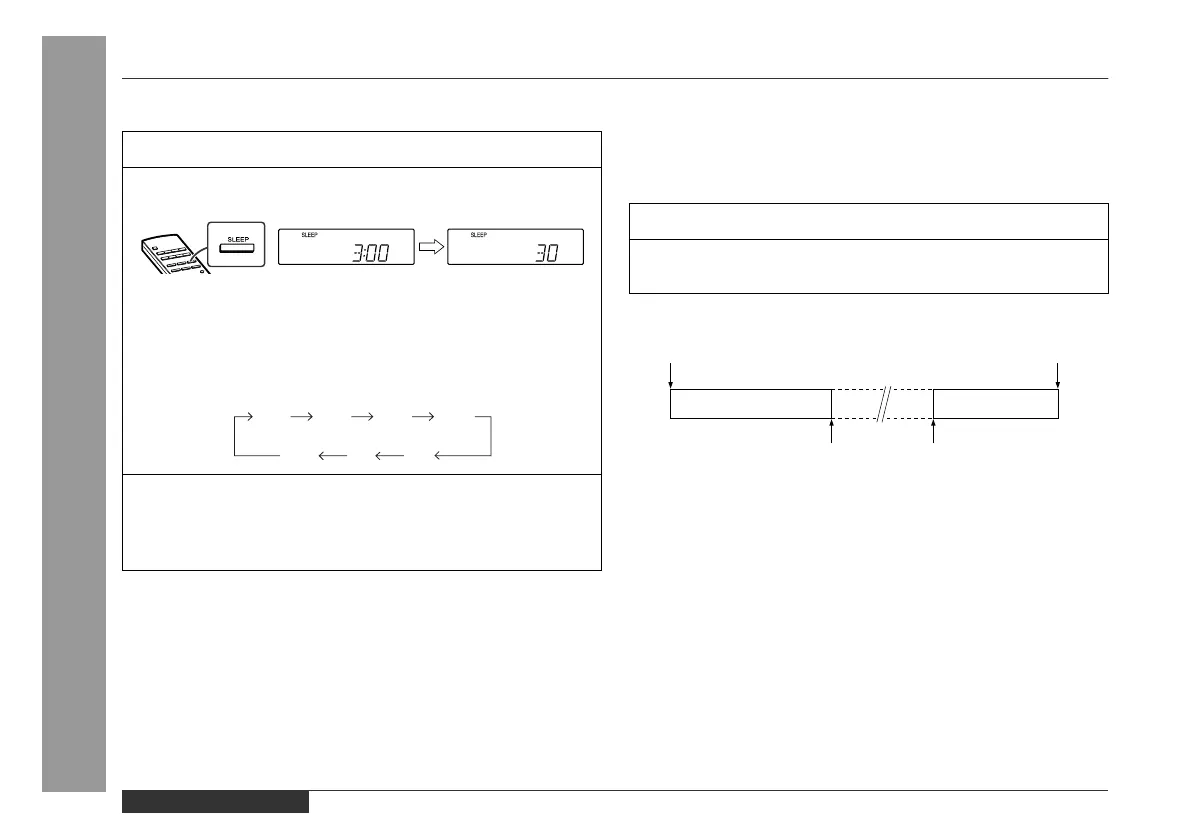
Press the SLEEP button.
To change the sleep time:
Press the SLEEP button repeatedly to select the desired sleep
time. The time will decrease as follows.
The amount of sleep time can also be changed whilst in the
sleep mode.
3
Your system will enter the power stand-by mode auto-
matically after the preset time has elapsed.
The volume will be turned down 1 minute before the sleep op-
eration finishes.
3:00 2:00
OFF 15 30
1:30 1:00
1
Set the sleep time (see left, steps 1 - 2).
2
Whilst the sleep timer is set, set the desired playback
time (steps 4 - 6, pages 21 - 22).


 To Next Page