16
XL-UH2080H
CD or MP3/WMA disc Playback
Advanced CD or MP3/WMA disc playback
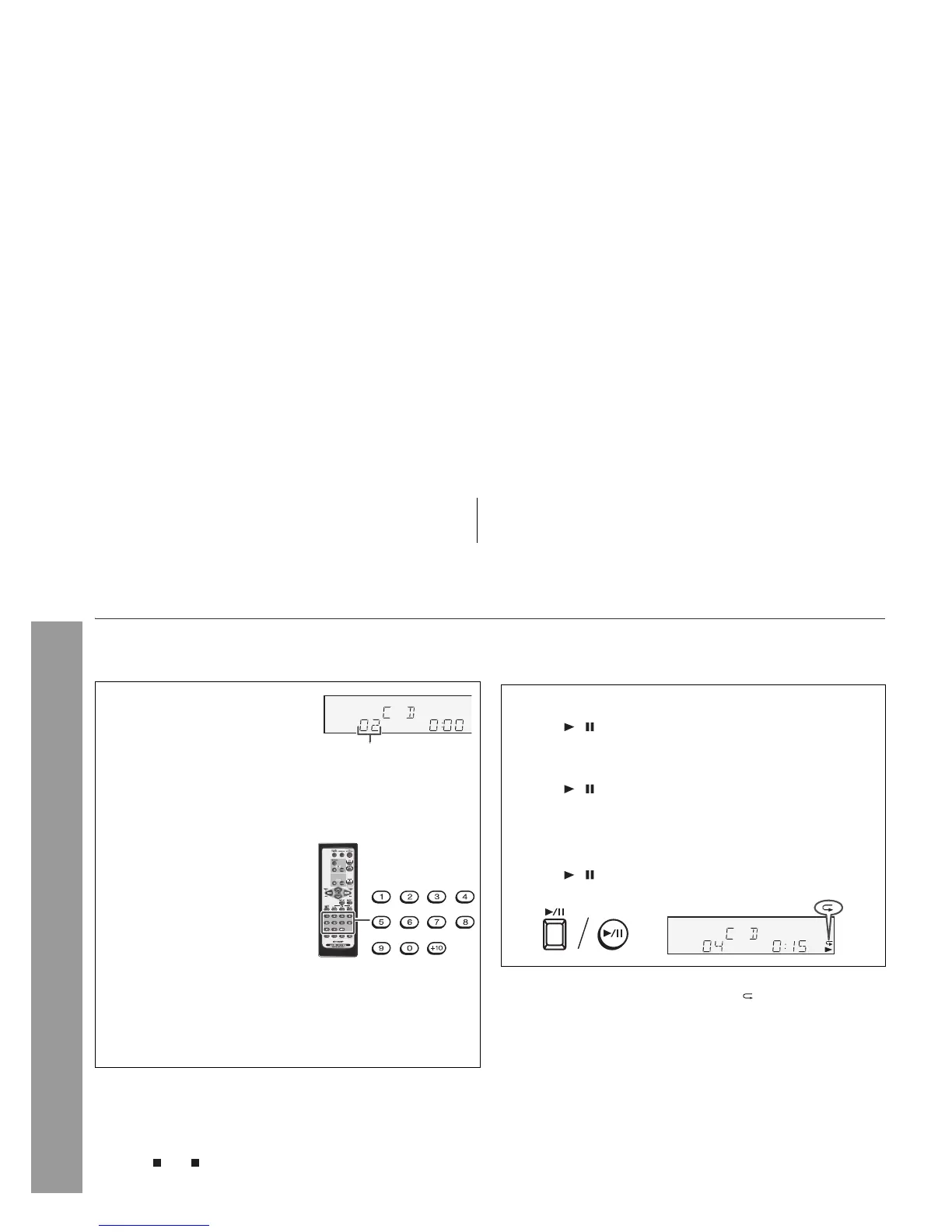
Direct track search
By using the direct search buttons, the desired tracks on the current
disc can be played.
Notes:
z A track number higher than the number of tracks on the disc
cannot be selected.
z During random play, direct search is not possible.
To stop playback:
Press the (CD ) button.
Repeat play
Repeat play can play one track, all tracks or a programmed
sequence continuously.
To cancel repeat play:
Press the PLAY MODE button again until “ ” disappears.
Use the direct search buttons on
the remote control to select the
desired track whilst playing the
selected disc.
Selected track number
z The direct search buttons allow you to select up to number 9.
z When selecting number 10 or higher, use the “+10” button.
A. For example, to choose 13
1 Press the “+10” button once.
2 Press the “1” button.
3 Press the “3” button.
B. For example, to choose 130
1 Press the “+10” button twice.
2 Press the “1” button.
3 Press the “3” button.
4 Press the “0” button.
To repeat one track:
Press the PLAY MODE button once.
Press the / button.
To repeat all tracks:
Press the PLAY MODE button twice.
Press the / button.
To repeat desired tracks :
Perform steps 1 - 6 in “Programmed play” section on page 19 and
then press the PLAY MODE button once.
Press the / button.



 To Next Page