20
XL-UH2080H
USB Memory Playback
MP3/WMA folder mode (only for MP3/
WMA files) (continued)
Note:
If “NO SUPPORT” is displayed, it means “Copyright protected
WMA file” or “Not supported playback file” is selected.
Listening to USB mass storage
device / MP3 Player
Note:
This product is not compatible with MTP and AAC file systems.
To play back USB/MP3 Player with Folder mode off
4
Press the
/
(CD
/
) button.
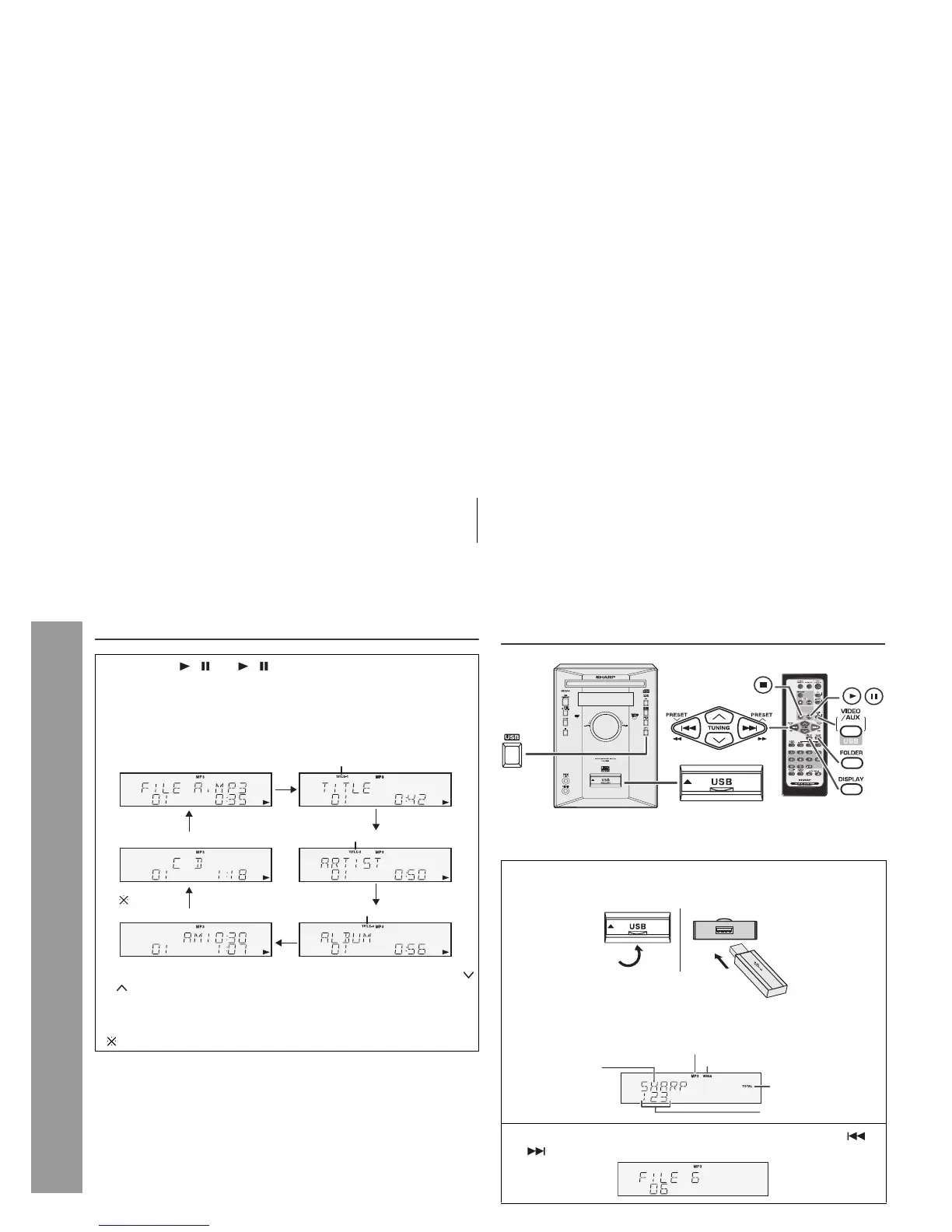
Playback will start and file name will be displayed.
z
Title, Artist & Album name are displayed if they are recorded on
the disc.
z
Display content can be changed by pressing the DISPLAY
button.
In case of playback with the folder mode on, press the
TUNING (
or )
button, and the folder can be selected even though it is in
playback/pause mode.
It will continue playback/pause mode in the 1st track of the
selected folder.
()
Only appears when clock is already set.
( )
File Name Display
Clock Display
Function Display
Title Display
Artist Display
Album Display
TITLE-1 Indicator
TITLE-1 Indicator
TITLE-1 Indicator
1 Press the USB button, and push up the USB door. Connect
the USB Memory device that has MP3/WMA format files on
the unit.
When the USB memory is connected to the main unit, the
device information will be displayed.
2 Select desired file to be played back by pressing the or
button.
Total number of files
TOTAL indicator
MP3 indicator
Volume ID
WMA indicator



 To Next Page