32 | P a g e
CONTROL PANEL OVERVIEW (CONTINUED)
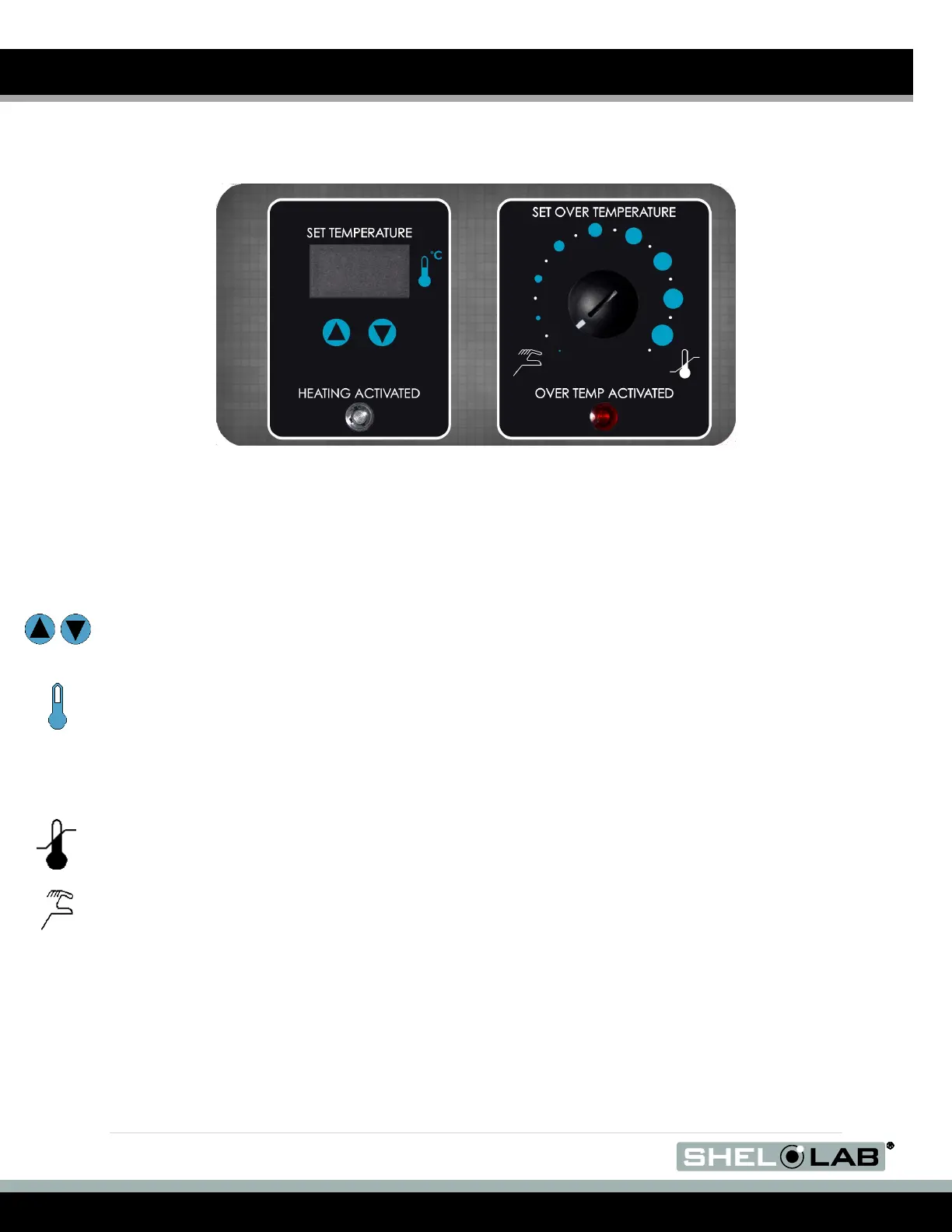
Figure 24: BACTORN900 Workspace Incubator Control Panel
The workspace incubator control panel on the BACTRON900 controls the operations of the
workspace chamber incubator and Over Temperature Limit system.
Workspace Incubator Display and Control
Labeled Set Temperature, the display shows the current air temperature in the workspace
incubator accurate to within 0.1C. The arrow buttons can be used to adjust the temperature set
point, or place the display in its temperature calibration mode and then enter a display value
correction.
The indicator light labeled Heating Activated illuminates whenever the temperature control system
is heating the incubation chamber.
Set Over Temperature
This graduated dial sets the heating cut off point for the OTL temperature limit system. The OTL
system prevents unchecked heating of the chamber in the event of a failure of the main digital
controller. For more details, please see the Over Temperature Limit System description in the
Theory of Operations (page 35).
The red Over Temp Activated light illuminates when the Over Temperature Limit system cuts off
heating by rerouting power away from the heating elements.


 To Next Page