47 | P a g e
OPERATION (CONTINUED)
SET THE TEMPERATURE SET POINT
Perform the steps below to change the set point to the operational temperature you will be using
during your incubation application. Incubators come from the factory with a set point of 37°C. Each
incubator set point must be set independently.
Note: The visual example below depicts adjusting the incubator set point from 35°C to a 37°C
application temperature.
End of Procedure
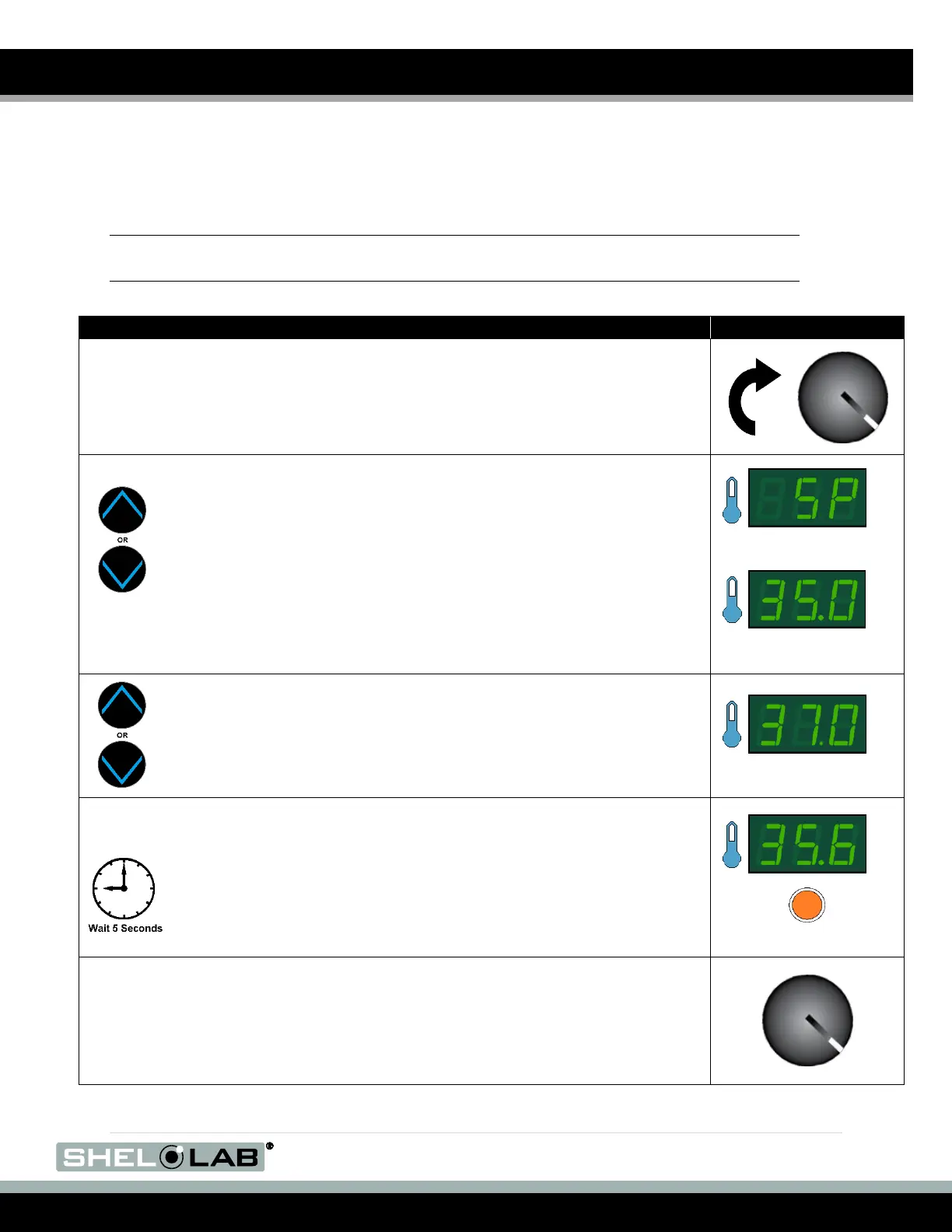
Set Temperature Set Point
1. Turn the OTL dial clockwise to its max setting, if not already set at max.
a. This prevents the Safety cutoff system from interfering with
this procedure.
2. Press and release either of the temperature arrow buttons to
activate the temperature set point adjustment mode.
a. The display will briefly flash the letters “SP” to indicate the Set
Point is about to be shown.
b. The temperature display will then show the flashing,
adjustable temperature set point.
Note: The display will automatically exit the adjustment mode after 5 seconds of
inactivity, with the last shown set point value saved.
Set Point Adjustment Mode
Initial Set Point
3. Use the Up or the Down arrow keys to adjust the set point to your
application temperature.
4. Wait 5 seconds after entering the set point.
a. The display will stop flashing, and the set point is now saved in
the controller.
b. The chamber will now automatically heat or passively cool to
match your set point.
c. The display will revert to showing the current chamber air
temperature.
See the Set the OTL procedure on page 50 for how to set the OTL system once
the incubation chamber has stabilized at your application temperature set point,
after you have performed any display verifications or calibrations.


 To Next Page