Need help?
Do you have a question about the Shimaden FP23 and is the answer not in the manual?
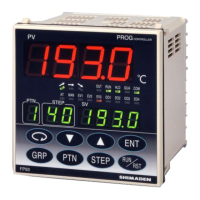
Displays measurement or error messages for CH1 or CH2 in 2-loop spec.
Displays target set values for CH1 or CH2 in 2-loop spec.
Main display showing pattern, output, channel, or input status.
Controls for navigating screens and changing parameters.
Status indicators for program, hold, manual, fix, and output actions.
Displays CH2 PV/SV values or CH2 PV on SV display.
The FP23 2-input Digital Controller is a sophisticated control instrument designed for industrial applications, primarily for managing temperature, humidity, and other physical quantities in general industrial facilities. It is crucial to understand that this device is intended for industrial use and should not be employed in ways that could compromise safety, health, or working conditions. Users are responsible for implementing adequate and effective safety measures when operating this device. Any use without proper safety countermeasures will invalidate the warranty.
The FP23 2-input Digital Controller offers comprehensive control and monitoring capabilities, making it suitable for a wide range of industrial processes.
Control Modes: The device supports various control modes, including program control, manual operation, and fixed setpoint (FIX) control. In program control, the controller executes a predefined sequence of steps, each with its own setpoint and duration. The "Remaining step time display" feature shows the time left for the current step during program operation, aiding in process management. The "Pattern graph display" visually represents the pattern (step) graph during program operation, providing an intuitive overview of the control process.
Input and Output: The FP23 supports two input channels (IN1/IN2 PV) for measuring process variables, making it a 2-input specification device. It can handle various input types, including mV, thermocouple, RTD, V, and mA signals. For thermocouple inputs, compensation wires compatible with the specific thermocouple type must be used. For RTD inputs, the resistance of a single lead wire must be 100 Ω or less, and all three wires must have the same resistance to ensure accuracy.
The controller provides multiple output options, including analog outputs (current or voltage), and external control outputs (DO). The external control outputs include Darlington outputs (DO1 to DO3) and open collector outputs (DO4 to DO8, and DI5 to DI10). These outputs can be used to drive relays, SSRs, or other external devices. The brightness of the output lamps (OUT1, OUT2) changes according to the fluctuation of the control output for current/voltage outputs, and they light up when the output is ON for contact/SSR drive voltage outputs.
Alarm Functions: The device includes a heater break alarm option, which can be configured with a current transformer (CT) for monitoring heater status. This feature enhances safety by detecting potential issues with heating elements.
Communication: The FP23 supports RS-232C and RS-485 communication interfaces, allowing for integration into larger control systems. A terminal resistor is available as an optional accessory for RS-485 communication. The "Communication function" (SG+, SD+, RD-) terminals facilitate data exchange with external systems. The "COM" lamp lights up during communication mode, indicating active data transfer.
Display Modes: The controller features an LCD display (21 characters x 4 lines, max.) and LED indicators for clear status monitoring. For 2-loop specifications, there are three display modes, which can be switched using the DISP key on the front panel:
The LED indicators (RUN, HLD, MAN, FIX, EXT, AT, EV1, EV2, EV3, DO1-DO5, COM, CH2, PV) provide quick visual feedback on the device's operational status, control actions, and alarm conditions. For instance, the RUN lamp lights green during program execution, the HLD lamp lights green when the program is paused, and the MAN lamp blinks green when control output is set to manual operation. The EXT lamp lights green when pattern number selection is active.
Parameter Setup: Parameters can be selected and displayed through the front key operation. The "Parameter Assistant" setup tool and "USB SHIMADEN" software are available for easier configuration via a computer.
Installation: The FP23 is designed for panel mounting. Users must drill mounting holes according to the panel cutout dimensions provided in the manual. The applicable thickness of the mounting panel is 1.0 to 8.0 mm. The device is pressed into the panel from the front, and mounting fixtures are inserted at the top and bottom from behind, then tightened with screws to secure the device. Care must be taken not to overtighten the screws, as this may deform or damage the device housing. After wiring, the terminal cover should be attached.
Wiring: Wiring must be performed with the power supply turned off and disconnected to prevent electric shock. Crimped terminals accommodating M3 screws with a width of 6.2 mm or less should be used. Input signal leads should not be routed along the same conduit or duct as high-voltage power lines. Shield wiring (single point grounding) is effective against static induction noise, and short interval twisted pair wiring is effective against electromagnetic induction noise. For ground wiring, the ground terminal should be connected with an earth resistance of less than 100 Ω using a wire of 2 mm² or thicker. If the device is susceptible to power supply noise, a noise filter should be attached to a grounded panel, with the wire connecting the noise filter output and the power supply terminal on the controller kept as short as possible.
Operation: The front panel features several keys for intuitive operation:
Key combinations like ENT + PTN enable "Hold (HLD) operation," and ENT + STEP enable "Advance (ADV) operation."
Environmental Considerations: The device should not be used in locations with inflammable or corrosive gases, dirt, dust, smoke, water droplets, direct sunlight, strong radiated heat, or high-frequency noise. It should also be protected from ambient temperatures outside the -10°C to 50°C range, dew condensation, humidity exceeding 90%, strong vibration, impact, or elevations exceeding 2000 m. These conditions can lead to malfunction, damage, or dangerous situations.
Troubleshooting and Error Messages: The device displays error codes on the PV display to indicate malfunctions. These codes include:
If any of these messages appear, all outputs will turn OFF or become 0%. In such cases, repair or replacement is required, and users should immediately turn off the power and contact their dealer.
Other error codes related to PV input abnormalities include:
When these codes appear, users should check the input or heater lead. If the issue persists, contacting the dealer is recommended.
Heater Current Abnormality: The code H6 HH indicates that the heater current exceeds 55.0A. This error code is displayed on the LCD when a heater current abnormality is detected during control execution.
Cleaning: When cleaning the device, users should not use paint thinner or other solvents. Instead, wipe gently with a soft, dry cloth.
Ventilation: The device is equipped with ventilation holes to dissipate heat. It is crucial to prevent metal objects or other foreign matter from entering these holes, as this can cause malfunction. The ventilation holes should not be blocked, and dirt or dust should not accumulate on them, as this can lead to temperature buildup or insulation failure, shortening the device's service life.
Power-On Stabilization: It takes approximately 30 minutes for the digital controller to display the correct temperature after applying power. Therefore, it is recommended to turn on the power more than 30 minutes prior to operation.
General Safety: Users should never open the device's case or touch the boards or internal components with their hands or any conductor, as this could result in electric shock, serious bodily injury, or death. The device does not have a built-in fuse; therefore, a fuse conforming to the rating of 250 VAC 1.0A (medium lagged or lagged type) must be installed in the power circuit connected to the power terminal. A means for turning the power OFF, such as a switch or breaker, must be installed on the external power circuit connected to the power terminal. This switch or breaker should be easily operable and clearly indicated as the power-off means for the device. The device should be used within its rated power voltage and frequency ranges. Applying voltage or current outside the input rating to the input terminal can shorten the device's service life or cause malfunction. Similarly, the voltage and current of the load connected to the output terminal should be within the rated range to prevent overheating and malfunction. The keys on the front panel should be operated with fingertips, not with hard or sharp-tipped objects. The device should never be remodeled or used in a prohibited manner. Repeated tolerance tests on voltage, noise, surge, etc., may cause the device to deteriorate.
 General
| Model | FP23 |
|---|---|
| Type | Temperature Controller |
| Input Type | Thermocouple, RTD, DC Voltage |
| Output Type | Relay, DC Current |
| Display | LED |
| Power Supply | 100 to 240 VAC |
| Control Method | PID |
| Accuracy | ±0.3% of FS |
| Operating Temperature | 50 °C |


 To Next Page