41
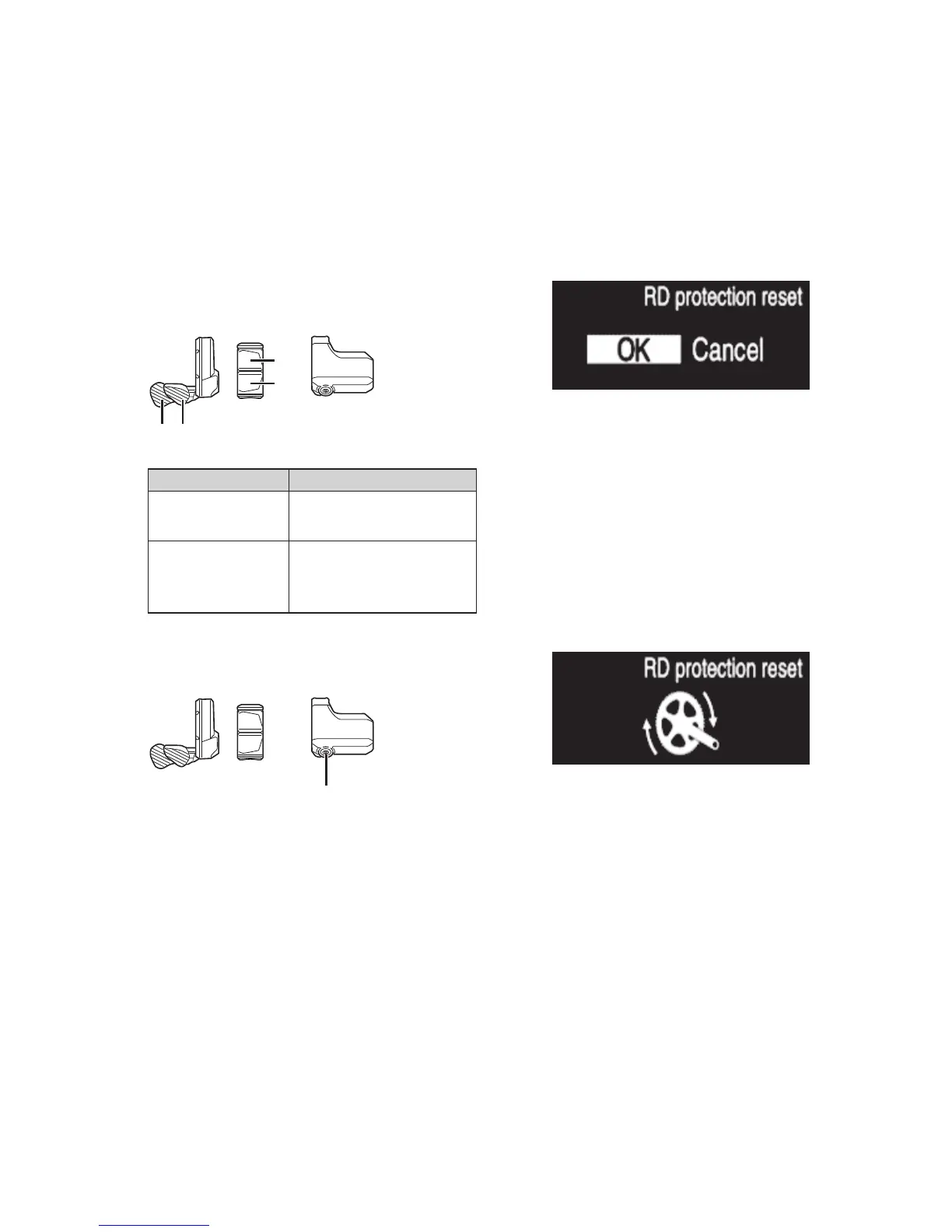
RD protection reset
In order to protect the system from falls etc., if the bicycle is subjected to a strong impact, the RD Protection function
will operate and the connection between the motor and the link will be momentarily severed so that the rear derailleur
can no longer operate. Executing RD Protection Reset restores the connection between the motor and the link, as well as
the function of the rear derailleur.
1.
Enter the [RD protection reset] menu.
(1) Launch the setting menu.
(2) Press Assist-X or Assist-Y to select [RD protection
reset], then press A.
2.
Press Assist-X or Assist-Y to select the required setting.
Assist
XY
X
Y
Configurable items Details
[OK]
RD Protection Reset will
operate
[Cancel]
To not execute RD
Protection Reset, select
[Cancel]
3.
Press A to confirm the setting.
Assist
A
4.
Rotate the crankarm.
Connection of motor and the link is restored.
Exit
Returns to the basic screen.
1.
Confirm that the menu list screen is displayed.
2.
Press Assist-X or Assist-Y to select [Exit], then press A.
*
The screen returns to the basic screen.



 To Next Page