48(49)
4.2.1 Panel Operation
1) Turn on blower switch;
2) Turn on heater switch, start heating operation;
3) Turn on the timer switch, set time to dry the material.
4.2.2 Timer Setting
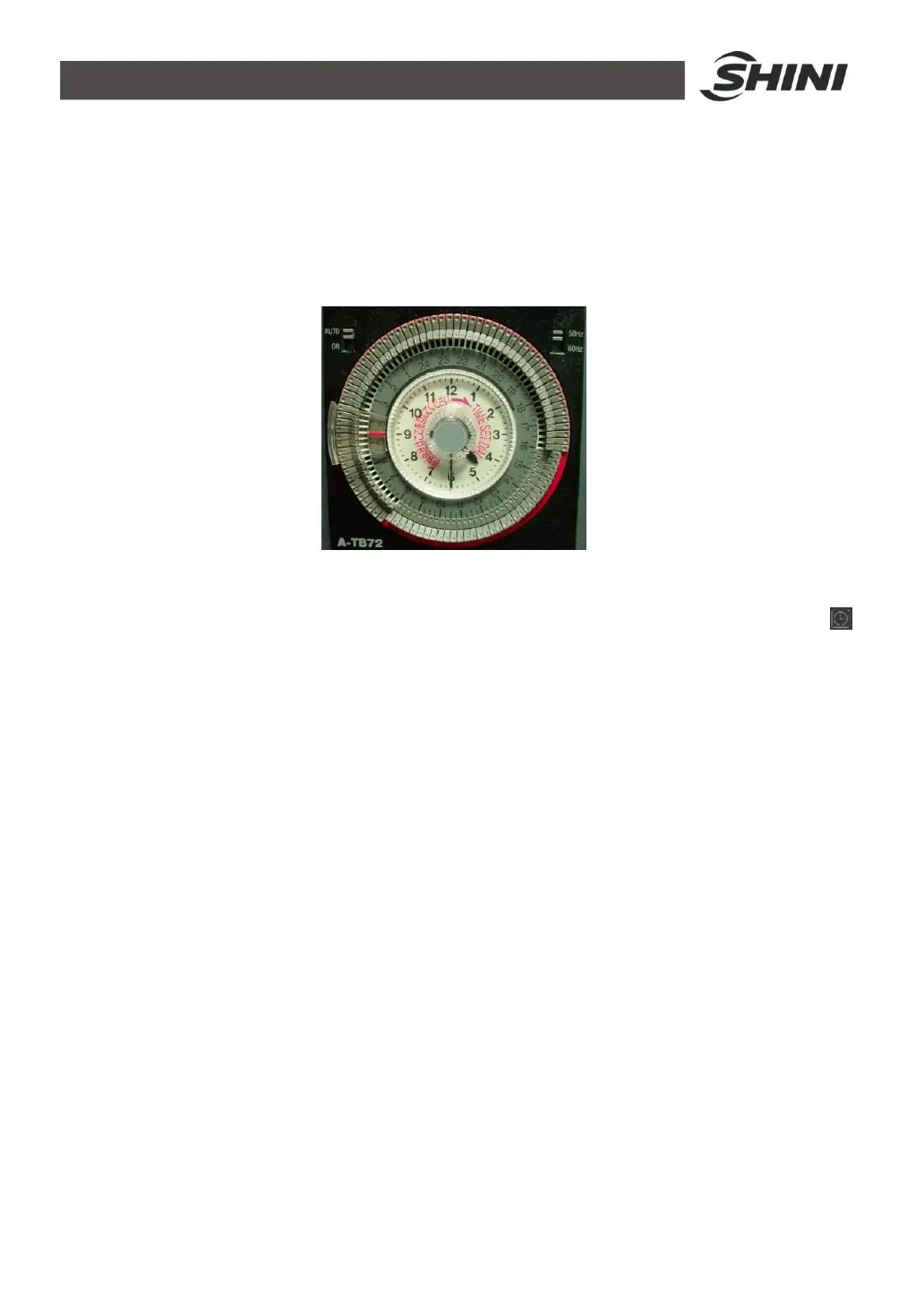
Picture 4-6: Timer
1. Under the condition that all the switches turned on, turn on the timer switch .
2. Take down the transparent cover of the timer, push the little gray switch at left
conner on top of the timer to “Auto” status. Set the pressure electrical
frequency at top right conner of timer to current customer’s frequency.
3. Current time setting. As the picture 4-6, rotate the “TIME SET DIAL” knob at
middle of the timer clockwise to set current time. In the middle is 12-hour
white circle dial, the outside is 24-hour gray circle dial. Please pay special
attention to distinguish them. As above picture, it set time is half past four in
the morning, just the 4:30 am.
4. Requirement drying hour setting. Press timer’s outer teech down to the inner
circle. The pressing range is the drying hour from beginning to the ending. As
above picture, when it reaches 8 o’clock, the machine starts work; till 4
o’clock in the afternoon, the machine stops. Everyday repeat the circulation.


 To Next Page