Caution
Start to calibrate when the temperature of the device get high enough(35℃).
The calibration board is matched to the device. Calibrating with an mismatched
calibration board will lead to inaccuracy or fail to get good scanned data.
Always make sure that both sides of the calibration board are clean and free of
scratches.
Do not place heavy objects or sundries on the calibration board.
Keep the calibration board away from corrosives, metals and sharp objects to avoid
corrosion or damage.
It is not recommended to wipe the calibration board. If needed, gently wipe it with a
piece of a clean damp cloth. Do not use a cloth with chemicals or alcohols to wipe the
calibration board.
After using the calibration board, put it in a flannel bag.
Step
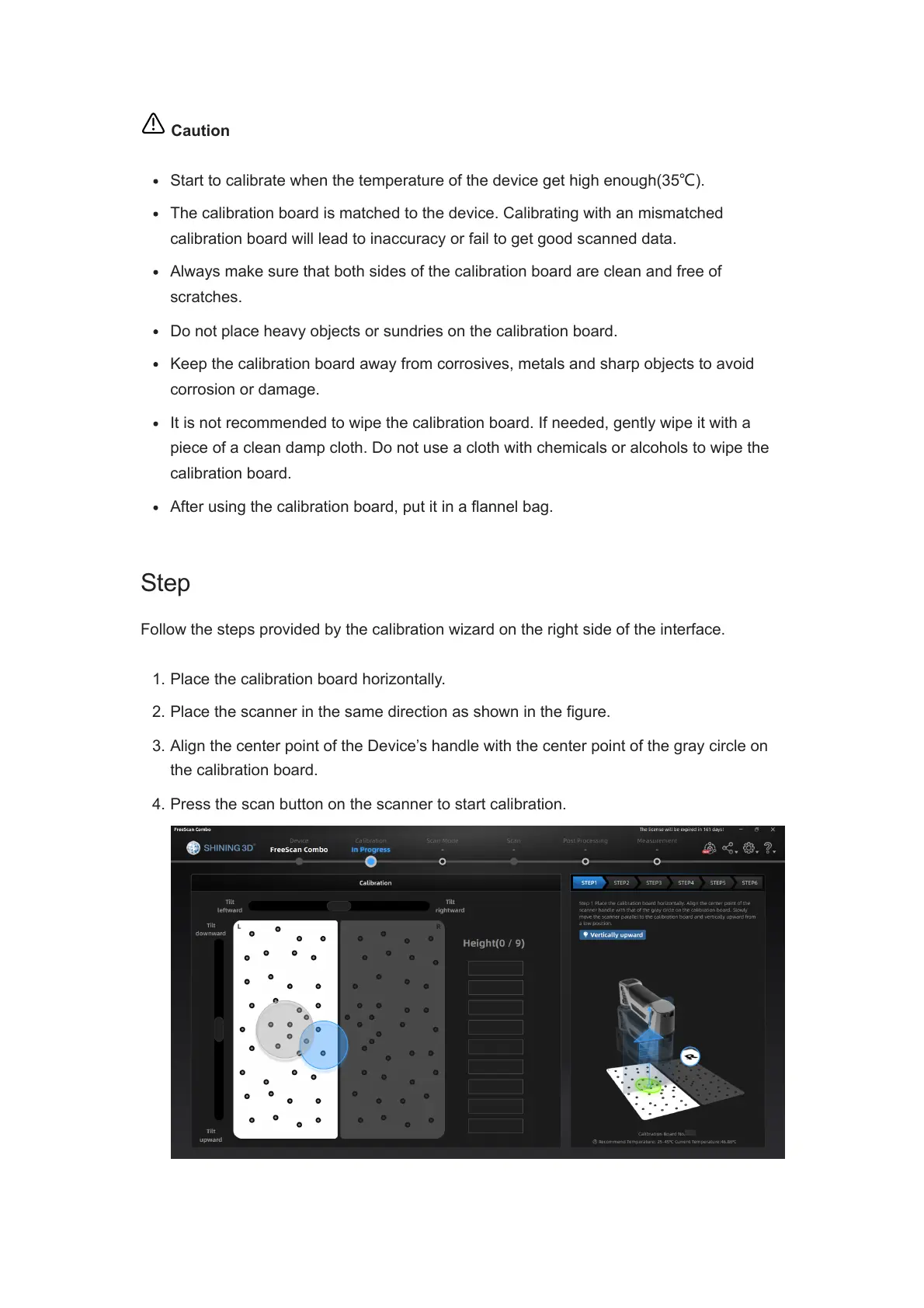
Follow the steps provided by the calibration wizard on the right side of the interface.
1. Place the calibration board horizontally.
2. Place the scanner in the same direction as shown in the figure.
3. Align the center point of the Device’s handle with the center point of the gray circle on
the calibration board.
4. Press the scan button on the scanner to start calibration.














 To Next Page