Scan
Mode
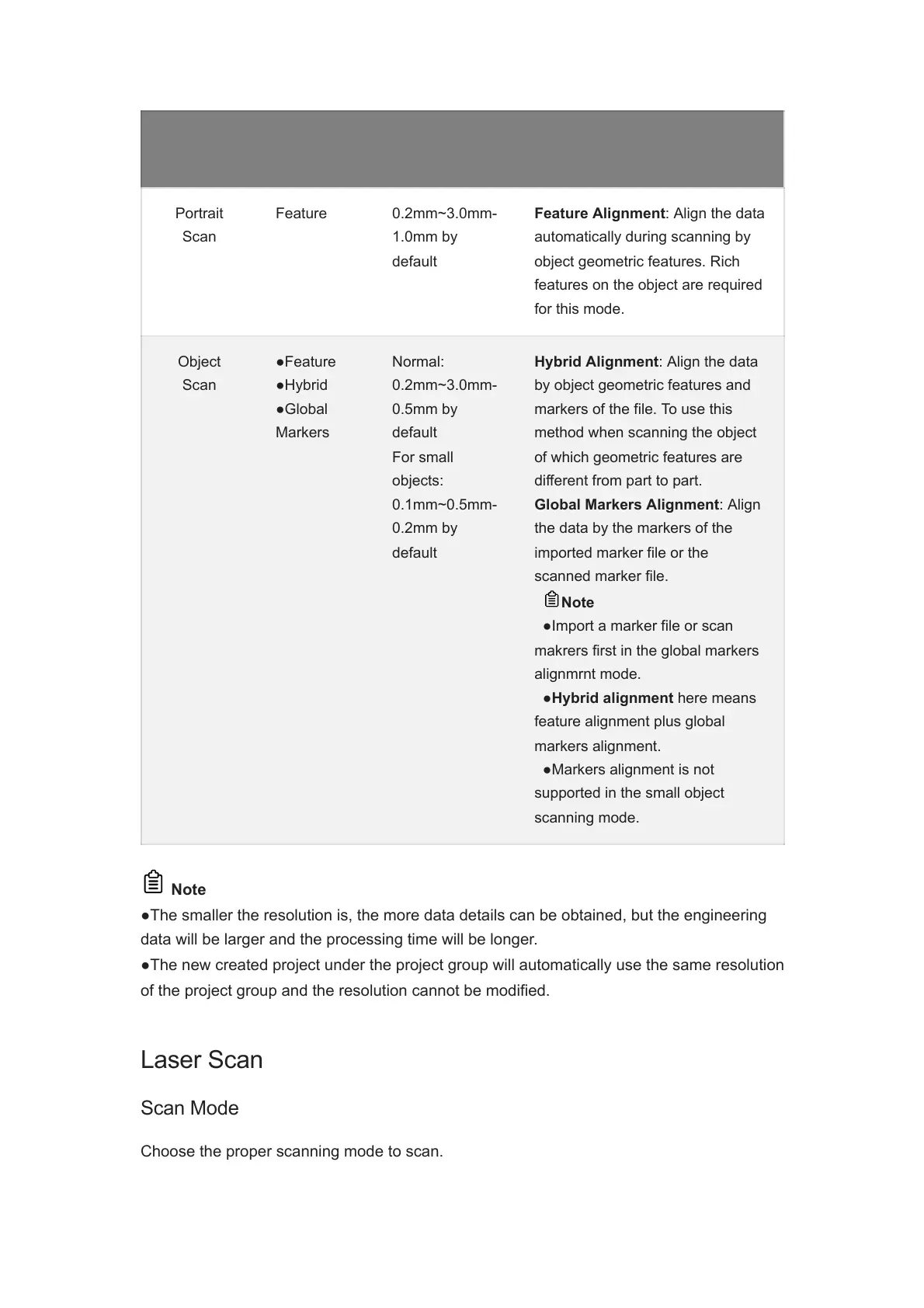
Alignment Resolution Note
Portrait
Scan
Feature 0.2mm~3.0mm-
1.0mm by
default
Feature Alignment: Align the data
automatically during scanning by
object geometric features. Rich
features on the object are required
for this mode.
Object
Scan
●Feature
●Hybrid
●Global
Markers
Normal:
0.2mm~3.0mm-
0.5mm by
default
For small
objects:
0.1mm~0.5mm-
0.2mm by
default
Hybrid Alignment: Align the data
by object geometric features and
markers of the file. To use this
method when scanning the object
of which geometric features are
different from part to part.
Global Markers Alignment: Align
the data by the markers of the
imported marker file or the
scanned marker file.
Note
●Import a marker file or scan
makrers first in the global markers
alignmrnt mode.
●Hybrid alignment here means
feature alignment plus global
markers alignment.
●Markers alignment is not
supported in the small object
scanning mode.
Note
●The smaller the resolution is, the more data details can be obtained, but the engineering
data will be larger and the processing time will be longer.
●The new created project under the project group will automatically use the same resolution
of the project group and the resolution cannot be modified.
Laser Scan
Scan Mode
Choose the proper scanning mode to scan.














 To Next Page