DAP Audio cable for the demanding user with exceptional audio-qualities and connector made by
Neutrik®. Ordercode FL7275 (0,75 m), FL72150 (1,5 m), FL723 (3 m), FL726 (6 m), FL7210 (10 m).
DAP Audio 110 Ohm cable with digital signal transmission. Ordercode FL0975 (0,75 m), FL09150 (1,5
m), FL093 (3 m), FL096 (6 m), FL0910 (10 m), FL0915 (15 m), FL0920 (20 m).
Control Modes
1. Programming
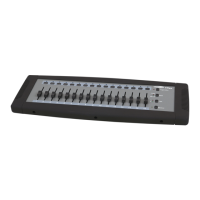
01) To enter the program mode, press PROGRAM and then press SCENE buttons 1, 5, 6, 8.
02) Choose the position for the scene you want to save.
03) Use the fader and PAGE button (8) to set the DMX value.
04) Press the program/rec button to store the scene.
2. Exit programming
01) To exit Program mode, first press the PROGRAM button (10) and then the BLACKOUT button (7).
3. Chase / Manual
01) Press MODE (9), you can select 2 different modes: AUTO and MANUAL.
02) You can control the controller manually or automatically.
4. Chase Mode
A chase is created by using previously created scenes. Scenes become steps in a chase.
01) In Chase Mode the scenes will automatically be played one after the other.
02) In AUTO mode: fader 13 controls the running direction of the CHASE
fader 14 controls the dimmer of the chase(0-100%)
fader 15 control the run speed of the chase CHASE (0.1s-10m)
fader 16 control FADE of the chase(0-100%)
03) In MANUAL mode: fader 1-16 and the PAGE button control the output of each channel.
5. Delete a Chase
01) Press PROGRAM (10) and then press SCENE buttons 1, 5, 6, 8. You’re now in Program mode.
02) To delete a chase, press and hold down the PROGRAM (10) + MODE button (9).
03) All LEDs will flash, indicating all programs have been deleted.
6. Blackout
01) Press the BLACKOUT button (7) to enable or disable relevant DMX output. When its LED is lit, that
means the relevant DMX output is disabled. Press this button again the LED will be “off”, that means
the DMX output is reactivated.












 To Next Page