11
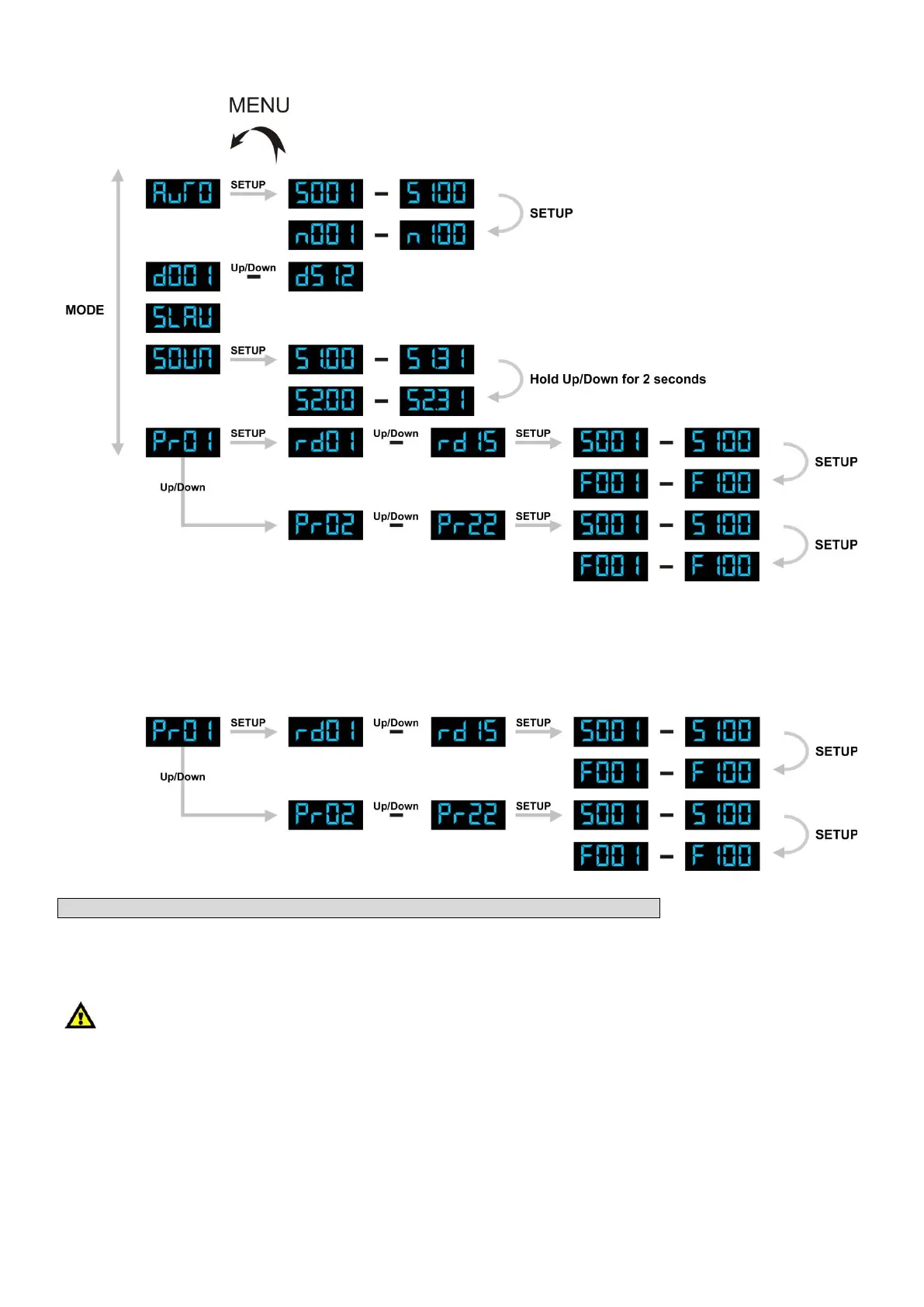
Menu Overview
Built-in Programs
Operation by using the buttons on the device
1) Press the MODE button, until the LED displays show PrXX.
You can select the built-in programs by pressing the Up/Down buttons.
Note: Pr is the abbreviation of programs.
Pr01: Selection of 15 phrases (10 built-in phrases and 5 user-defined phrases)
2) When you have pressed the MODE button and the display shows Pr01.
3) Press the SET UP button once, the display will show rdXX.
You can now select the built-in phrases by pressing the Up/Down buttons.
rd01 - rd10 Built-in phrases(Happy Birthday, Merry Christmas, Happy Holidays,
Happy Halloween, Happy Hanukkah, Happy Thanksgiving, Last Call, Party!!,
Drink Specials, Congratulations )
rd11 - rd15 are the phrases, which can be edited by the user.
4) Press the SET UP button twice, the display will show SXXX.
You can now set speed from S001 to S100 by pressing the Up/Down buttons.
5) Press the SET UP button three times, the display will show FXXX.
You can now set the flash frequencies from F001 to F100 by pressing the Up/Down buttons.











 To Next Page