12
Pr02 - Pr22: Built-in effect programs
1) When you have pressed the MODE button and the display shows Pr02 to Pr22.
2) Press the SET UP button once, the display will show SXXX.
You can now set speed from S001 to S100 by pressing the Up/Down buttons.
3) Press the SET UP button twice, the display will show FXXX.
You can now set the flash frequencies from F001 to F100 by pressing the Up/Down buttons.
Operation by using the IR remote control
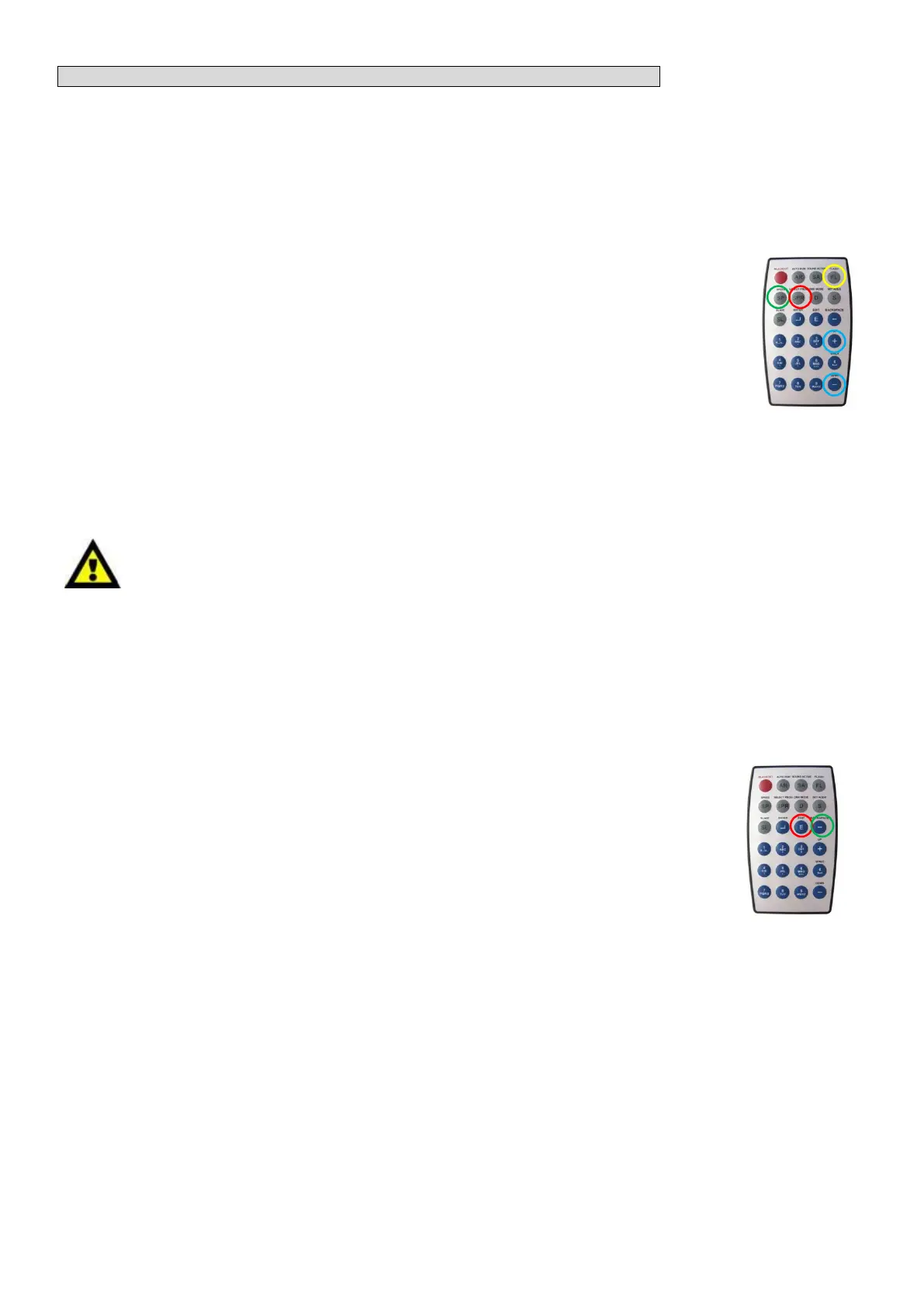
1) If you select Pr01, press the SELECT PROG button (O) twice, the display will show r d X X.
2) By pressing the Up/Down buttons you can show any of the built-in (rd01 - rd10) or
user-defined (rd11 - rd15) phrases.
3) Press the SELECT PROG button (O), the display will show PrXX.
By pressing the Up/Down buttons (O) you can select preferable programs from Pr02 - Pr22.
4) Press FLASH button (O). This will not be shown on the display.
You can set the flash frequencies from F001 to F100 by pressing the Up/Down buttons.
5) Press SPEED button (O), the display will show SXXX.
You can set speed from S001 to S100 by pressing the Up/Down buttons.
Create/Edit Phrases by using the IR Remote control
Note: you can only use the IR remote to edit phrases.
Only rd11 to rd15 are able to be edited by a user.
The user is able to edit phrases, containing not more than 30 characters.
1) Press the SET UP button once, the display will show rdXX.
2) Use the Up/Down buttons to go to rd11 - rd15. Here you create 5 user-defined phrases.
For example, if you want to create/edit rd11.
3) First press the EDIT button(O), the device will show … _ _ _.
4) Use buttons 2-9 to choose any character you want
This procedure to do this, is the same as writing a SMS on a cellphone.
For example, press the 2 button for once to choose A/a, press it twice to choose B/b, press it three
times to choose C/c.
Press the 1 button to choose capitals (A) or small capitals (a).
Press the 0 button to choose blank space.
5 ) …_ _ _ means the device is waiting for the input of the first character of this line.
A… _ _ means the device is waiting for the input of the second character of this line.
AB…_ means the device is waiting for the input of the third character of this line.
ABC… means the device is waiting for the input of the forth character of this line.
ABCD means the input of the 4 characters is successful.
6 ) If you find a character that is wrong, you can press the BACK SPACE button (O) to delete the
characters one by one starting from right to left. When you have entered the correct character, after
waiting for 2-3 seconds, the cursor will automatically jump to another line … _ _ _.
Repeat this procedure to edit another line or phrase.
7) When you have finished editing the entire phrase, your phrase will be automatically stored in the
memory.
When the device is in auto run mode, DMX mode or Master/Slave mode, the stored phrases can be
recalled and played back.











 To Next Page