EasyManua.ls Logo

Shure BLX4 - User Manual

Shure BLX4
28 pages
Print Icon
To Next Page IconTo Next Page
Loading...
BLX
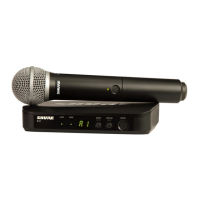
Wireless System
Online user guide for Shure BLX wireless system.
Version: 4 (2019-H)

Other manuals for Shure BLX4

Questions and Answers

  • C
    Christopher AndersonSep 7, 2025
    What to do if the receiver LED screen is off on my Shure BLX4 Microphone system?
    • J
      Jason LeeSep 7, 2025
      If the receiver LED screen is off on your Shure Microphone system, make sure the DC adapter is securely plugged into the electrical outlet and that the receiver is powered on.
  • E
    Evan RiveraAug 22, 2025
    What to do if Shure Microphone system has audio artifacts or dropouts?
    • H
      Heidi AustinAug 22, 2025
      If you are experiencing audio artifacts or dropouts with your Shure Microphone system, consider the following: Change the receiver and transmitter to a different group and/ or channel. Identify and eliminate any nearby sources of RF interference. Replace the transmitter batteries. Ensure that the receiver and transmitter are properly positioned within the system's recommended range, keeping the receiver away from metallic surfaces. For optimal sound, the transmitter should be used within line of sight of the receiver.
  • M
    Michelle PhillipsSep 5, 2025
    Why does my Shure Microphone system have no sound or faint sound?
    • C
      cookbrianSep 5, 2025
      If your Shure Microphone system has no sound or faint sound, check the following: If the receiver ready LED is on, verify all sound system connections or adjust gain as needed. If the receiver ready LED is off, turn on the transmitter. Also, ensure the batteries are installed correctly and are fresh. Finally, perform transmitter setup.
  • L
    Laura HoganSep 3, 2025
    How to fix sound level variations in Shure BLX4?
    • W
      wallacepamelaSep 3, 2025
      To address sound level variations in your Shure Microphone system, adjust the transmitter gain as necessary.
  • C
    Christina LewisSep 2, 2025
    Why is there distortion in my Shure Microphone system?
    • J
      jjarvisSep 2, 2025
      Distortion in your Shure Microphone system may occur if the audio LED on the receiver indicates overload (red). Reduce the transmitter gain to resolve this issue.
  • Y
    ysmithAug 31, 2025
    What does it mean when the transmitter indicator LED is flashing red on my Shure Microphone system?
    • T
      Thomas ChaneyAug 31, 2025
      If the transmitter indicator LED is flashing red on your Shure Microphone system, replace the transmitter batteries.
  • L
    logan18Aug 30, 2025
    Why does my Shure Microphone system have audio artifacts or dropouts?
    • S
      Stephanie Carroll PhDAug 30, 2025
      Audio artifacts or dropouts in your Shure Microphone system can occur if the ready LED is flickering or off. To resolve this: 1. Change the receiver and transmitter to a different group and/or channel. 2. Identify and remove nearby sources of RF interference. 3. Replace the transmitter batteries. 4. Ensure the receiver and transmitter are within system parameters. 5. Set up the system within the recommended range and keep the receiver away from metallic surfaces. 6. Ensure the transmitter is used in line of sight from the receiver for optimal sound.
  • M
    Miguel SandersAug 29, 2025
    What to do if my Shure BLX4 Microphone system has no sound?
    • J
      John MooreAug 29, 2025
      If your Shure Microphone system has no sound or a faint sound, check the following: * If the receiver ready LED is on, verify all sound system connections or adjust gain as needed. * If the receiver ready LED is off, turn on the transmitter, ensure batteries are correctly installed, perform transmitter setup, or insert fresh batteries. * If the receiver LED screen is off, ensure the DC adapter is securely plugged into the electrical outlet and that the receiver is powered on.
  • C
    Christopher LawsonAug 27, 2025
    What to do if Shure BLX4 Microphone system transmitter indicator LED is flashing red?
    • M
      Ms. Amanda PerezAug 27, 2025
      If the transmitter indicator LED on your Shure Microphone system is flashing red, replace the transmitter batteries.
  • S
    susanpowellAug 27, 2025
    Why is the receiver ready LED off on my Shure Microphone system?
    • C
      Carmen GardnerAug 27, 2025
      If the receiver ready LED is off on your Shure Microphone system, ensure the transmitter is turned on and the batteries are correctly installed. You may need to perform the transmitter setup. If not, insert fresh batteries.

Summary

Important Safety Instructions

System Components

Quick Start Guide

Features

Front Panel

Details the controls and indicators on the front of the receiver units.

Back Panel

Describes the connection ports and features located on the back of the receiver units.

BLX1 Transmitter Features

Outlines the specific features and controls of the BLX1 bodypack transmitter.

BLX2 Transmitter Features

Details the specific features and controls of the BLX2 handheld transmitter.

Transmitter LED Indicators

Explains the meaning of different LED light statuses on the transmitters.

Single System Set Up

Setting Transmitter Group and Channel

Step-by-step guide to manually set the group and channel for transmitter-receiver synchronization.

Multiple System Setup

Tips to Improve Wireless System Performance

Manually Setting Receiver Group and Channel

Procedure for manually adjusting receiver group and channel settings, especially for multiple systems.

Locking and Unlocking Controls

Instructions on how to lock and unlock transmitter and receiver controls to prevent accidental changes.

Getting Good Sound

Correct Microphone Placement

Guidance on optimal microphone positioning for clear audio capture and tone.

Wearing the Headworn Microphone

Instructions for correctly positioning headworn microphones for best performance.

Adjusting Gain

Batteries

Wearing the Bodypack Transmitter

Troubleshooting

Power Off

Procedure for safely powering down the BLX transmitters and receivers.

Removing and Installing Identification Caps

Guide on how to remove and attach identification caps to the transmitters.

Specifications

Certifications

Important Product Information

Licensing Information

Information regarding licensing requirements for operating wireless microphone equipment.

Information to the User

FCC compliance statements and user guidelines for device operation.

Frequency Range and Transmitter Output Level

Australia Warning for Wireless

Specific warnings and compliance information for wireless devices in Australia.

Frequencies for European Countries

Shure BLX4 Specifications

General IconGeneral
Ethernet LANNo
Mounting type-
Product colorBlack
Built-in displayYes
Housing materialABS
Operating frequency662 - 686 MHz
Operating frequency typeUltra High Frequency (UHF)
Operating temperature (T-T)-18 - 57 °C
Microphone frequency response50 - 15000 Hz
Total Harmonic Distortion (THD)0.5 %
Input voltage12 - 15 V
Power supply typeAC
Current consumption235 mA
XLR out1
Weight and Dimensions IconWeight and Dimensions
Depth103 mm
Width188 mm
Height40 mm
Weight241 g

Related product manuals