Shure Incorporated
14/16
1.
2.
3.
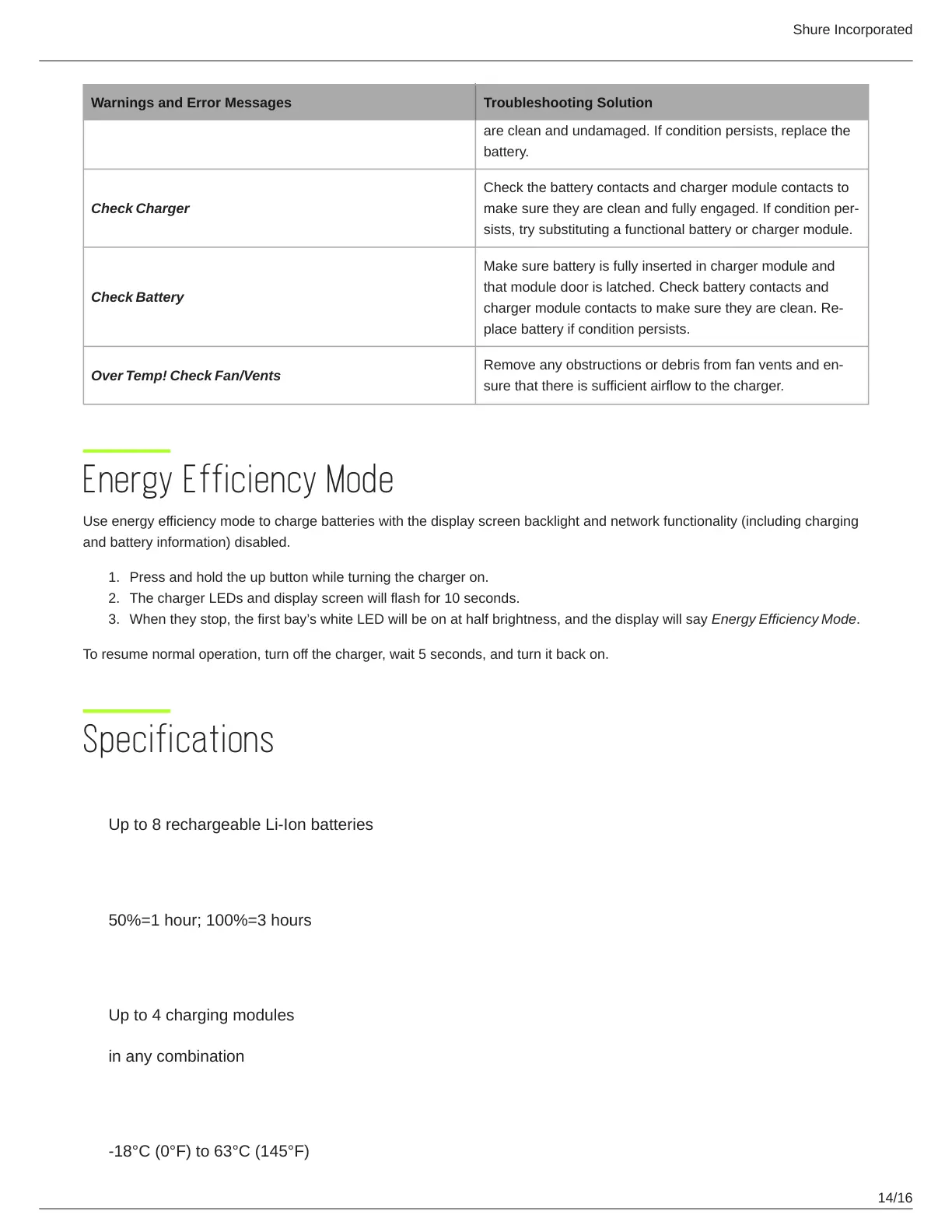
Warnings and Error Messages Troubleshooting Solution
are clean and undamaged. If condition persists, replace the
battery.
Check Charger
Check the battery contacts and charger module contacts to
make sure they are clean and fully engaged. If condition per
sists, try substituting a functional battery or charger module.
Check Battery
Make sure battery is fully inserted in charger module and
that module door is latched. Check battery contacts and
charger module contacts to make sure they are clean. Re
place battery if condition persists.
Over Temp! Check Fan/Vents
Remove any obstructions or debris from fan vents and en
sure that there is sufficient airflow to the charger.
Energy Efficiency Mode
Use energy efficiency mode to charge batteries with the display screen backlight and network functionality (including charging
and battery information) disabled.
Press and hold the up button while turning the charger on.
The charger LEDs and display screen will flash for 10 seconds.
When they stop, the first bay’s white LED will be on at half brightness, and the display will say Energy Efficiency Mode.
To resume normal operation, turn off the charger, wait 5 seconds, and turn it back on.
Specifications
Battery Type
Up to 8 rechargeable Li-Ion batteries
Charge Time
50%=1 hour; 100%=3 hours
Charging Module Type
Up to 4 charging modules
in any combination
Operating Temperature Range
-18°C (0°F) to 63°C (145°F)



 To Next Page