Shure Incorporated
7/16
1.
2.
3.
4.
Off = No network link
On = Network link active
Flashing = Network link active, flash rate corresponds to traffic volume.
⑪ Cooling Fan Vent
Clean fan screen as needed to maintain airflow.
Charge Status LED
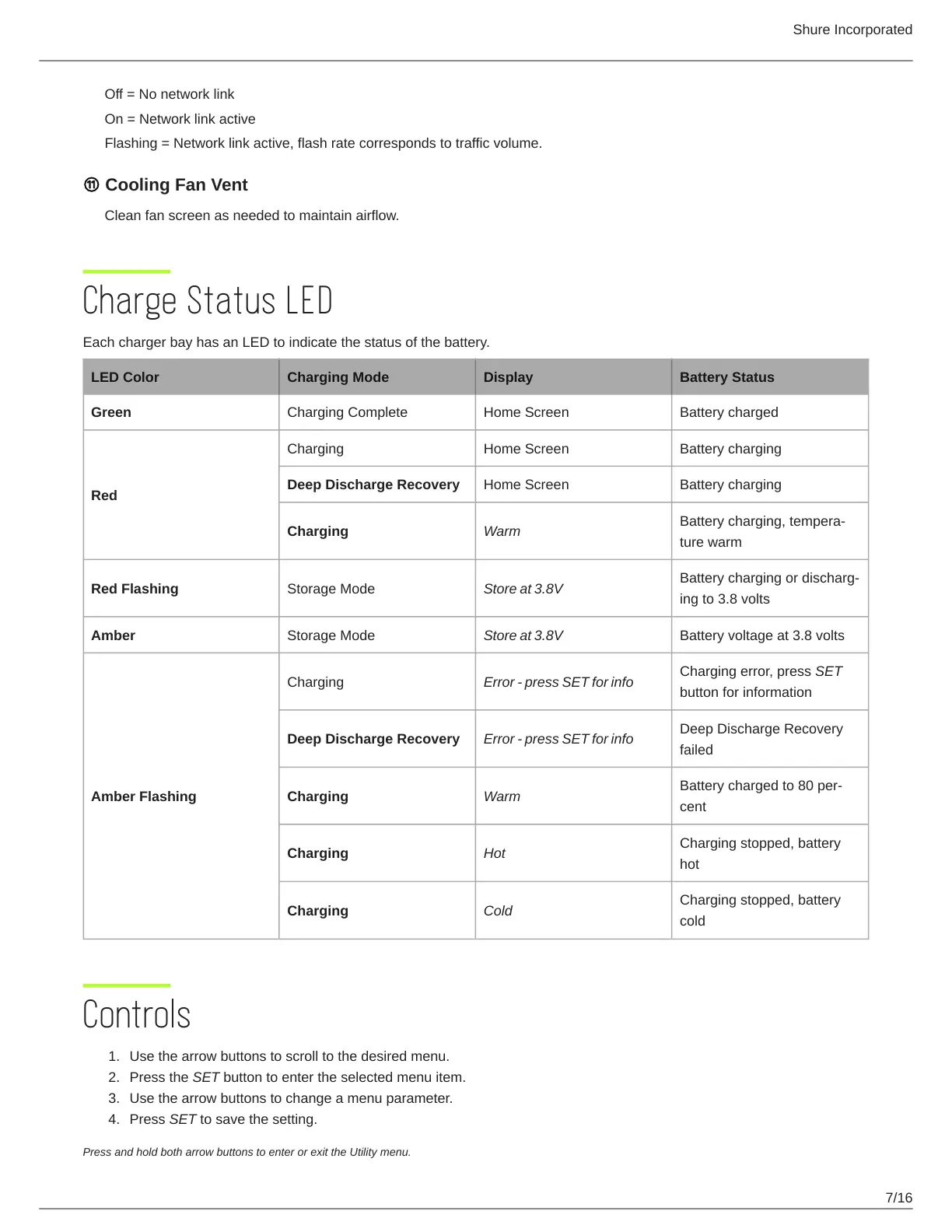
Each charger bay has an LED to indicate the status of the battery.
LED Color Charging Mode Display Battery Status
Green Charging Complete Home Screen Battery charged
Red
Charging Home Screen Battery charging
Deep Discharge Recovery Home Screen Battery charging
Charging Warm
Battery charging, tempera
ture warm
Red Flashing Storage Mode Store at 3.8V
Battery charging or discharg
ing to 3.8 volts
Amber Storage Mode Store at 3.8V Battery voltage at 3.8 volts
Amber Flashing
Charging Error - press SET for info
Charging error, press SET
button for information
Deep Discharge Recovery Error - press SET for info
Deep Discharge Recovery
failed
Charging Warm
Battery charged to 80 per
cent
Charging Hot
Charging stopped, battery
hot
Charging Cold
Charging stopped, battery
cold
Controls
Use the arrow buttons to scroll to the desired menu.
Press the SET button to enter the selected menu item.
Use the arrow buttons to change a menu parameter.
Press SET to save the setting.
Press and hold both arrow buttons to enter or exit the Utility menu.



 To Next Page