7
3 4
5
1
6
Transmitters
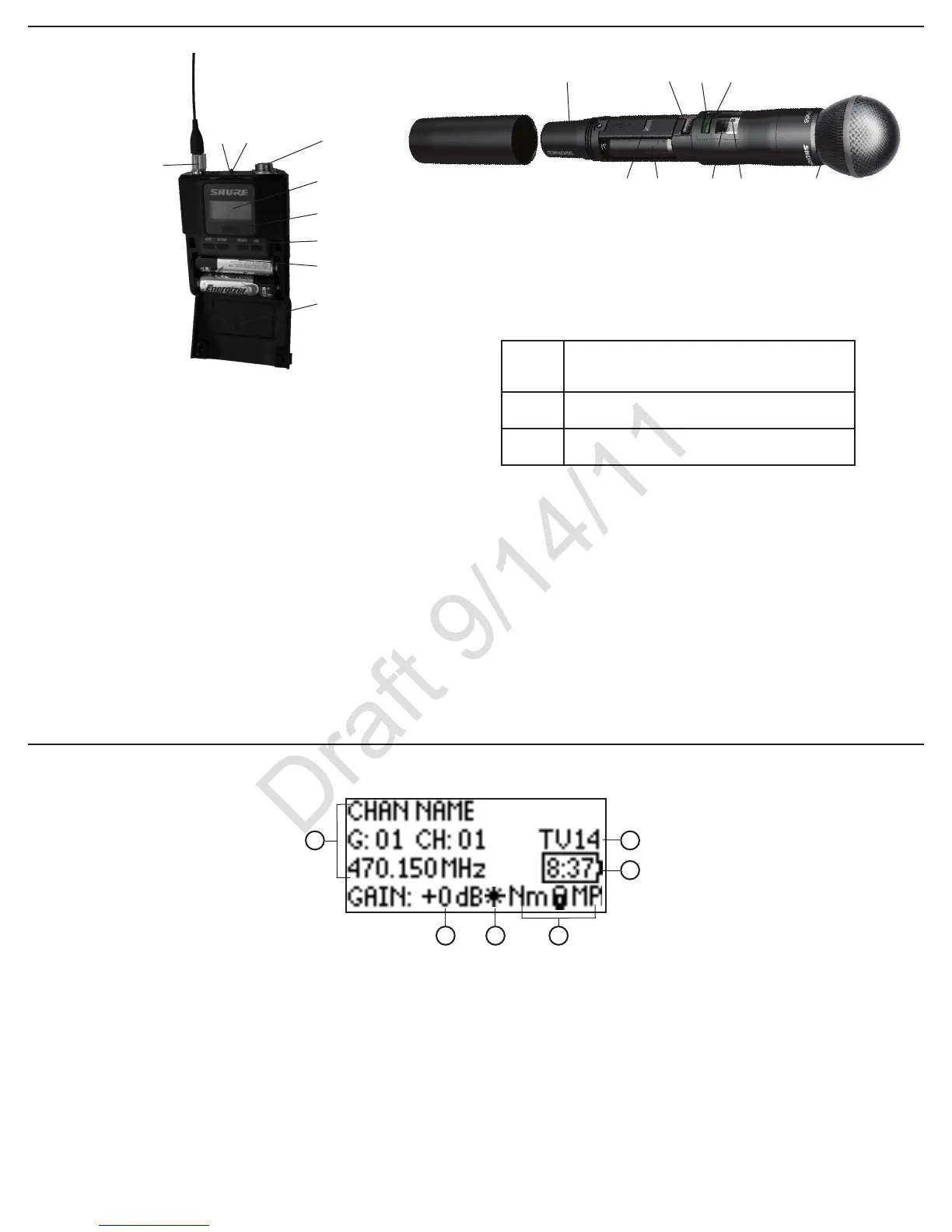
① Power LED
•Green = unit is powered on
•Red = low battery or battery error (see Troubleshooting)
•Amber = power switch is disabled
② On/Off Switch
Powers the unit on or off
③ TA4M Input Jack
Connects to a 4-Pin Mini Connector (TA4F) microphone or instrument cable
④ LCD Display:
View menu screens and settings. Press any control button to activate the
backlight
⑤ Infrared (IR) Port
Align with the receiver IR port during an IR Sync for automated transmitter
programming
⑥ Menu Navigation Buttons
Use to navigate through parameter menus and change values.
exit
Acts as a ‘back’ button to return to previous
menus or parameters without confirming a value
change
enter
Enters menu screens and confirms parameter
changes
▼▲
Use to scroll through menu screens and to change
parameter values
⑦ Battery Compartment
Requires Shure SB900 rechargeable battery or 2 AA batteries.
⑧ AA Battery Adapter
Handheld: rotate and store in the battery compartment to use a Shure re-
chargeable battery pack
Bodypack: remove to accommodate a Shure rechargeable battery pack
⑨ Detachable Bodypack Antenna
For RF signal transmission
⑩ Integrated Antenna
For RF signal transmission
⑪ Microphone Cartridge
See Optional Accessories for a list of compatible cartridges
①
②
②
③
④
④
⑤
⑤
⑥
⑥
⑦
⑦
⑧
⑧
⑨
⑪
①
⑩
Home Screen
④ Transmitter Settings
The following information cycles when a
transmitter is tuned to the receiver’s frequency:
•Transmitter Type (ULXD1=Bodypack;
ULXD2=Handheld)
•Input Pad (Bodypack only)
•RF Power Level (Lo=1 mW; Nm=10 mW; Hi=20
mW)
•Transmitter Lock Status (M=Menu; P=Power)
Note: -No TX- is displayed when there is no RF
connection between a receiver and transmitter
⑤ Battery Runtime Indicator
Shure SB900 battery: runtime is displayed in
minutes remaining
AA Batteries: runtime is displayed with a 5-bar
indicator
⑥ TV Channel
Displays the TV channel that contains the tuned
frequency
Receiver
① Receiver Information
Use UTILITIES > HOME INFO to rearrange the
following information:
•Channel name
•Group
•Channel
•Frequency
② Gain Setting
0 to +60 dB, or Mute
③ Mic. Offset Indicator
Indicates the transmitter is set to a gain offset
value
2
ULXD2 4-Way Menu Navigation Button



 To Next Page