Reading out UID with SIMATIC RF1070R
Article ID: 109780625, V1.0, 09/2020
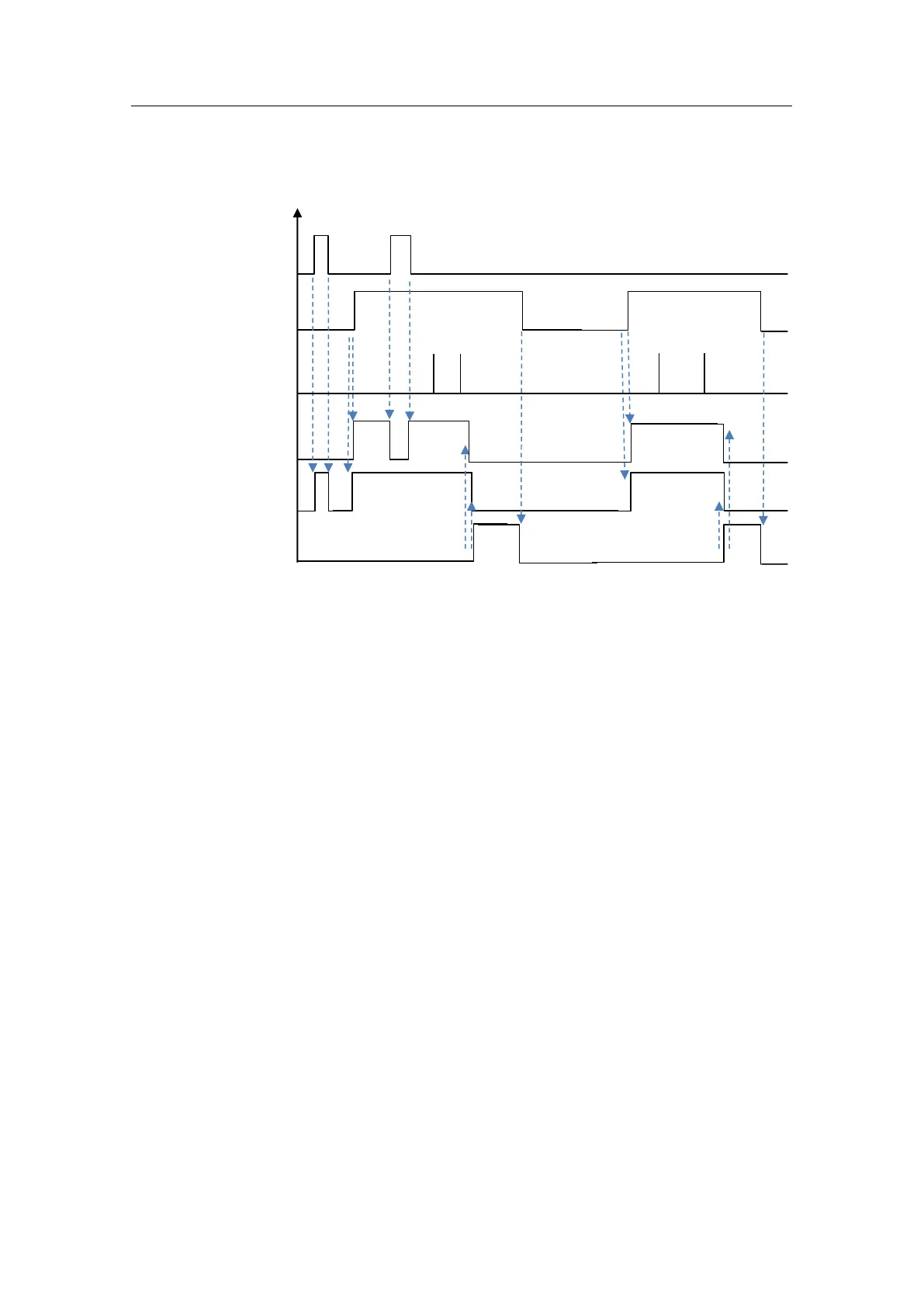
1. With "reset" as "TRUE", "busy" is set and "error" and "valid" are reset.
a. After successfully resetting the reader and when enable is FALSE, "busy"
is reset.
b. After successfully resetting the reader and when "enable" is TRUE, "busy"
and "valid" are set again. Job handling is active again and new data can be
continuously read and processed.
2. With "enable" to TRUE, "busy" and "valid" are set. Job handling is active and
new UIDs can be continuously read and processed.
3. New UID has been read and stored in the "rfData" memory range.
4. With "error" as TRUE, "busy" and "valid" are reset and all functions of the
"ReadUID" function block are stopped.
5. The pending error, which must be remedied by the user, can only be cleared
with a falling edge at "enable".










 To Next Page