3 Installation and commissioning
Reading out UID with SIMATIC RF1070R
Article ID: 109780625, V1.0, 09/2020
© Siemens AG
2020 All rights reserved
3 Installation and commissioning
3.1 Hardware configuration
Section 1.3 lists the required hardware components.
Please observe the setup guidelines for the S7-1200 and SIMATIC
RF1070R. Refer to the corresponding device manuals \5\ and \3\.
Only switch on the power supply after you have completed and checked
the assembly!
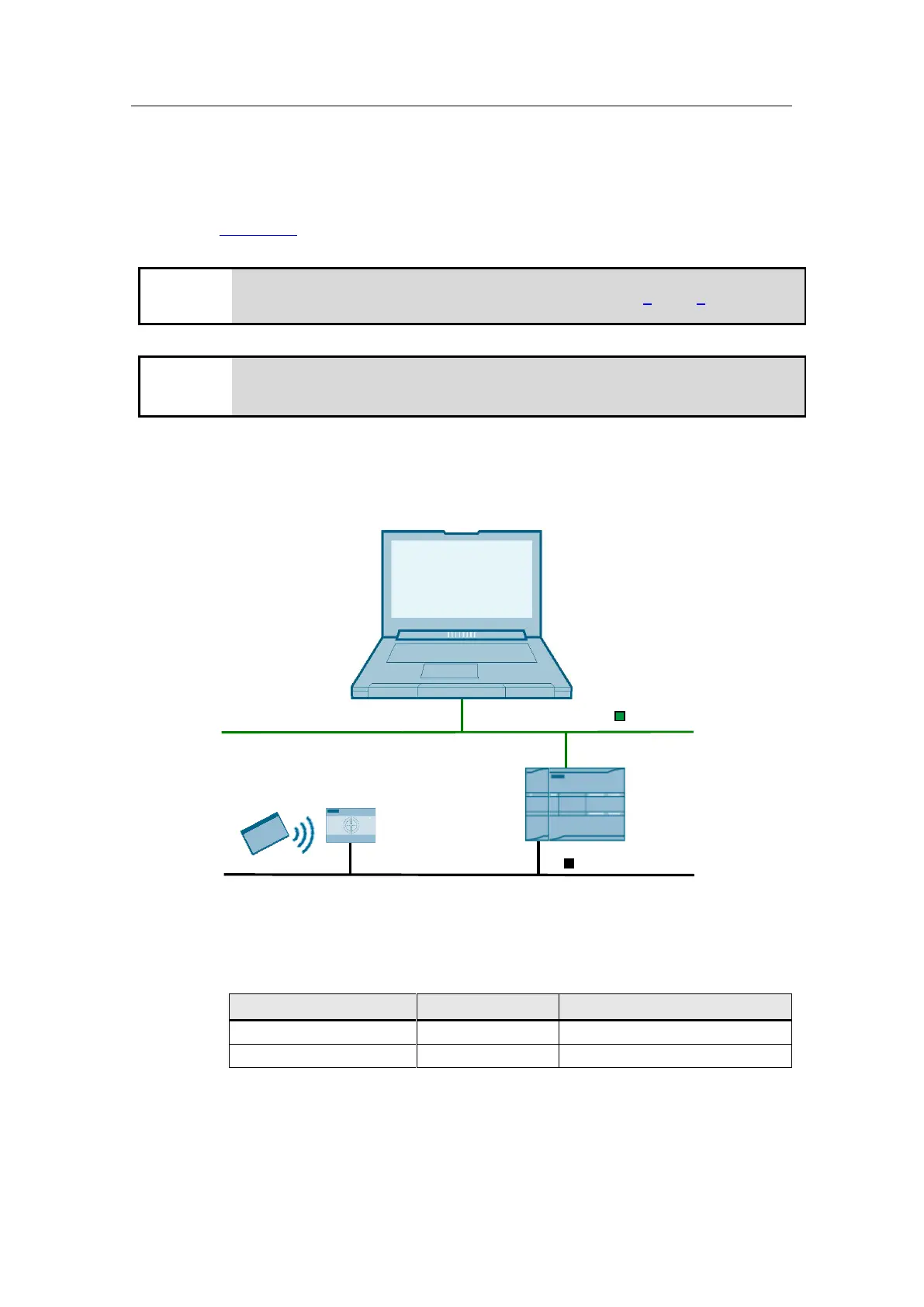
The following graphic shows the hardware setup of the application.
Figure 3-1
Engineering station
CM1241 RS232 SIMATIC S7-1200 CPU Card with UID SIMATIC RF1070R
serial coupling / RS232
PROFINET IE
STEP 7 V16
The following table provides an overview of all IP addresses used in this example.
Assignment of static IP addresses is assumed.
Table 3-1
The subnet mask in all network components is 255.255.255.0.










 To Next Page