Reading out UID with SIMATIC RF1070R
Article ID: 109780625, V1.0, 09/2020
In this example, the communication module is dynamically parameterized via the
user program. This chapter is only for reference on how you can also
parameterize the CM1241 RS232 via the hardware configuration in TIA Portal.
This chapter shows the required configuration steps in order to create a project
with a SIMATIC S7-1200 CPU, the CM1241 RS232 and the SIMATIC RF1070R
reader.
1. Create a new STEP 7 project.
2. Configure the S7 station:
– CPU 1214C DC/DC/DC
Note:
A different S7-1200 CPU from the SIMATIC product range can also be
used as an alternative.
– CM1241 RS232
3. Open "Devices & Networks" and select the CM1241 RS232 communication
module.
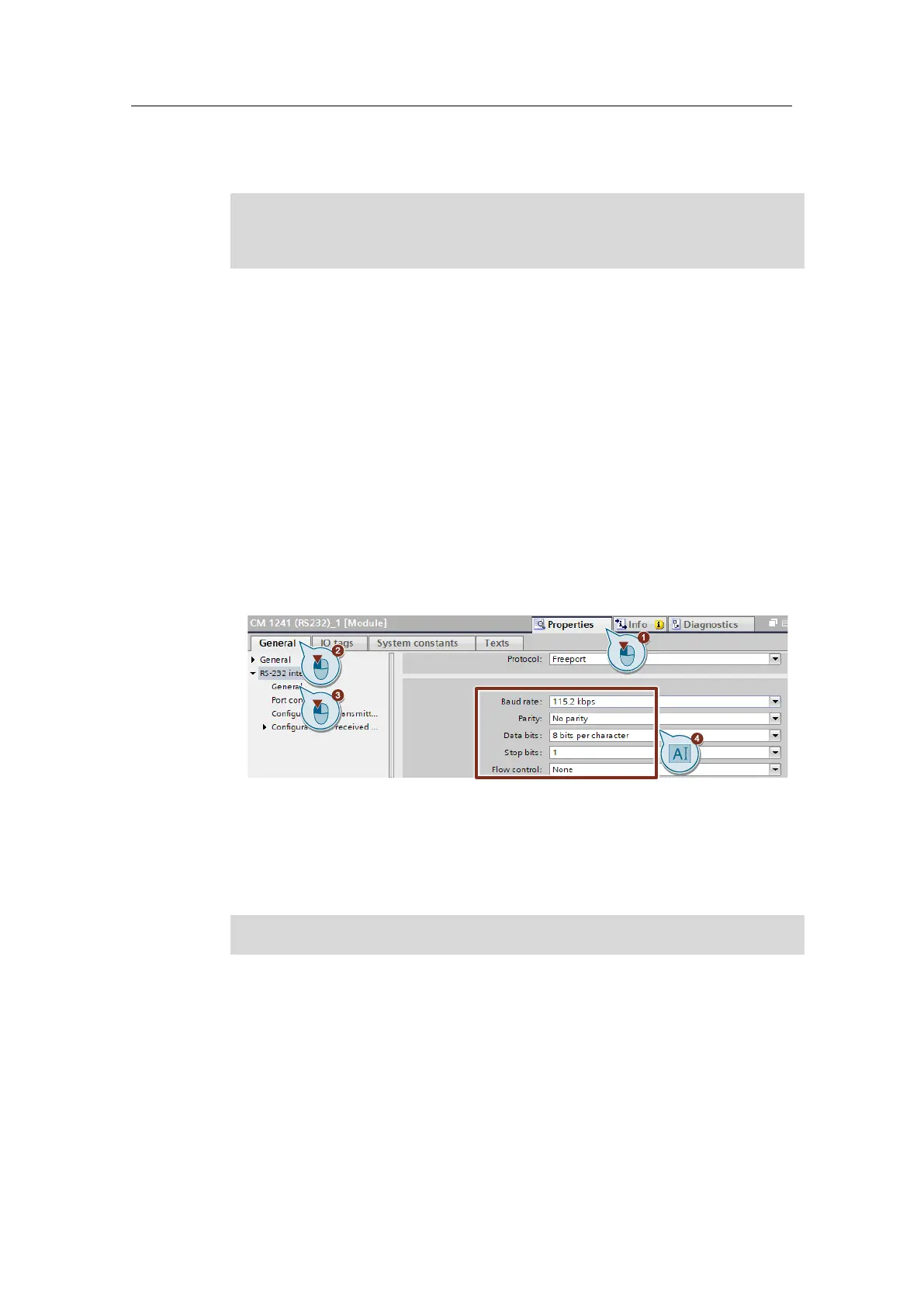
4. Switch to "Device view > Properties > General > RS-232 interface"
and
adjust the module parameters as shown in the following figure.
– Transmission speed: 115.2 kbps
– No parity
– 8 data bits
– 1 stop bit
– No flow control










 To Next Page