Mounting / Installing / Connecting
4.6 Connecting the supply cable
VersiCharge AC Wallbox IEC
Operating Instructions, 03/2021, A5E50366109-AA
31
To connect the supply cable, proceed as follows:
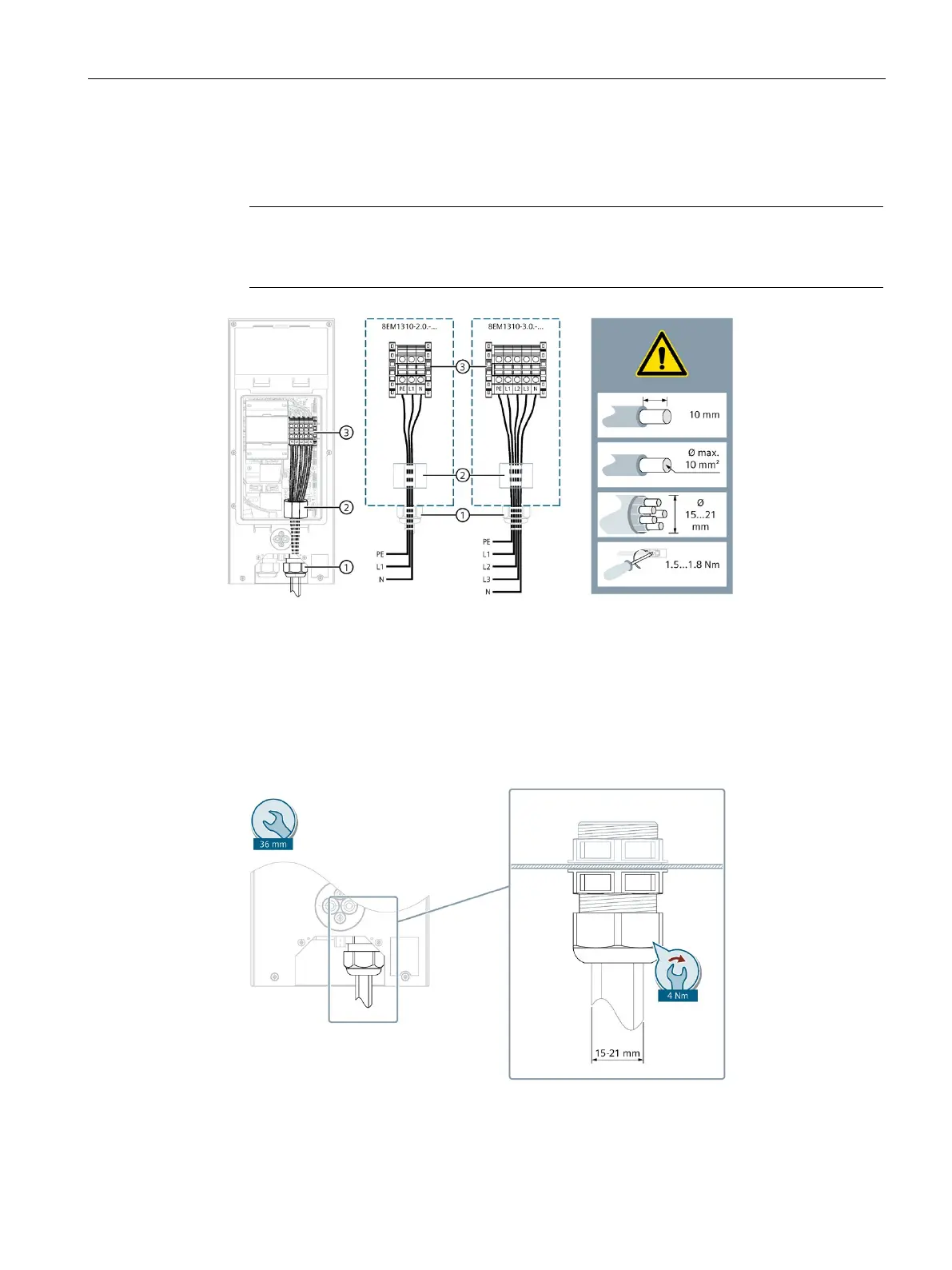
1. Insert the supply cable through the cable entry and connect the supply cable.
Wire end sleeves with flexible cables
When connecting flexible cables, use wire end sleeves.
Supply line at the terminal block
Figure 4-4 Infeed of VersiCharge Wallbox 8EM1310-..0.-….
a. Tighten the nuts of the cable gland by hand to ensure a tight seal and strain relief. Use the
supplied reducer for cables with 9-15 mm outer diameter. Check that the seal is sitting correctly.
Figure 4-5 Infeed of VersiCharge Wallbox 8EM1310-..0.-….





 To Next Page