104
Parameter Function
Setup
z
In X458H458H458HFigure 7-29X, click set button, you can go to the corresponding
setup interface.
z
Please set schedule period and then select corresponding record
or snapshot type: schedule/snapshot, motion detection/snapshot,
and alarm/snapshot.
z
Please select date (Current setup applies to current day by default.
You can draw a circle before the week to apply the setup to the
whole week.)
z
After complete setup, please go back to X459H459H459HFigure 7-29X and then click
save to save current time period setup.
Copy It is a shortcut menu button. You can copy current channel setup to
one or more (all) channels. The interface is shown as in
X460H460H460HFigure
7-28
X.
Save You can click save button after you complete setup for one channel,
or you can complete the whole setups and then click save button.
Refresh Click this button to get device latest configuration information.
7.3.2.4 RS232
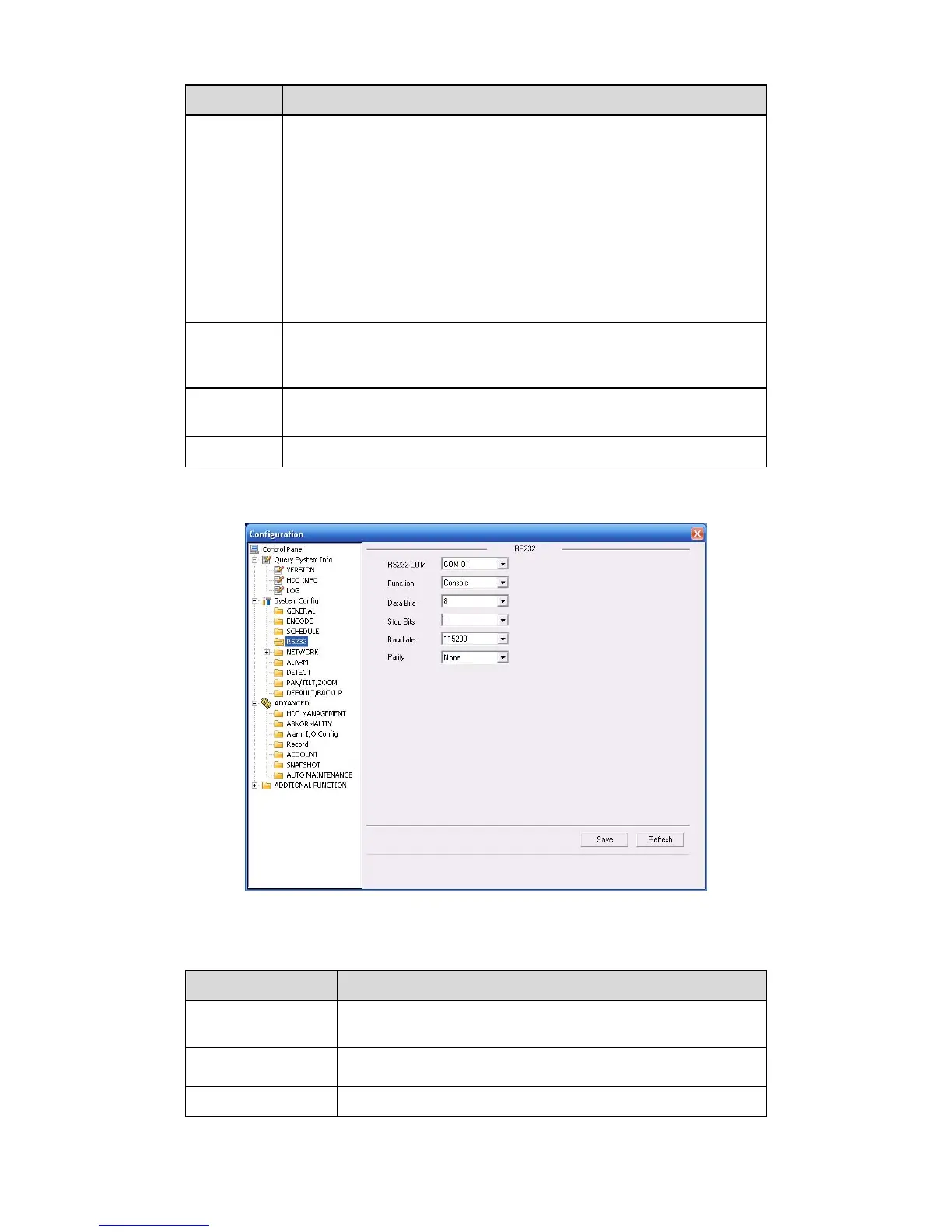
The RS232 interface is shown as in X461H461H461HFigure 7-31X.
Figure 7-31
Please refer to the following sheet for detailed information.
Parameter Function
RS232 Select the corresponding COM control protocol.
Data Bit
The value ranges from 5 to 8.
Stop Bit
There are three options: 1/2.



 To Next Page