50
4.7 Backup
DVR support USB device backup and network download. Here we introduce USB backup
first. You can refer to Chapter 7 Web Operation for network download backup operation.
4.7.1 Detect Device
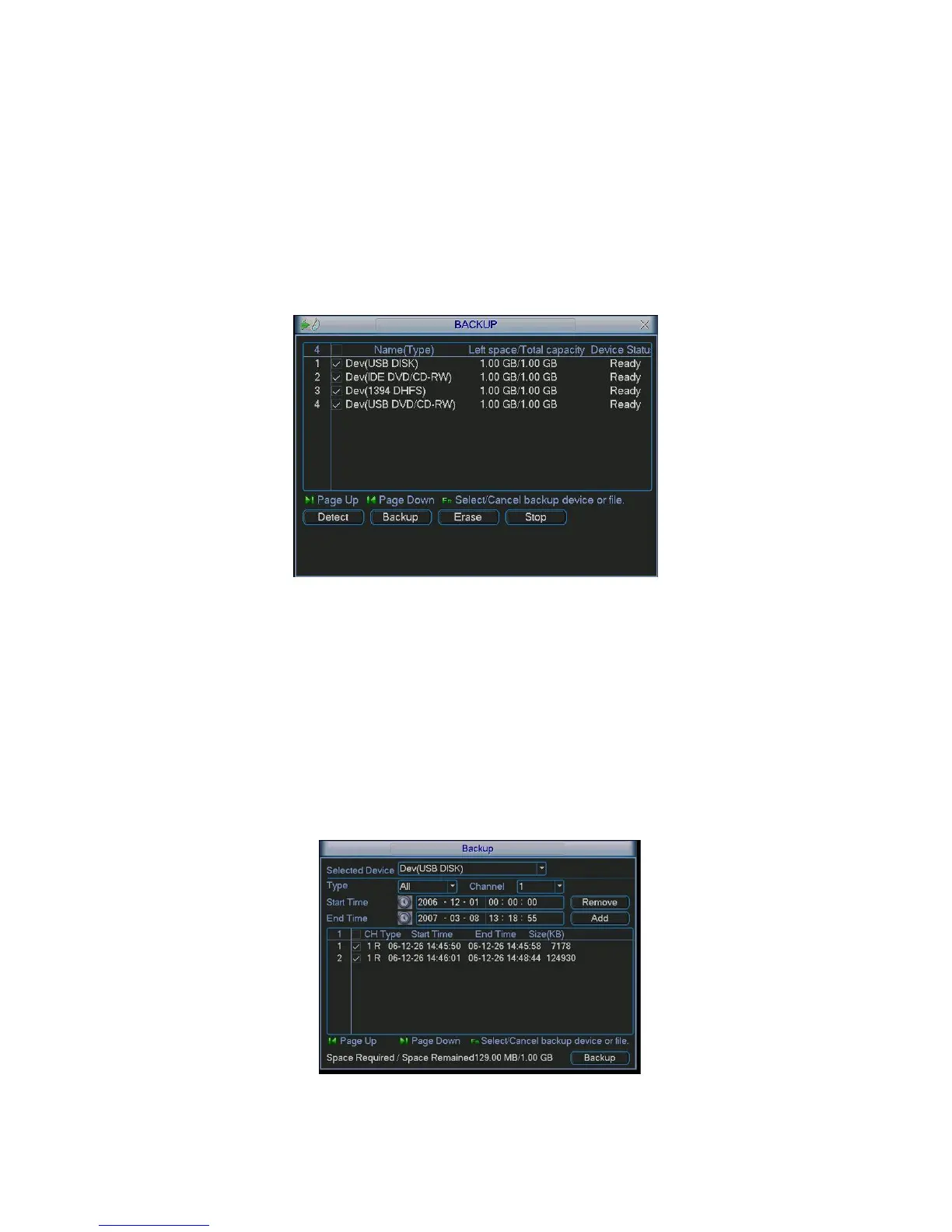
Click backup button, you can see an interface is shown as in Figure 4-28.Here is for you to
view devices information.
You can view backup device name and its total space and free space. The device includes
USB burner, flash disk, SD card and portable HDD.
Figure 4-28
4.7.1 Backup
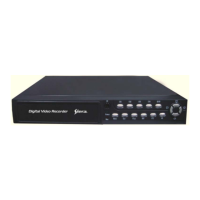
Select backup device and then set channel, file start time and end time.
Click add button, system begins search. All matched files are listed below. System
automatically calculates the capacity needed and remained. See Figure 4-29.
system only backup files with a √ before channel name. You can use Fn or cancel button to
delete
√ after file serial number.
Click backup button, you can backup selected files. There is a process bar for you reference.
When the system completes backup, you can see a dialogue box prompting successful
backup.
Figure 4-29



 To Next Page