23
3 Installation and Connections
Note: All the installation and operations here should conform to your local
electric safety rules.
3.1 Check Unpacked DVR
When you receive the DVR, please check whether there is any visible damage. The protective
materials used for the package of the DVR can protect most accidental clashes during
transportation. Then you can open the box to check the accessories.
Please check the items in accordance with the list on the warranty card (Remote control is
optional). Finally you can remove the protective film of the DVR.
Note
Remote control is not a standard accessory and it is not included in the accessory bag.
3.2 About Front Panel and Real Panel
For detailed information of the function keys in the front panel and the ports in the rear panel,
please refer to the appendix for detailed information.
The model in the front panel is very important; please check according to your purchase order.
The label in the rear panel is very important too. Usually we need you to represent the serial
number when we provide the service after sales.
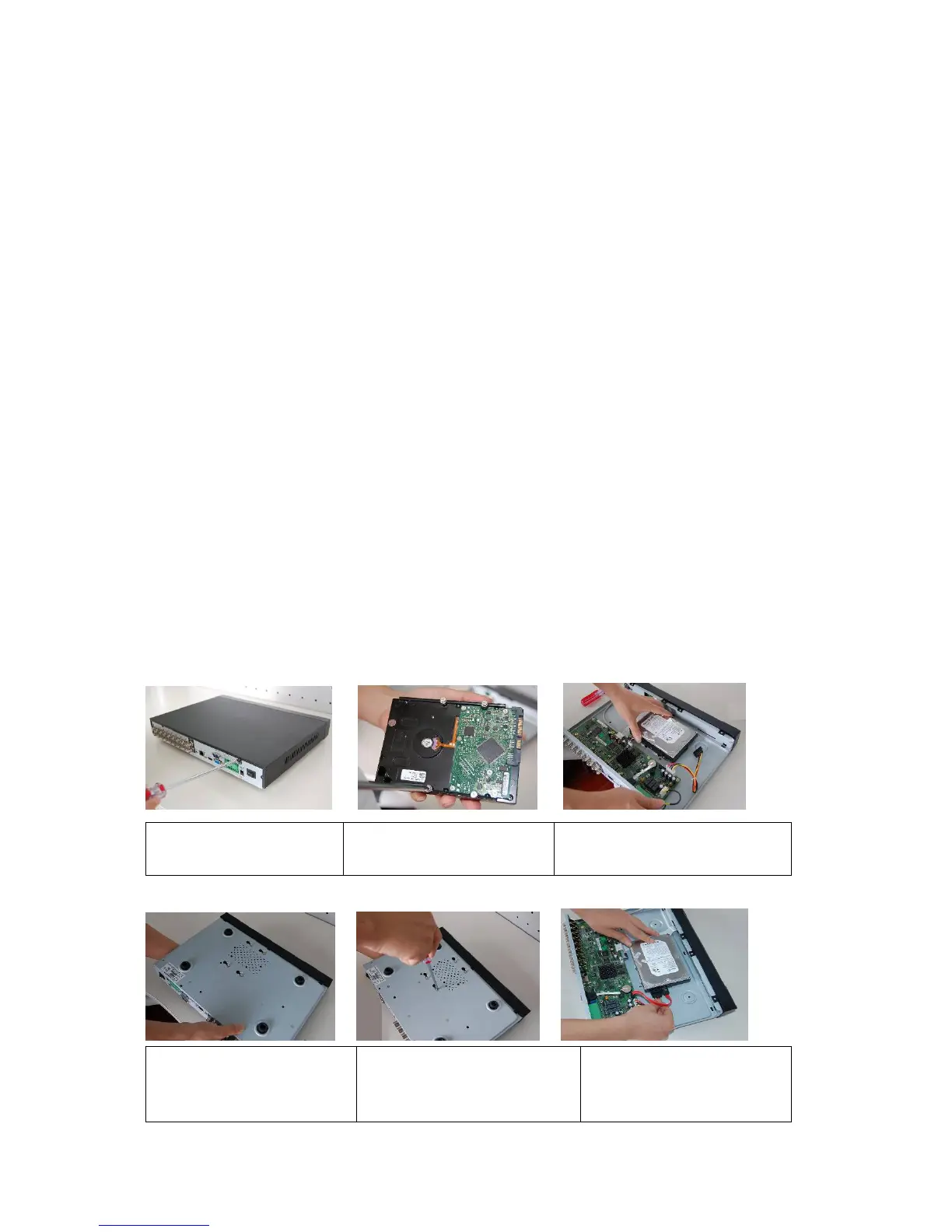
3.3 HDD Installation
This series DVR has only one SATA HDD. Please use HDD of 7200rpm or higher.
You can refer to the Appendix for recommended HDD brand.
Please follow the instructions listed below to install hard disk.
1. Loosen the screws of the
u
er cover and side
anel.
2. Fix four screws in the HDD
Turn
ust three rounds
.
3. Place the HDD in accordance with
the four holes in the bottom.
4. Turn the device upside down
and then turn the screws in
firml
.
5. Fix the HDD firmly.
6. Connect the HDD cable and
power cable.



 To Next Page