114
Parameter Function
PTZ
Activation
z
Here you can set PTZ movement when alarm occurs. Such as go to
preset x when there is an alarm.
Capture You need to input capture channel number so that system can backup
motion detection snapshot file.
Copy It is a shortcut menu button. You can copy current channel setup to
one or more (all) channels.
Save You can click save button after you complete setup for one channel,
or you can complete the whole setups and then click save button.
Refresh Click this button to get device latest configuration information.
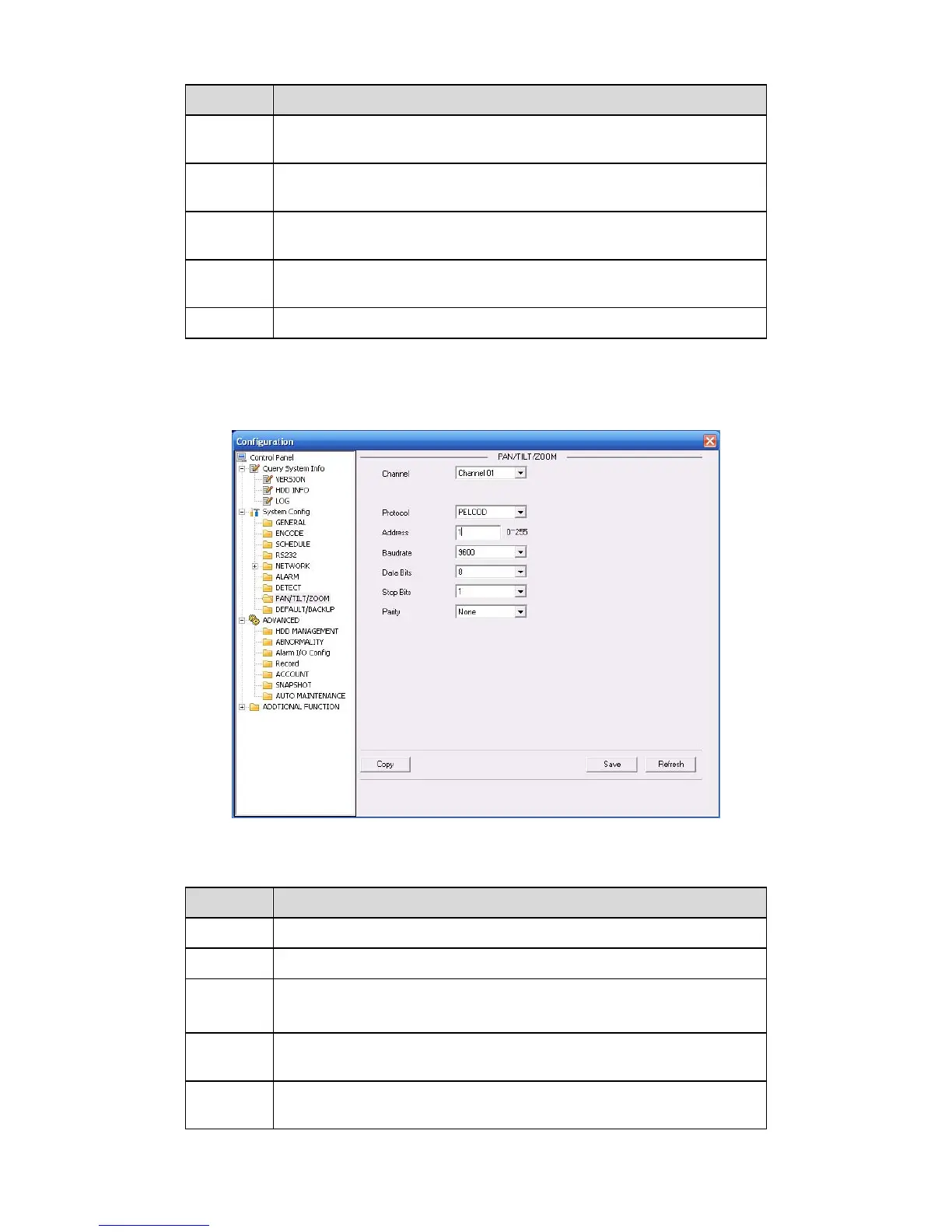
7.3.2.8 PTZ
PTZ interface is shown as in X470H470H470HFigure 7-42X
Please note, before operation please make sure you have set speed dome address. And DVR
and speed dome connection is OK.
Figure 7-42
Please refer to the following sheet for detailed information.
Parameter Function
Channel
You can select monitor channel from the dropdown list. .
Protocol
Select the corresponding dome protocol.(such as PELCOD)
Address
Set corresponding dome address. Default value is 1. Please note your
setup here shall comply with your dome address; otherwise you can
not control the speed dome.
Baud
Rate
Select the dome baud rate. Default setup is 9600.
Data Bit Default setup is 8. Please set according to the speed dome dial switch
setup.



 To Next Page