17
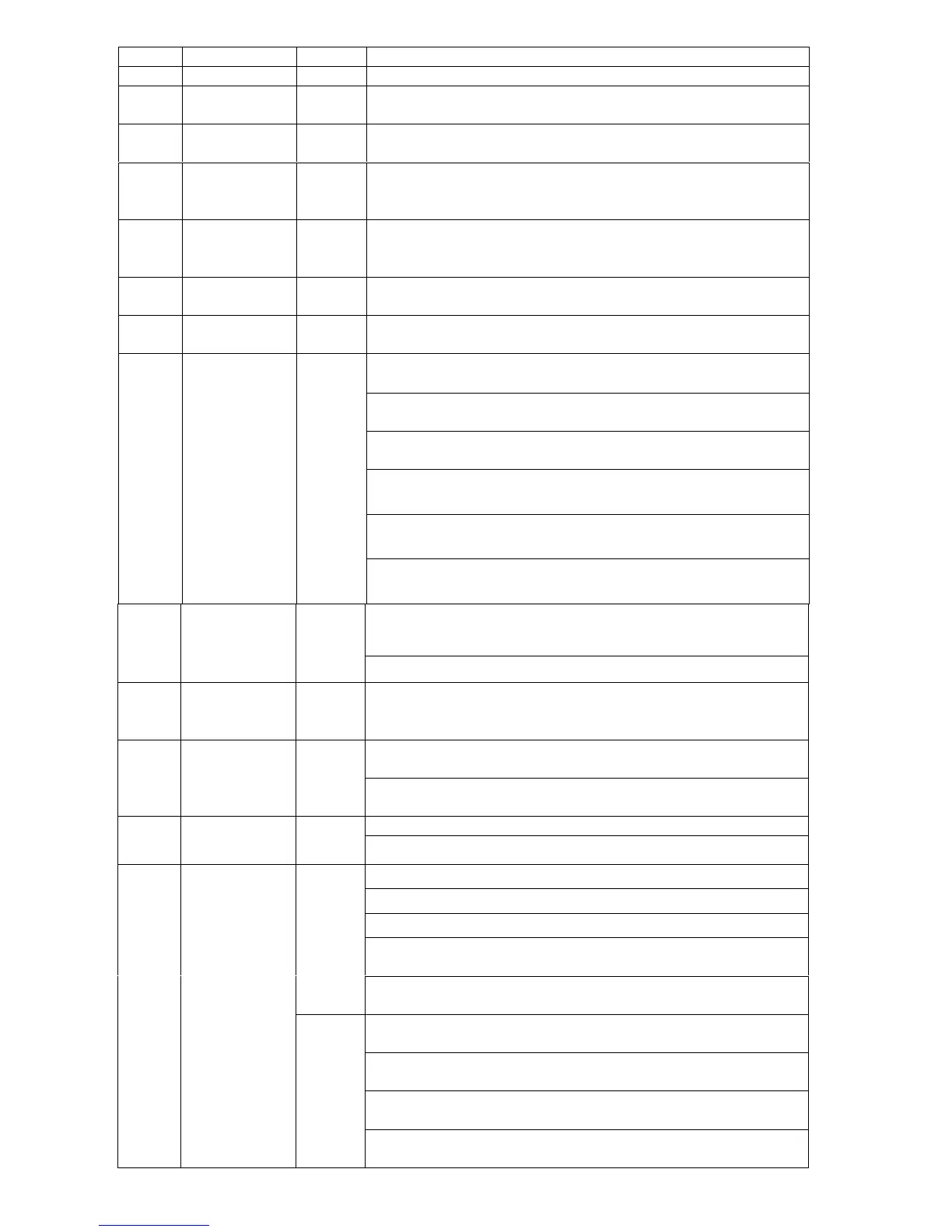
SN Button Name Icon Function
1 Power Boot up or shut down the DVR
2
Play/pause II
In playback mode: play or pause video.
In text box: input number 5.
3 Reverse/paus
II
In playback mode: reverse play video.
In text box: input number 6.
4 Fast play
In playback mode: click this button to switch between
various fast play speeds and normal playback.
In text box: input number 7.
5 Slow play ►
In playback mode: click this button to switch between
various slow play speeds and normal playback.
In text box: input number 8.
6Next I
In playback mode: play the next video.
In text box: input number 9.
7PreviousI
In playback mode: play the previous video.
In text box: input number 0
In 1-ch monitor mode: pop up assistant function:PTZ
control and Video color
In motion detection interface, working with direction keys
to finish setup.
Clear: Press Fn for 1.5 seconds to clear all contents in
current text box.
In preview interface (There is no other menu), click this
button for 3 seconds to switch between TV/VGA.
In text box input mode, press this button to switch
between numeral/English character (small/capitalized).
8AssistantFn
Special combined operation in some menus.
In input mode, switch between numeral/character and
other function keys.
9Shift SHIFT
In four-window preview mode, it can work as Fn button.
10 Record REC
Enable or disable record function manually. In record
control menu, working with direction keys to select
recording channel.
Go back to previous menu or cancel current operation in
function menu interface.
11 Cancel ESC
In video playback mode, click this button to go back to
real-time monitor mode.
Confirm
14 O.K ENTER
Go to the main menu
Move cursor
In text box: increase or decrease numerals.
In dropdown list, modify current setup.
In monitor mode, click this button to go to the 1
st
channel-
or 4
th
channel. (Single-channel monitor mode).
<
>
In text box input mode, press SHIFT and then use
up/down key to input number 1 or 4.
In the main menu or sub-menu interface, click left or right
key to move cursor.
In playback mode: Click left/right key to select
corresponding option in the function menu.
In monitor mode, click left/right key to go to 2
nd
channel
or 3
rd
channel (single-window monitor mode)
12
13
15
16
Direction key
< >
In text box input mode, press SHIFT and then use
left/right key to input number 2 or 3.



 To Next Page