32
Longevity
Mechanical 50×106 times (3Hz)
Electrical 200×103 times (0.5Hz)
Temperature
-40 ~+70
3.8 RS485
When the DVR receives a camera control command, it transmits that command up the coaxial cable
to the PTZ device. RS485 is a single-direction protocol; the PTZ device can’t return any data to the
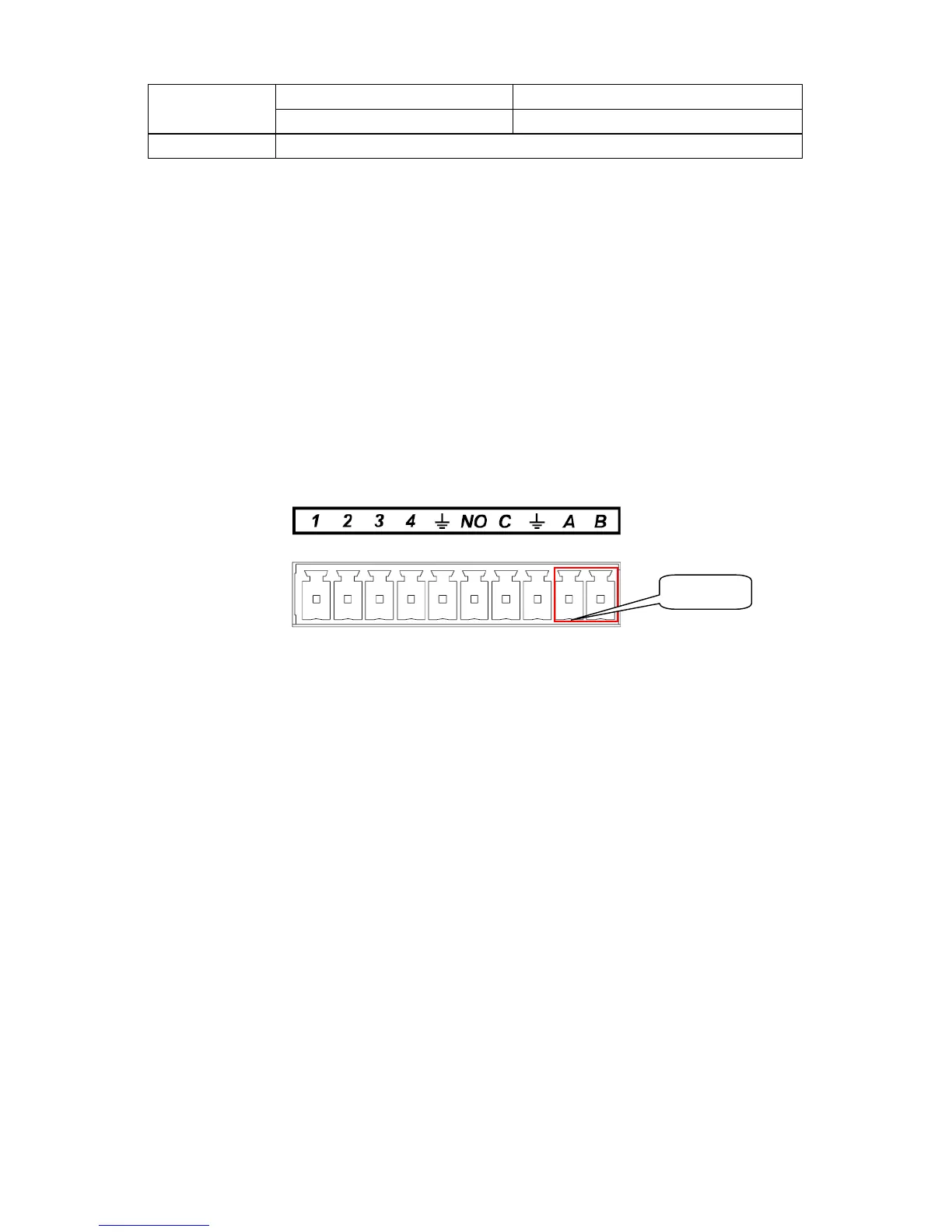
unit. To enable the operation, connect the PTZ device to the RS485 (A,B) input on the DVR.
Since RS485 is disabled by default for each camera, you must enable the PTZ settings first. This
series DVRs support multiple protocols such as Pelco-D, Pelco-P.
To connect PTZ devices to the DVR:
1. Connect RS485 A,B on the DVR rear panel.
2. Connect the other end of the cable to the proper pins in the connector on the camera.
3. Please follow the instructions to configure a camera to enable each PTZ device on the DVR.
Figure 3-8
485 Port



 To Next Page