Compass 597 USB modem - User Guide
32 2130972
ThestandardWindowscontrolbuttonsintheupperright
cornerofthewindowareusedtominimizeorcloseWatcher.
Whenminimized,Watcherdoesnotappearasataskbar
button.Instead,aniconisshowninthesystemtray,usuallyat
therightendofthetaskbar.(See“Minimizedicons”
on
page 36.)
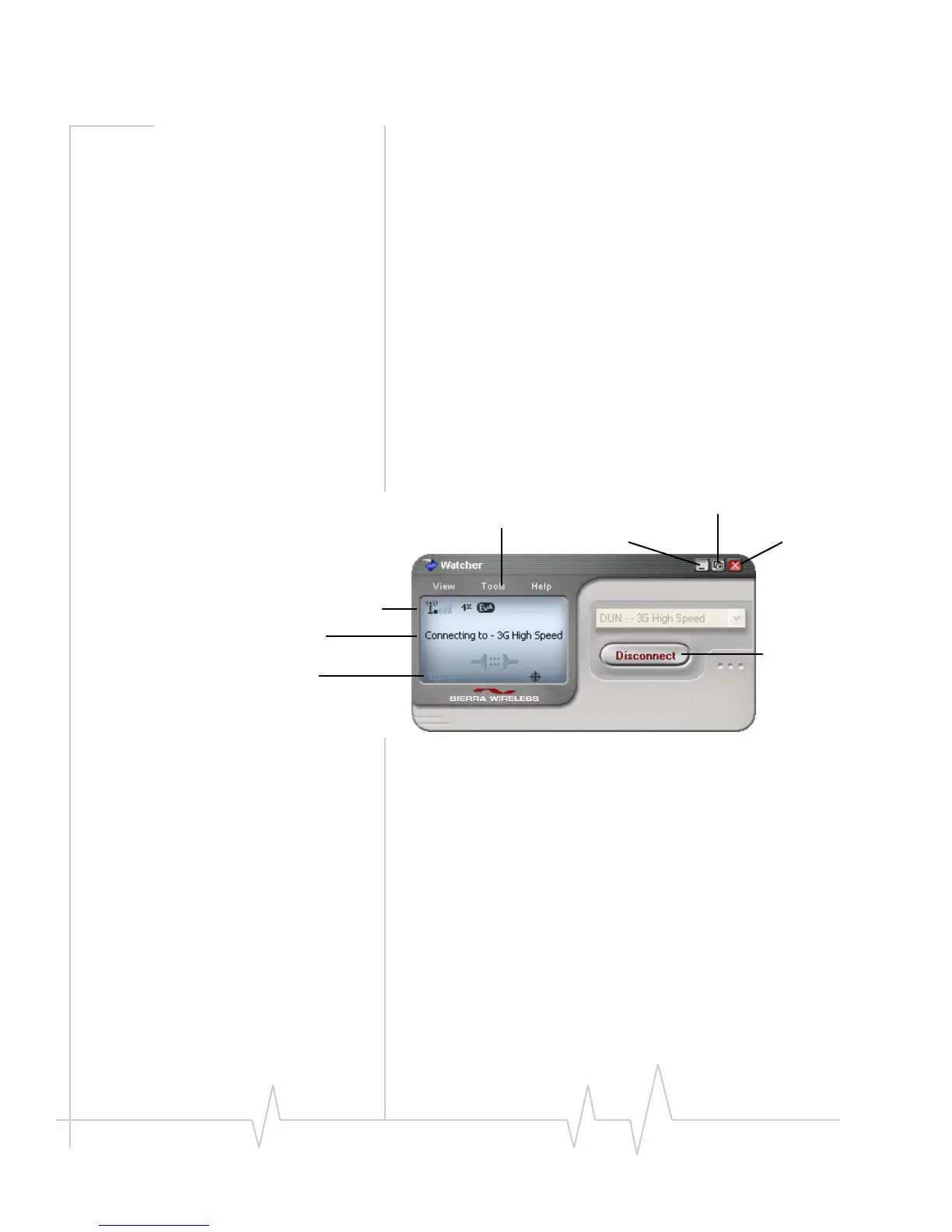
Components of the Watcher
window
Thewindowhasthreeareasthatdisplaymessagesandicons:
theConnectionStatusArea(page 34),CallStatusArea
(page 35),andIndicatorArea(page 36 ).Theseareasareshown
inFigure 5‐1thatfollows.
Amenubarislocatedontheupperleftsideofthewindow.
Windowscontrolbuttonsare
inthetoprightcorner.
Figure 5-1: Watcher window
Foradetaileddescriptionofeachoptioninthemenus,seethe
onlinehelp.
Toggle Full/Compact button
Close buttonMinimize button
Menu bar
Connection Status Area
Call Status Area
Indicator area
button
Disconnect
Connect/












 To Next Page