Watcher Basics (Windows)
Document 2130972. Rev 1.0 Apr.08 37
Onlyoneiconcanbedisplayedatatime.Thepriorityoficons,
fromhighesttolowest,is:
• Nomodemdetected
• SMSmessage(s)
• Activeorinactiveconnection.
Forexample,ifyouhaveunreadSMSmessages,andthen
establishadataconnection,theiconstilldisplaysasanunread
SMSmessage.
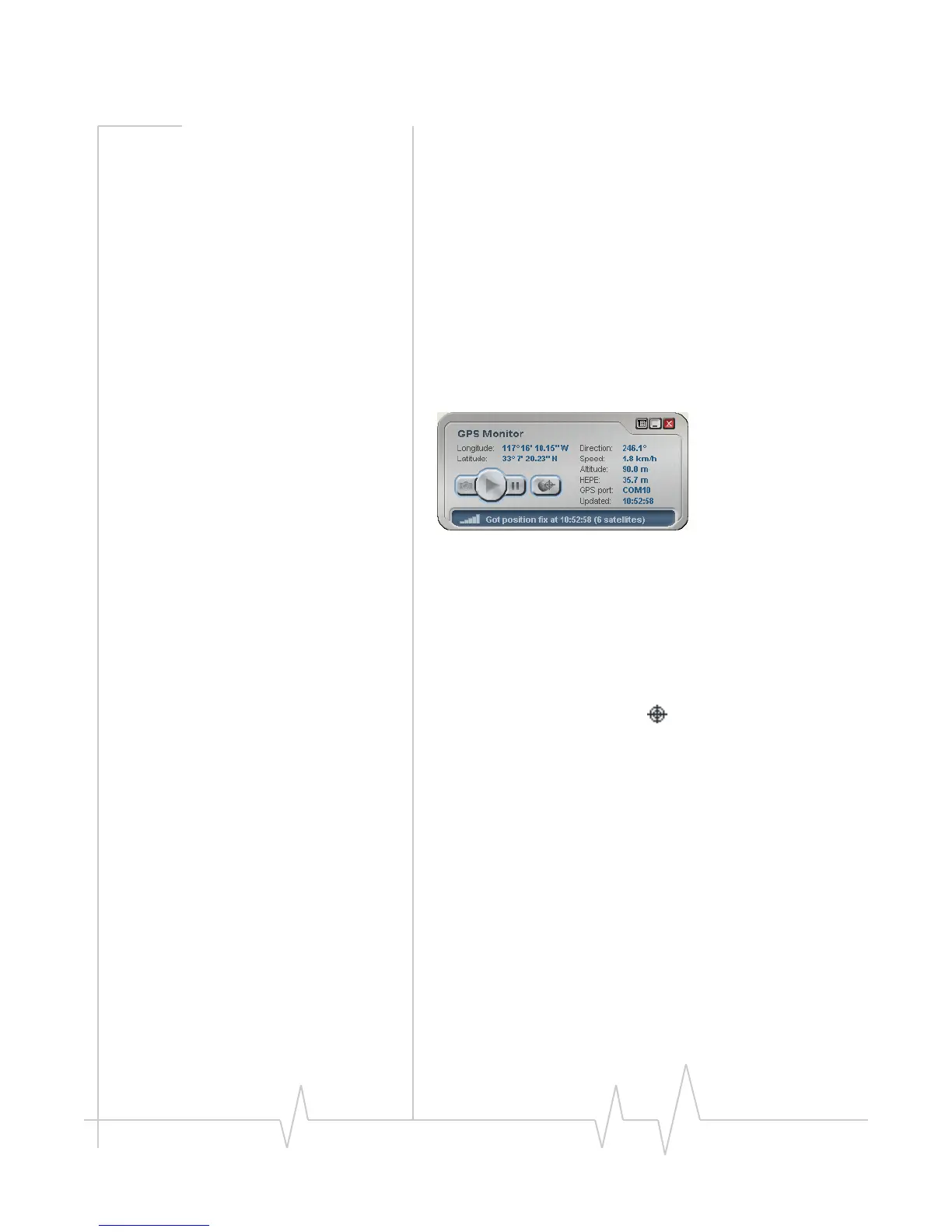
GPS Monitor window
TheGPSMonitorwindowreportsGPSdatafromyour
modem.
Themodemmusthaveafixonatleastfoursatellitestoreport
latitude,longitude,altitude,velocityandheading.(Thestatus
baratthebottomoftheGPSMonitorwindowindicateshow
manysatellitesarebeingtracked.)
ToopentheGPSMonitor
window:
1. InWatcher,select
Tools > Display GPS.
‐or‐
Double‐clicktheGPSiconinthemainWatcher
window(networkoperatordependent;thisiconmaynot
beavailable).
TheGPSMonitorwindowreports:
• LongitudeandLatitude—yourcoordinatesindegrees,
minutes,andseconds.
• Direction—yourdirectionindegreesfromtruenorth(0),
increasingclockwise.
• Speed—
calculatedbasedonyourcurrentlatitudeand
longitudeandthelastreading(onesecondprevious).This
iseitherinkilometersperhourormilesperhour,
dependingonyourchosenoption.
• Altitude—youraltituderelativetomeansealevel,in
eitherfeetormeters,dependingonyourchosenoption.
• HEPE
—HorizontalEstimatedPositionError.Reflects
accuracy(horizontal/verticalprecision).




 To Next Page