SDS1000X-E&SDS1000X-U User Manual
212
Universal Knob will activate the visual keypad for more precise input.
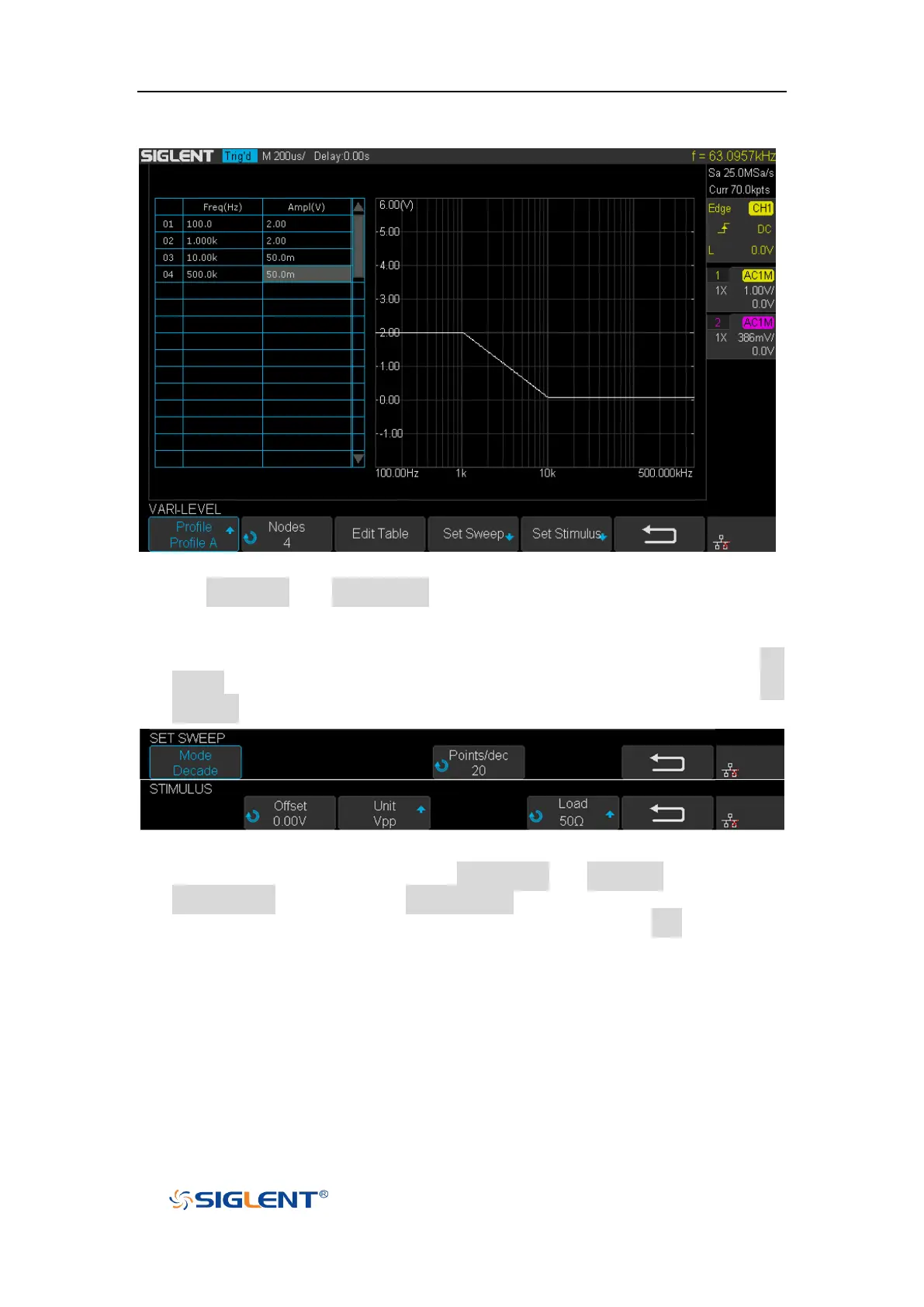
Figure 143 Set Vari-level Parameters Menu
10. The Set Sweep and Set Stimulus in Vari-level editor are similar to that in the
Simple sweep mode, but they are independently configured and do not affect
each other. These options in Vari-level mode do not have frequency and
amplitude input because they are specified in the spreadsheet. Press Set
Sweep and then set Mode to “Decade”, and set Points/dec to 20. The Set
Stimulus remains default setting.
Figure 144 Set Sweep Parameters Menu
11. Return to Configure menu and press Set Channel. Set DUT Input to “CH1” and
DUT Output 1 to “CH2”, and Channel Gain to “Auto”.
12. Configuration was done. Return to the root menu and press Run and wait for
the sweep to complete.










 To Next Page