This document is proprietary and confidential. No part of this document may be disclosed in any manner to a third party without prior
written consent. © Siklu Communication Ltd 2021 All rights reserved.
4. Installing the MultiHaul™ TG Units
4.7 Mounting and Aligning the MultiHaul™ TG TU on a Pole or Wall
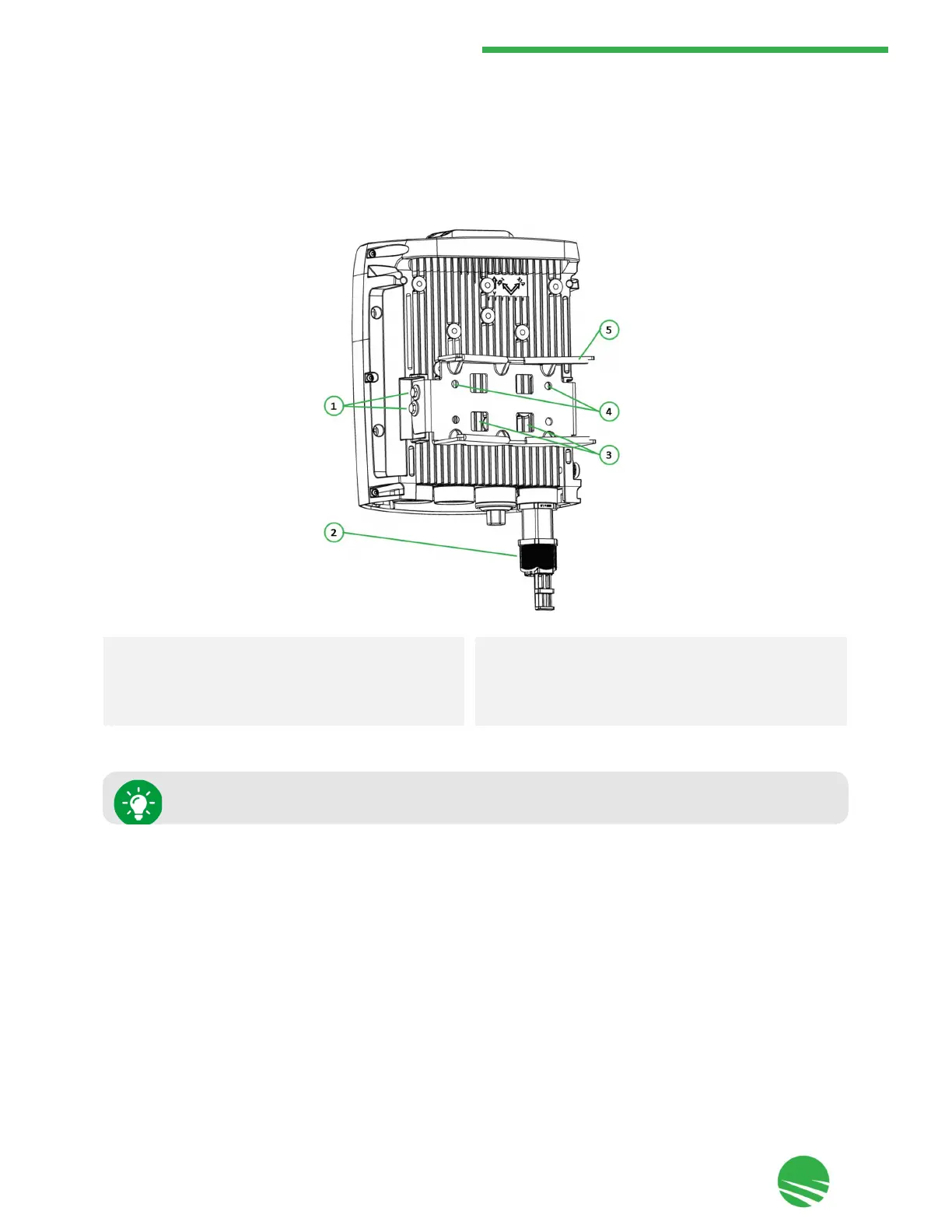
The TU is provided with a pre-attached mounting bracket suitable for mounting on a pole or wall.
Field of View Considerations while Mounting
When mounting the TU using the attached mounting bracket, the FOV (field-of-view) of the TU is as follows:
•
horizontal: ±45° electronically.
•
vertical : ±35° (25° electronically and 10° mechanical adjustment, achieved through the elevation lock bolts).
1.
Elevation lock bolts (2 x 7 mm on each side)
2.
All-weather shells (1 or 3, depending on model)
3.
Self-locking bands fixing points (for 2 x 130 mm bands
provided)
4.
Wall-mount fixing holes (4)
5.
Mounting bracket
TUs should be pointed towards the node.


 To Next Page