This document is proprietary and confidential. No part of this document may be disclosed in any manner to a third party without prior
written consent. © Siklu Communication Ltd 2021 All rights reserved.
4. Installing the MultiHaul™ TG Units
4.9 Unit LEDs
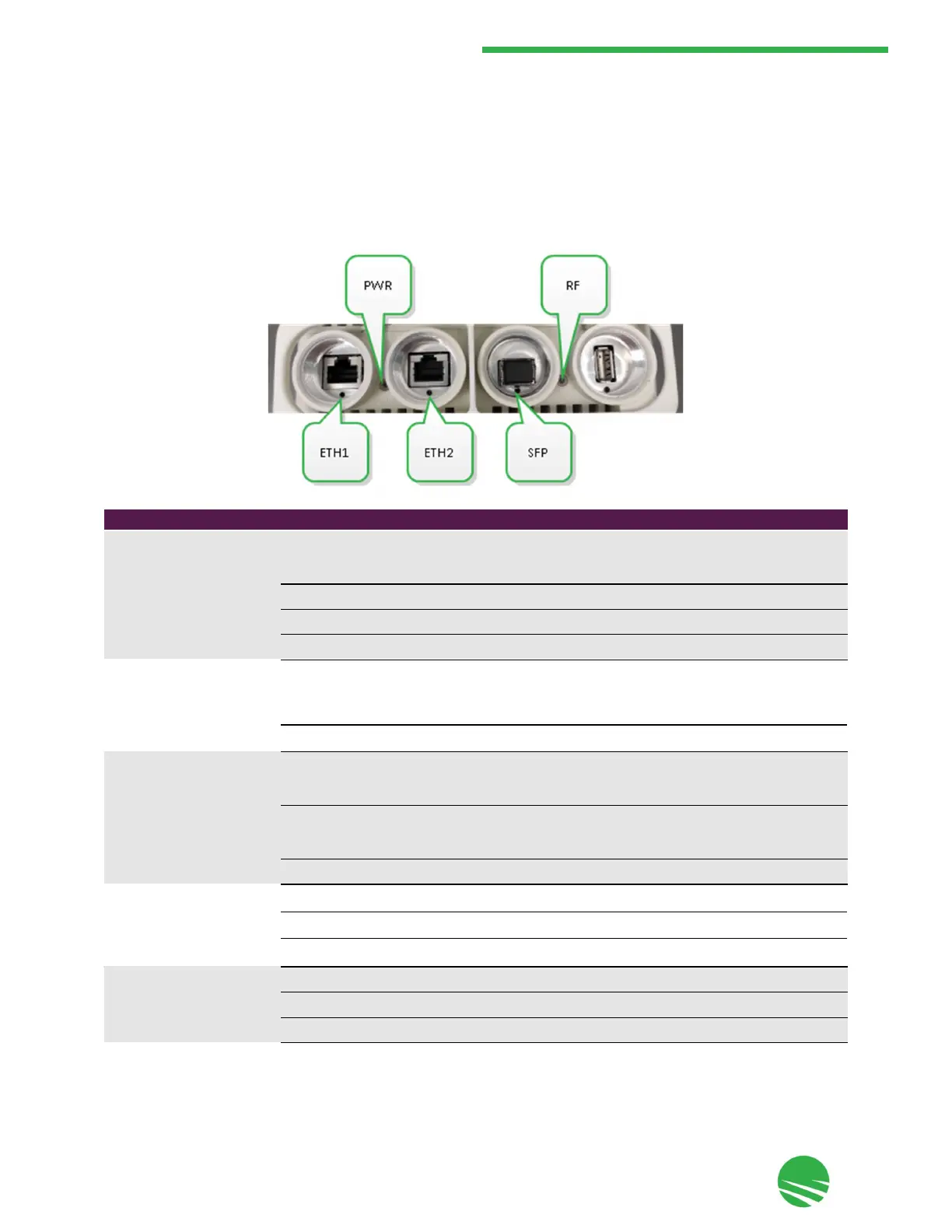
The MultiHaul™ TG unit includes the following LEDs on the connector panel under the unit, as shown and
described below:
RF Green
•
Node: on - at least one link connected (link can be to another node or a TU
on any sector).
•
TU: on - connected to the node.
Off
•
No link.
ETH1
Green
Node: on - 10 GbE link.
•
TU: on - 2.5 GbE link.
Orange
Node: on - 5/2.5/1 GbE, 10/100 Mbps link.
•
TU: on - 1 GbE, 10/100 Mbps link.
Off
No link (carrier).
ETH2 (Node and T265-CCP only) Green
•
On - 1 GbE link.
Orange
•
On - 10/100 Mbps link.
Off
•
No Link (carrier).
SFP (Node and T265-CCP only)
Green
On - 10 GbE link.
Orange
On - 1 GbE link.
Off
No Link (carrier).
LED Color Description
PWR (Power) Green
On - power is on.
•
Blinking - booting up.
Orange
On - booting up (boot failure if LED remains on for more than 2 seconds).
Red
Blinking - when reset pushbutton is released.
Off
No power.


 To Next Page