This document is proprietary and confidential. No part of this document may be disclosed in any manner to a third party without prior
written consent. © Siklu Communication Ltd 2021 All rights reserved.
4. Installing the MultiHaul™ TG Units
4.8 Connecting Cables
4.8.1 Connecting the Cables to the MultiHaul™ TG Node
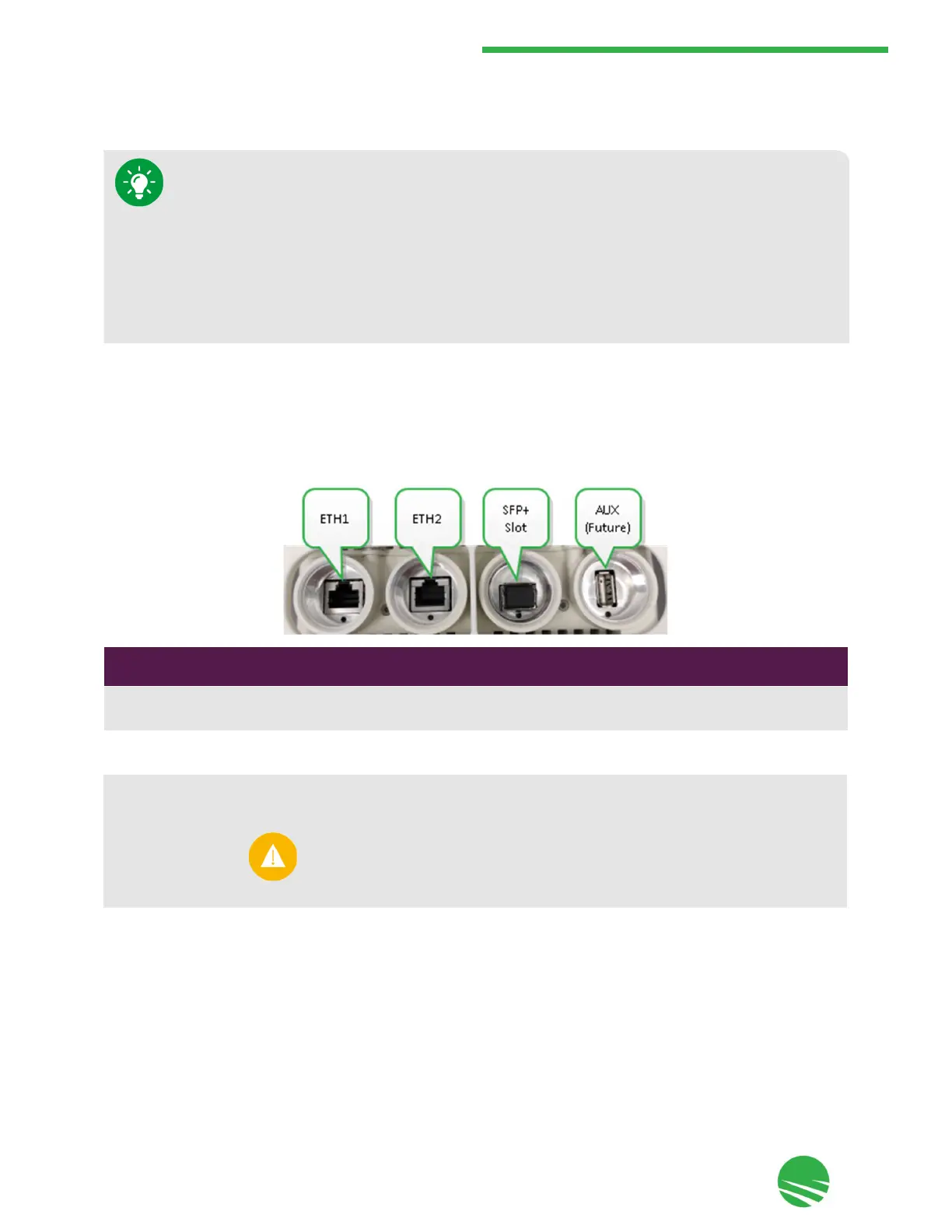
The MultiHaul™ TG node includes the following ports on the connector panel under the node, as shown and
described below:
Port
Type
Description
ETH1
RJ45
• 10 GbE (10/5/2.5/1 GbE)
•
PoE in
ETH2
RJ45
• 1 GbE
•
PoE out
AUX USB For future use
•
When mounting the TU on a pole: if additional vertical adjustment is required, use
the EH-MK-SM mounting kit.
•
When mounting the TU on a wall using the attached mounting bracket: if additional
horizontal adjustment is required, use the AX-MK-WM accessory.
•
When mounting the TU on a wall: if both additional horizontal and vertical
adjustment are required, use the EH-MK-SM mounting kit and the AX-MK-WM
accessory together.
Use only Class 1 Laser SFP/SFP+ with rated voltage of 3.3 Vdc which is safety
approved to UL/EN/IEC 60950-1, and is CDRH (Center for Devices and
Radiological Health) registered if deploying in the USA.


 To Next Page