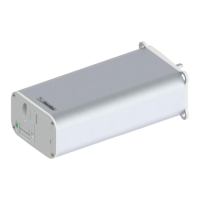
To do Signal
Step
1
2
3
4
5
6
Check if the DIP switch setting is correct
(Setting according to Chapter 5.8)
Disconnect power supply of the motor for
5 seconds and make sure that the motor
will have permanent power supply
Establish power supply and simultaneously
push programming button 1 or 2 on Motor.
Select the desired chanel by pressing the
select button (only SG 9942)
Push simultaneously programming button
1 and 2, >6 seconds. The motor is now
able to be programmed for 3 minutes
Move to first end position with programming
button 1. Subsequently, push both program-
ming buttons simultaneously for 3 seconds.
The first end position is now saved
Acoustic Signal,
LED lights
Chanel LED on trans-
mitter lights on
Acoustic Signal and
LED blinks after 3 and
6 seconds respectively
Acoustic Signal and
LED blinks 1 x
7 Move to the second end position with pro-
gramming button 2. Subsequently, push
both programming buttons simultaneously
for 3 seconds. The second end position is
now saved
Acoustic Signal and
LED blinks 1 x
2 Disconnect power supply of the motor for
5 seconds and make sure that the motor
will have permanent power supply when
reconnected. Typically unplug power lead
from motor.
3 Move the curtain with button 1 or 2 on the
motor about to the middle position of the
two endstops.
4 Select the desired chanel by pressing the
select button (only SG 9942)
Chanel LED on
trans-mitter lights on
5 Position yourself in front of the motor
with the remote control in your hand, and
open the front cover of the device and
press button „P“.
Curtain moves
independently
approx. 2 minutes
open and close
6 To dene the allocation of the buttons
press rst button on the transmitter as
soon as the curtain begins to move in the
rst direction.
The curtain will
come to a briey
hold
7 As soon as the curtain begins to move
again, press the second button on the
handheld transmitter. The transmitter has
been succesfully programmed.
The curtain will
come to a stop
Adjusting the endpositions


 To Next Page