2. Software
The first step to getting started with the EFM8BB1 is download Simplicty Studio from the Silicon Labs website (http://www.silabs.com/
simplicity-studio). Follow the installation wizard for a complete install. More information on specific tools included in Simplicity Studio
and their usage can be found at http://www.silabs.com/products/mcu/Pages/simplicity-studio.aspx.
The second software tool needed is Wireless Development Suite or WDS. This tool allows complete custimization to radio parameters.
It can be downloaded at https://www.silabs.com/products/wireless/EZRadio/Pages/WirelessDevelopmentSuite.aspx. For more informa-
tion on WDS please refer to AN796 found at http://www.silabs.com/Support%20Documents/TechnicalDocs/AN796.pdf.
2.1 Simplicity Studio
Simplicity Studio is a free tool offered by Silicon Labs that includes an IDE and many other tools to speed up development. This is the
main tool for developing on Silicon Labs' MCUs and running demos with the kit. Be sure that Simplicity Studio is installed and updated,
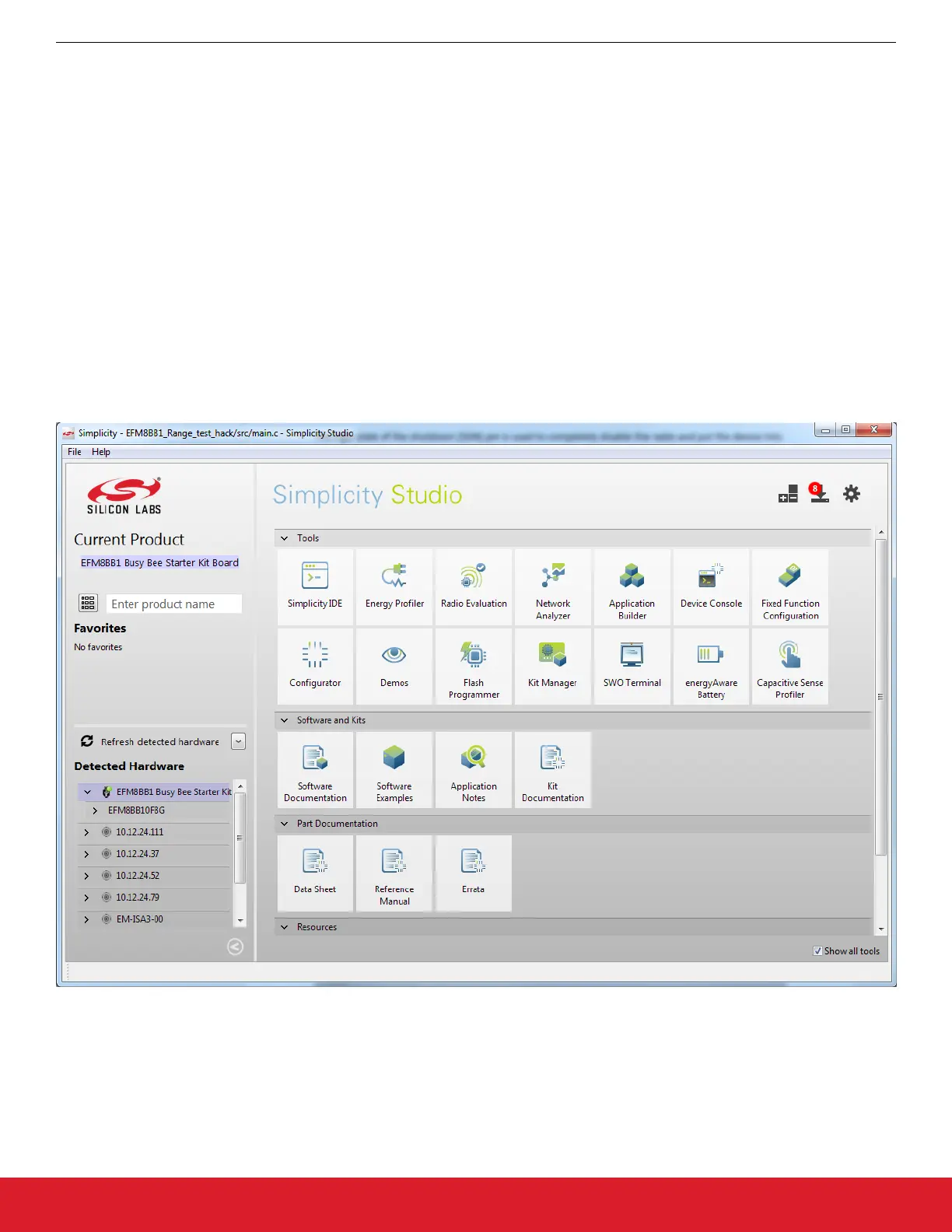
and the BB1 Starter Kit is connected. Once launched, Simplicity Studio will automatically detect any connected devices that it recogni-
zes. After connecting the BB1 kit, the device will appear in the [Detected Hardware] area of the main Simplicity Studio launcher.
Note: There may be a delay after connecting the kit before it appears in Simplicity Studio. If the kit does not appear, ensure the switch
is in the AEM position and that the J-Link drivers are installed.
Figure 2.1. Simplicity Studio Main Page
2.2 Wireless Development Suite
Silicon Labs provides a powerful tool to help with EZRadio/PRO software development, the Wireless Development Suite (WDS). It is
available at https://www.silabs.com/products/wireless/EZRadio/Pages/WirelessDevelopmentSuite.aspx. WDS allows the user to virtual-
ly select a radio and use the EZConfigPRO Setup GUI. This setup interface provides an easy path to quickly select and load the de-
sired configuration for the EZRadio/PRO devices. The EZConfigPRO Setup allows four different methods for device setup.
AN954: Programming Guide for EFM8 and EZRadio ®
Software
silabs.com | Smart. Connected. Energy-friendly. Rev. 0.1 | 6




 To Next Page