EasyManua.ls Logo

Simer Ace-In-The-Hole A5000 - User Manual

Simer Ace-In-The-Hole A5000
24 pages
Print Icon
To Next Page IconTo Next Page
Loading...
OWNER’S MANUAL
Ace-In-The-Hole
TM
NOTICE D’UTILISATION
Ace-In-The-Hole
MD
MANUAL DEL USUARIO
Ace-In-The-Hole
MR
Installation/Operation/Parts
For further operating, installation,
or maintenance assistance:
Call 1-800-468-7867
English . . . . . . . . . . . . . . Pages 2-8
Installation/Fonctionnement/Pièces
Pour plus de renseignements
concernant l’utilisation,
l’installation ou l’entretien,
Composer le
1 (800) 468-7867
Français . . . . . . . . . . . Pages 9-15
Instalación/Operación/Piezas
Para mayor información sobre el
funcionamiento, instalación o
mantenimiento de la bomba:
Llame al 1-800-468-7867
Español . . . . . . . . . .Paginas 16-22
©2003 PRINTED IN U.S.A. SIM558 (Rev. 10/17/03)
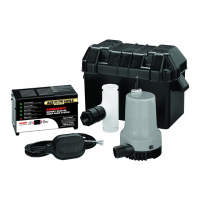
BATTERY POWERED Automatic Standby Sump Pump System
MODEL A5000
TES
T
P
UM
P
PUM
P
CYCLED
CHARG
E
REQ
UIRED
PUMP
PLUG-IN
TRAN
SFO
RM
ER
PLUG
-IN
FLO
AT
SW
ITCH
PLUG
-IN
BATTER
Y
READ
Y
RESET
SY
STEM
®
F
u
s
e
F
u
s
e
F
u
s
e
Mod. A5000
293 Wright St., Delavan, WI 53115
Phone: 1-800-468-7867
1-800-546-7867
Fax: 1-800-390-5351

Questions and Answers

  • M
    Mrs. Monique BrayAug 5, 2025
    What to do if Simer Ace-In-The-Hole A5000 runs but pumps very little water?
    • D
      Donna WilliamsAug 5, 2025
      If your Simer Water Pump runs but pumps very little or no water, there might be several reasons: * Ensure a check valve is properly installed and functioning between the primary pump discharge and the backup sump pump discharge pipe. * Clean out any blockage in the anti-airlock hole located in the pump body. * Inspect the discharge pipe for obstructions. * Verify that the discharge pipe length or height is appropriate for the pump's capacity. * Check the battery to ensure it is not low or defective. An extended power outage may have depleted the battery. * Confirm that the positive and negative wires are correctly connected to the battery. If reversed, correct the connection.
  • B
    Brooke MarshallAug 10, 2025
    Why does my Simer Ace-In-The-Hole A5000 Water Pump cycle too frequently?
    • N
      Norma HintonAug 10, 2025
      If your Simer Water Pump cycles too frequently, consider the following possible causes: * The tether length on the automatic float switch might be too short. The correct tether length is 3-1/2”. Adjust the tether length accordingly. * The check valve between the primary pump discharge and the backup pump may not be installed properly or functioning correctly. Install or repair as required, ensuring the arrow points "up". If installed backward, replace it. * Excessive water may be entering the sump pit. In this case, call a plumber.
  • A
    Arthur LewisAug 17, 2025
    What to do if my Simer Ace-In-The-Hole A5000 won’t run?
    • I
      ibrownAug 17, 2025
      If your Simer Water Pump won’t run, here are a few things to check: * Make sure the float control switch can swing freely through its entire range. * Check all electrical connections to ensure they are secure. * Inspect the battery to make sure it is not defective or low.
  • J
    Jonathan CookAug 22, 2025
    How to fix a Simer Water Pump that keeps running?
    • M
      millstaraAug 23, 2025
      If your Simer Water Pump continues to run even when the sump is empty and the switch is in the down position, it could be due to a defective float switch or control panel. To troubleshoot: * Disconnect the float switch from the control panel. If the pump stops, the float switch needs to be replaced. * If the pump continues to run after disconnecting the float switch, then the control panel needs to be replaced.
  • L
    Lisa ClarkAug 29, 2025
    What to do if Simer Water Pump motor hums but pump won’t run?
    • C
      Cassandra StoneAug 29, 2025
      If the motor of your Simer Water Pump hums but the pump doesn’t run, the issue might be a low or defective battery. Check the battery and ensure that the positive and negative wires are connected correctly.

Summary

Safety

Simer Limited Warranty

Details SIMER's limited warranty terms, conditions, and exclusions for its products.

General Information

Important Safety Instructions for Battery Charger

Crucial safety guidelines for operating the battery charger to prevent electrical shock, fire, or explosion.

Battery Backup System Overview

Overview of the battery backup system's installation and operational context.

Installation

Tools and Materials Needed

Lists essential tools and materials required for the installation process.

Safety Warnings and Notices for Installation

Consolidates key safety warnings and notices related to pump installation hazards.

Pump Mounting and Discharge Connection

Covers steps for pump placement, securing to discharge pipe, and initial connections.

Discharge Piping and Float Switch Setup

Details on connecting discharge piping, float switch cord, and check valve installation.

Battery Box Placement and Wiring

Guidance on locating the battery box, connecting battery, and recording installation date.

Electrical Connections

Wiring Connections Summary

Details the specific wiring connections required for the control panel and components.

Test the System

Instructions on how to test the system's operation after installation.

Operation

Charger;Battery Operation

Explains how the backup pump activates and operates based on water levels and battery power.

Stages of the Charging Process

Describes the meaning of the yellow, green, and red indicator lights during charging.

Error Charge Table

Provides a table correlating indicator lights and buzzer with system status and errors.

Battery Requirements

Specifies battery type, size, and safety requirements for optimal system performance.

Capacity Ratings Table

Shows pump capacity ratings based on vertical pumping distance with a 12-volt battery.

Maintenance and Troubleshooting

System Maintenance Schedule

Outlines monthly and four-year maintenance tasks for the system components.

Troubleshooting Guide

Lists common symptoms, probable causes, and corrective actions for system issues.

Repair Parts

Model A5000 Repair Parts List

Identifies all replaceable parts for the Model A5000 with key numbers and part numbers.

Simer Ace-In-The-Hole A5000 Specifications

General IconGeneral
BrandSimer
ModelAce-In-The-Hole A5000
CategoryWater Pump
LanguageEnglish

Related product manuals