EasyManua.ls Logo

Simer A5500 - User Manual

Simer A5500
11 pages
Print Icon
To Next Page IconTo Next Page
Loading...
Installation/Operation/Parts
For further operating, installation,
or maintenance assistance:
Call 1-800-468-7867
English . . . . . . . . . . . . . Pages 2-11
Installation/Fonctionnement/Pièces
Pour plus de renseignements
concernant l’utilisation,
l’installation ou l’entretien,
Composer le
1 (800) 468-7867
Français . . . . . . . . . . Pages 12-21
Instalación/Operación/Piezas
Para mayor información sobre el
funcionamiento, instalación o
mantenimiento de la bomba:
Llame al 1-800-468-7867
Español . . . . . . . . . .Paginas 22-31
©2003. PRINTED IN U.S.A. 1000001410 (Rev. 5/20/03)
OWNER’S MANUAL
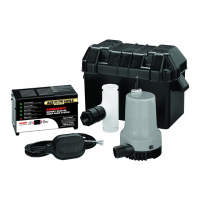
Battery Backup System
NOTICE D’UTILISATION
Système de secours à batterie
MANUAL DEL USUARIO
Systema de respaldo de la batería
ALARM RESET
SOFT RESET
AUDIBLE ALARM
DISABLE
CHARGING - YELLOW
CHARGED - GREEN
LOW BATTERY ALARM
A
U
DIB
LE
A
LAR
M
SILE
N
CE
PU
MP
RU
N A
LA
RM
A.C
.P
O
W
E
R O
N
M
IC
R
O
PR
OC
E
SS
O
R CO
NT
R
OL
LED
5
S
T
A
G
E
B
A
T
T
E
R
Y
C
H
A
R
G
E/M
A
I
N
TA
I
NE
R
12 VOLT 8 AMP
A
L
W
A
Y
S
R
E
A
D
W
A
R
N
I
N
G
S
I
N
I
N
S
T
R
U
C
T
I
O
N
M
A
N
U
A
L
B
E
F
O
R
E
U
S
I
N
G
.
®
A5500
®
293 Wright St., Delavan, WI 53115
Phone: 1-800-468-7867
1-800-546-7867
Fax: 1-800-390-5351
Web Site: http://www.simerpump.com

Questions and Answers

  • L
    Lauren WestAug 5, 2025
    What to do if Simer A5500 runs but pumps very little or no water?
    • R
      robingardnerAug 5, 2025
      If your Simer Water Pump runs but pumps very little or no water, several factors could be responsible: * Ensure a check valve is installed and functioning correctly between the primary pump discharge and the Backup Sump Pump tee. * Check the discharge pipe for any obstructions. * Verify that the discharge pipe length and/or height do not exceed the pump's capacity. * Check for a low or defective battery. * Confirm that the positive (+) and negative (–) wires are not reversed.
  • J
    Joseph DavisAug 12, 2025
    Why Simer Water Pump won’t run?
    • N
      Nicholas WaltonAug 12, 2025
      If your Simer Water Pump won’t run, consider the following possible causes: * Check for a low or defective battery. * Check all wiring connections. * Ensure that the automatic switch is free to swing up and down. * Check for a blown fuse in the charger of the A5500 system.
  • D
    Deborah BarryAug 21, 2025
    What to do if Simer Water Pump cycles too frequently?
    • P
      paul81Aug 21, 2025
      If your Simer Water Pump cycles too frequently: * Ensure the tether length on the automatic float switch is at least 2-1/2" (63mm). * Check the main check valve located between the discharge of the primary pump and the Backup Sump Pump tee. If it is not installed or working correctly, install or repair it as needed.
  • A
    Alisha DunnAug 27, 2025
    What to do if Simer A5500 motor hums but pump won’t run?
    • A
      adammillerAug 27, 2025
      If the motor of your Simer Water Pump hums but the pump won’t run, check for a low or defective battery.

Summary

Battery Backup System Overview

English Manual Sections

Details on English sections for installation, operation, and parts.

French Manual Sections

Details on French sections for installation, operation, and parts.

Spanish Manual Sections

Details on Spanish sections for installation, operation, and parts.

Safety Instructions and General Information

Understanding Safety Alerts

Explanation of safety alert symbols and signal words like DANGER, WARNING, CAUTION, and NOTICE.

General System Usage Guidelines

Details on system usage, primary vs. backup function, and battery substitution.

Simer Limited Warranty Details

Warranty Coverage and Exceptions

Details on what the Simer warranty covers, including exceptions and duration.

Warranty Limitations and Legal Rights

Information on excluded damages, implied warranties, and legal rights.

Installation Procedure

Preparation, Tools, and Materials

Lists necessary tools and materials, and preparation steps before starting installation.

Removing the Primary Sump Pump

Step-by-step instructions on how to safely remove the existing primary sump pump.

Installing the Backup Pump

Guidance on installing the backup pump, including notes on different installation methods.

Installation Procedure

Method A: Backup Pump Installation Steps

Detailed steps for installing the backup pump using Method A, including pipe connections.

Check Valve Assembly Installation

Instructions for removing, re-installing, and orienting the check valve assembly correctly.

Installation Procedure

Float Switch and Tether Assembly

Instructions for mounting the float switch assembly using cable ties and setting tether length.

Method B: Backup Pump Installation Steps

Steps for installing the backup pump using Method B, including pipe and nipple connections.

Installation Procedure

Double Pump Assembly and Final Connections

Steps for connecting the double pump assembly, making final adjustments, and gluing fittings.

Electrical Connections and Charger Setup

Guidance on connecting the charger to power and battery, including safety warnings.

Installation Procedure

Wiring Diagram and Connections

Diagram and table explaining how to connect the charger, battery, pump, and float switch.

Interpreting Charger LED Indicators

Explanation of LED indicators on the A5500 charger panel and error codes.

Testing the Backup System

Procedure to test the primary and backup pump operation after installation.

Operation and Charging

Charger Operation and Stages

Describes the 5 stages of the charging process and LED indicators.

Charger Special Features

Details on built-in safety features like reverse battery protection and safety timers.

Battery Requirements and Capacity Ratings

Information on recommended battery types, requirements, and performance ratings.

Troubleshooting and Battery Maintenance

Common Pump Troubleshooting

Addresses common problems like pump not running, low water output, or frequent cycling.

Battery Maintenance and Safety

Provides essential advice on safely maintaining the battery and protecting it from damage.

Replacement Parts

Parts List and Identification

Detailed list of all replacement parts with their corresponding key numbers and model codes.

Simer A5500 Specifications

General IconGeneral
TypeSubmersible pump
ModelA5500
Power sourceElectric
Maximum immersion depth7 m
Cable Length10 m
Motor power550 W
Max flow rate11000 l/h
Max. delivery head9 m
Power550 W
Max Head9 m
Frequency50 Hz
MaterialPlastic
Phase1
Voltage230 V

Related product manuals