JH-711 Manual
JH-711 Manual
10
09
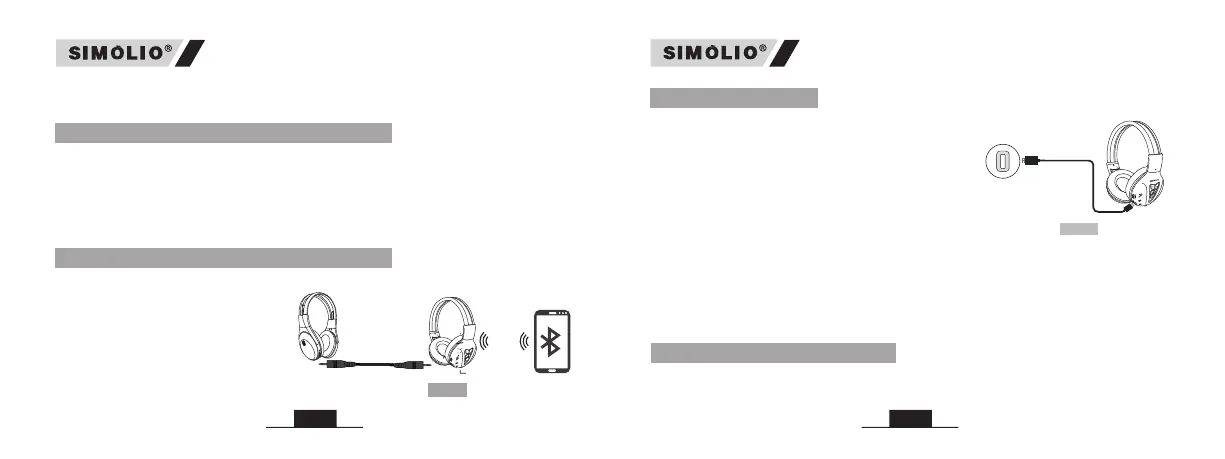
9. Use as Wired Headphones
10. Use the Additional Sharing Jack
Bluetooth headphone
JH-711
Another headphone
Sharing jack
If your audio source is non-Bluetooth enabled, or if the “SIMOLIO” battery is
low (LED flashing red), you can connect the supplied 3.5mm audio cable
between your device and the 3.5mm audio jack on your “SIMOLIO” to stream
music.
Note: The buttons and microphone on your “SIMOLIO” will not work when
used as wired headphones.
Fig 5
Plug another headphone into the
3.5mm sharing jack on the right
side of the “SIMOLIO” to share
audio with friends. Perfect for
children to use at school/home,
during traveling or flying.
Note: The volume limited function
is only available for “SIMOLIO JH-711”.
11. Charging
When the LED flashes red with a low power
prompt tone in every minute, you should
recharge your headphones. Charging the
headphones via the supplied USB Type C
cable. It normally takes about 3 hours to
fully charge the battery. The LED will stay
red when charging and will turn off when
charging is completed.
USB Type C port
on a PC/a power adapter
Charging requirement: You can plug our supplied USB Type C cable into a
compatible USB Type C charger (wall charger/travel charger/car charger
etc.) with 5V/500mA-2A output or to a Pc’s USB Type C port. It is ok to use
most mobile phone chargers on market.
Note: Please fully charge the headset before using it for the first time.
12. Clear Pairing History
You may need to reset your SIMOLIO if it's not working as expected.
Turn on the headphone, make sure there is no Bluetooth device connected or
Fig 6
Note: Your PC/ notebook should support the A2DP profile, if not you may
need a separate Bluetooth dongle that supports this feature.


 To Next Page