P
OW
ER I
N
D
C 5
V
AUX
STER
E
O / MO
N
O / O
F
F
O
P
TI
C
AL
OPT
ICA
L
A
U
X
IN
P
UT F
RO
M TV
ON / O
FF
O
UT
P
U
T TO S
PEAK ER
PO
WE
R IN
DC 5V
A
UX
STE
RE
O / M
O
N
O / O
FF
OP
TI
C
AL
OPTI CAL
A
U
X
I
NPUT F R
O
M TV
ON / O
FF
OU
T
P
U
T TO S
PEAK
ER
AUX I
N
R
12 13
Note:
* Your TV’s audio settings may be set to “Variable”
or “Fixed”. We recommend that you set your audio
settings to “Fixed” for better audio quality when
using this installation option. If you want to be
able to control your TV volume level separate from
your SIMOLIO SM-829D2 volume level, you will
need to make sure your TV is set to “Fixed”.
Contact your TV manufacturer for assistance
(Ref. Fig 3-16).
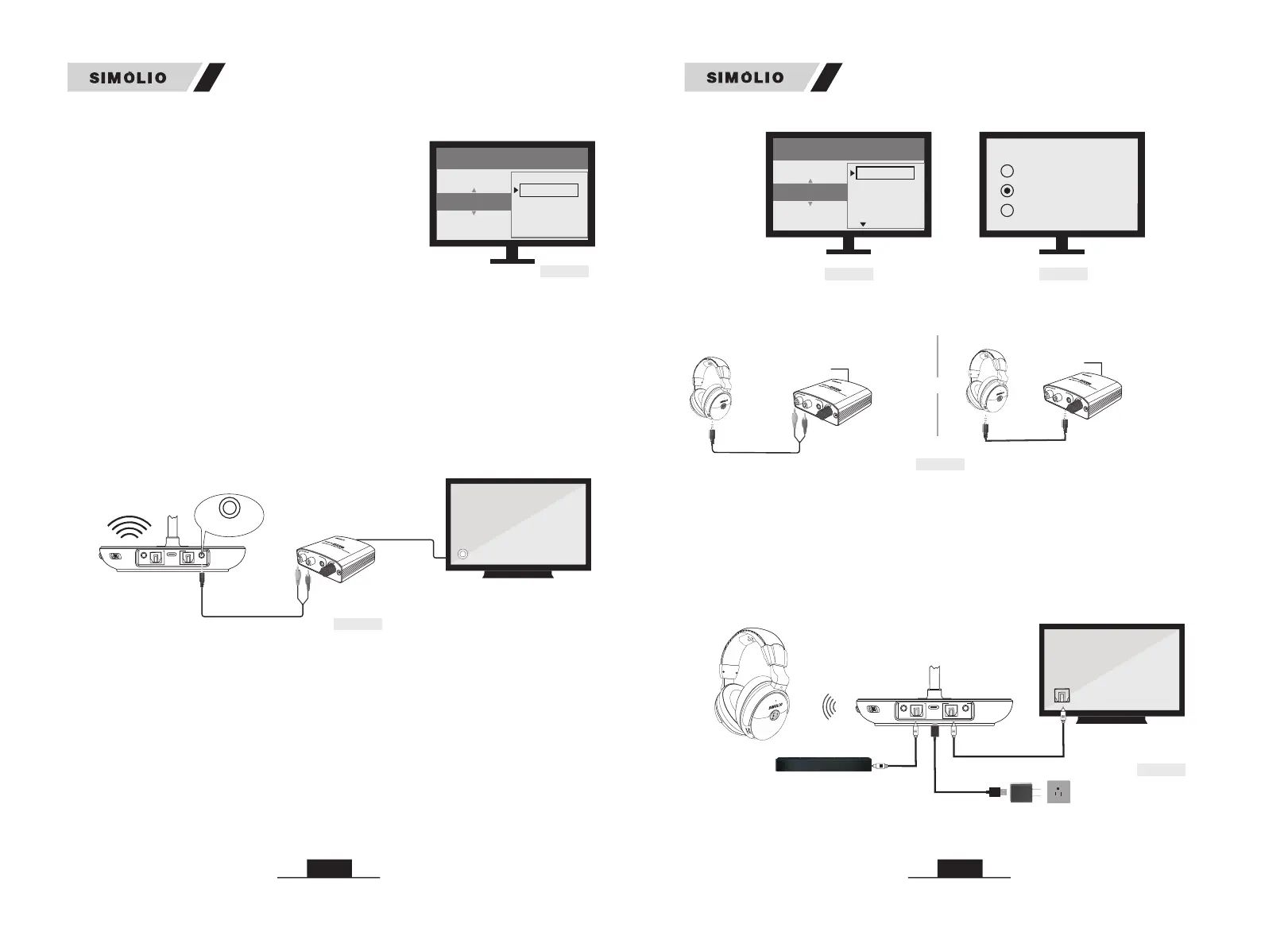
Step 2. TV Audio Format and Speaker Setting (use TV remote control)
If you can not hear sound from your headphone after connecting:
Note:
Setting menu may be different depending on different TV brands and models.
1) TV/Audio Source only has Digital Coaxial Audio Out port
3.4 Other Connections in Special Cases
* Setting menu may be different depending on different TV brands and models.
Step 1. Purchase a Digital to Analog Converter and Set up as Shown in
Fig 3-17
If your TV/Audio Source only has a digital coaxial audio out port, you will need
a digital to analog converter (SM-DAC01 Purchase separately) for installation.
• Ensure TV Audio Format is set to “PCM” or “Dolby/DTS” is OFF (This is
IMPORTANT, Ref. Fig 3-18)
PS: for certain smart Samsung models, the TV is retaining separate settings for
regular TV and internet TV setup. When you turn to the Smart Hub for Internet
source, please use the TV remote to go to Settings > Sound > Expert Settings >
Audio Format or Digital Output Audio Format, then select PCM.
• Ensure your TV speaker is set to “External Speakers” (Ref. Fig 3-19).
• Take turns to test RCA connection and 3.5mm /AUX connection.
Fig 3-16
SETTINGS
ANALOG AUDIO OUT
VARIABLE
FIXED
SOUND / AUDIO
Fig 3-18 Fig 3-19
Speakers
Internal speakers
External speakers
Headset
Settings
Audio Format
Dolby Digital
DTS
DTS Neo 2:5
PCM
• Use the AUX/RCA cable to plug the headphone into the H/P port or RCA output
of the SM-DAC01 (Purchase separately) to test if you can hear the TV sound
(Ref. Fig 3-20).
Transmitter
Fig 3-21
Digital Audio Out
(Optical)
Sound Bar
OPTICAL IN
OPTICAL OUT
Power adapter
Optical In
2) If your TV/Audio Source’s Digital Optical Audio Out port is occupied
by soundbar, you can use the by-pass feature.
Please make sure you use the same type of input/output.
A) If you're using optical cable to connect the wireless transmitter to TV, please
use optical cable to connect to the sound system (Ref. Fig 3-21).
B) If you’re using the AUX/RCA cable to connect the wireless transmitter to TV,
please use AUX/ RCA cable to connect to sound system (Ref. Fig 3-22).
SM-829D2 SM-829D2
wireless
transmitter
AUX IN
SM-DAC01
RCA
OUT
COAXIAL IN
Fig 3-17
(Purchase separately)
O
U
TPU
T
L
R
ON/O
F
F
Coaxial
Digital Out
Connect TV/Cable box/STB etc.
Fig 3-20
or
R
R
O
U
TP
U
T
L
R
ON
/
OF
F
COAXIAL IN
RCA
OUT
RCA Audio Cable
O
U
TPU
T
L
R
ON
/
OF
F
H/P
Connect TV/Cable box/STB etc.
COAXIAL IN
SM-DAC01
(Purchase separately)
SM-DAC01
(Purchase separately)


 To Next Page