Home
SimpleTech
Storage
SimpleDrive
Page 23 (Restoring Data From a Hard Drive)
SimpleTech SimpleDrive - Restoring Data From a Hard Drive
28 pages
Manual
Save Page as PDF
To Next Page
To Next Page
To Previous Page
To Previous Page
Loading...
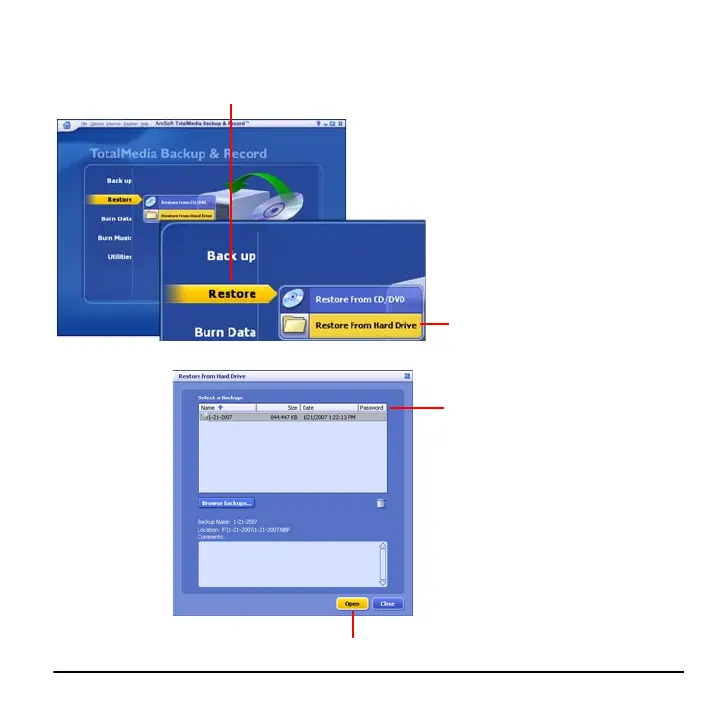
Using ArcSoft® TotalMedia Backup & Record™
19
Restoring Data From a Hard Drive
1
Place the cursor ove
r the
Restore
op
tion.
2
Click
Restore From Hard
Drive
.
4
Click
Open
.
3
Select the backup
containing
the files you want
to restore.
22
24
Table of Contents
Main Page
Default Chapter
3
Table of Contents
3
System Requirements
5
Installation
5
Guides and Additional Information
5
Visual Tour
6
Using Simpledrive
7
Connecting Simpledrive
7
Formatting Simpledrive
8
Viewing Files on Simpledrive
8
Reading the Capacity Meter
9
Using the One-Click™ Backup Button
9
Disconnecting Simpledrive
10
Using Totalmedia Backup & Record
11
Installing Totalmedia Backup & Record
11
Starting Totalmedia Backup & Record
12
Backing up Media Files
13
Backing up Personal Documents
15
Selecting Specific Folders to Back up
17
Scheduling Periodic Backups
19
Restoring Your Data
21
Restoring Data from a CD/DVD
21
Restoring Data from a Hard Drive
23
Technical Support from Simpletech
25
Specifications
26
Related product manuals
SimpleDrive SP-U25/120
8 pages
SimpleShare STI-NAS/160
8 pages
SimpleTech SP-U25/80
2 pages
SimpleTech STI-U2F36/160
8 pages
SimpleTech Pro Drive FP-UFE/1TB
17 pages
SimpleTech DELUXE
8 pages
SimpleTech FS-U25/250
4 pages



 To Next Page