Using SimpleDrive 3
USING SIMPLEDRIVE
Connecting SimpleDrive
1
Connect one end of the
provided USB or FireWire
cable to the corresponding
port on the back of
SimpleDrive.
2
Connect the other end of
the USB or FireWire cable
to the corresponding port on
your computer.
3
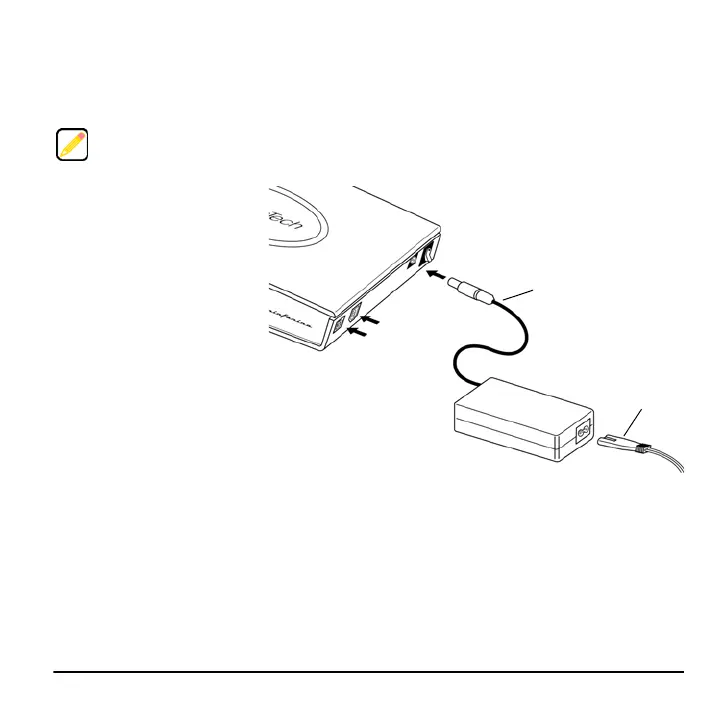
Connect the AC adapter
cord to the DC-IN socket on
the back of SimpleDrive.
4
Connect the power cord to
the AC adapter.
5
Connect the other end of the power cord to an electrical outlet or power strip.
6
Set the Power switch to the On position.
The Capacity Meter comes on for 10 seconds, providing a visual indication of the available
storage space on the drive.
SimpleDrive is ready to use.
Connect SimpleDrive to your computer using either the USB or FireWire 400 port. SimpleDrive does
not support simultaneous use of both ports.
FireWire 400 *
USB 2.0
DC-IN
Power Switch
AC Adapter Cord
Power Cord
* SimpleDrive Deluxe models only.



 To Next Page