GD1 Page 30 of 76 850-816926-EN R06
3.3.2. Using a HART® for tuning of signal strength
For tuning of signal strength and setting of transmission reference level, use the Alignment
Interface Unit and a HART® terminal.
Clean the lenses of both transmitter (TX) and
receiver (RX) for any dirt before proceeding.
The optical path should be clear at the time
of aligning (avoid fog, mist, steam, rain,
snow, etc.).
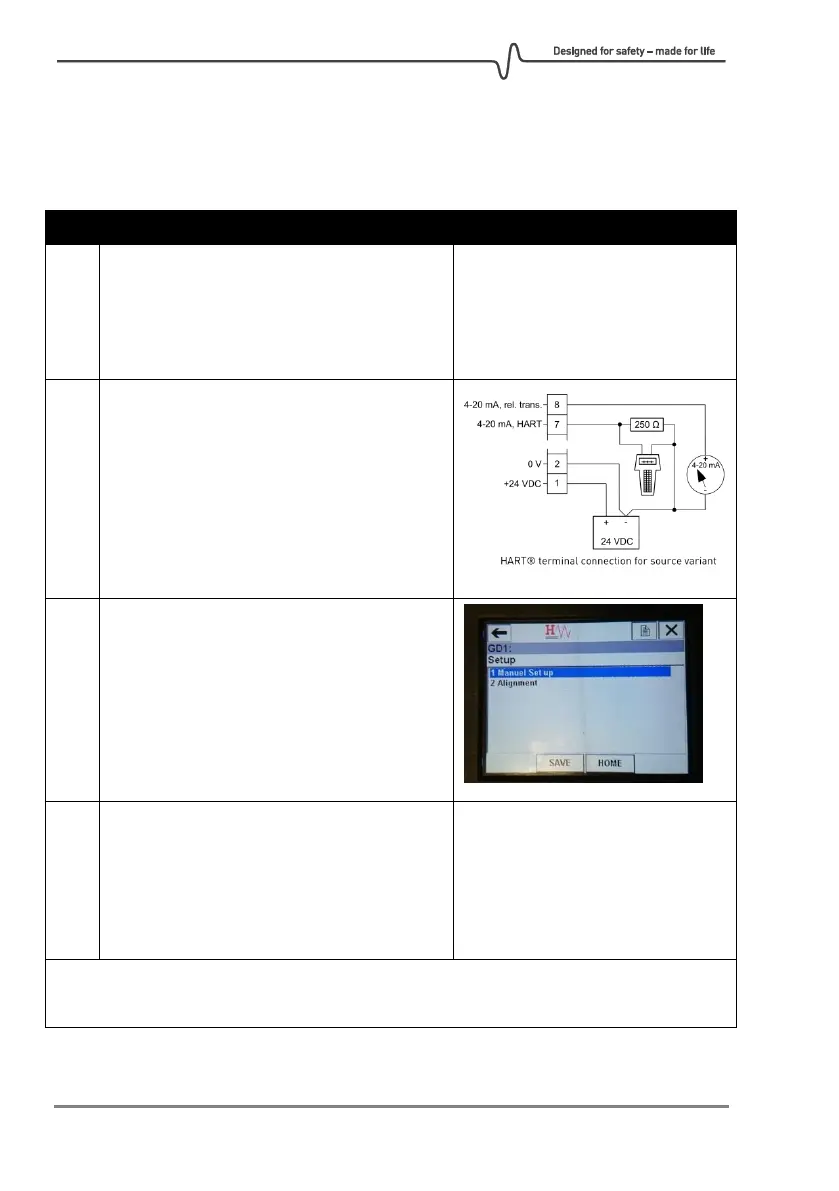
Connect the HART® terminal between
terminal 7 and 2, in parallel with a resistor as
shown in the figure to the right.
See section 0 for a more detailed description
on HART®.
On the HART® terminal start the “Alignment
procedure”. This can be found in the
following path:
ConfigurationSetupAlignment
On the HART® terminal enter the command:
#SM
Terminal response:
SM
Analogue loop 1 (terminal 7) and
loop 2 (terminal 8) will output
2 mA.
The system is now entering Service Mode. Using HART®, it is necessary to go through
Service Mode to enter or exit Alignment Mode.



 To Next Page