SERVICE MANUAL
8
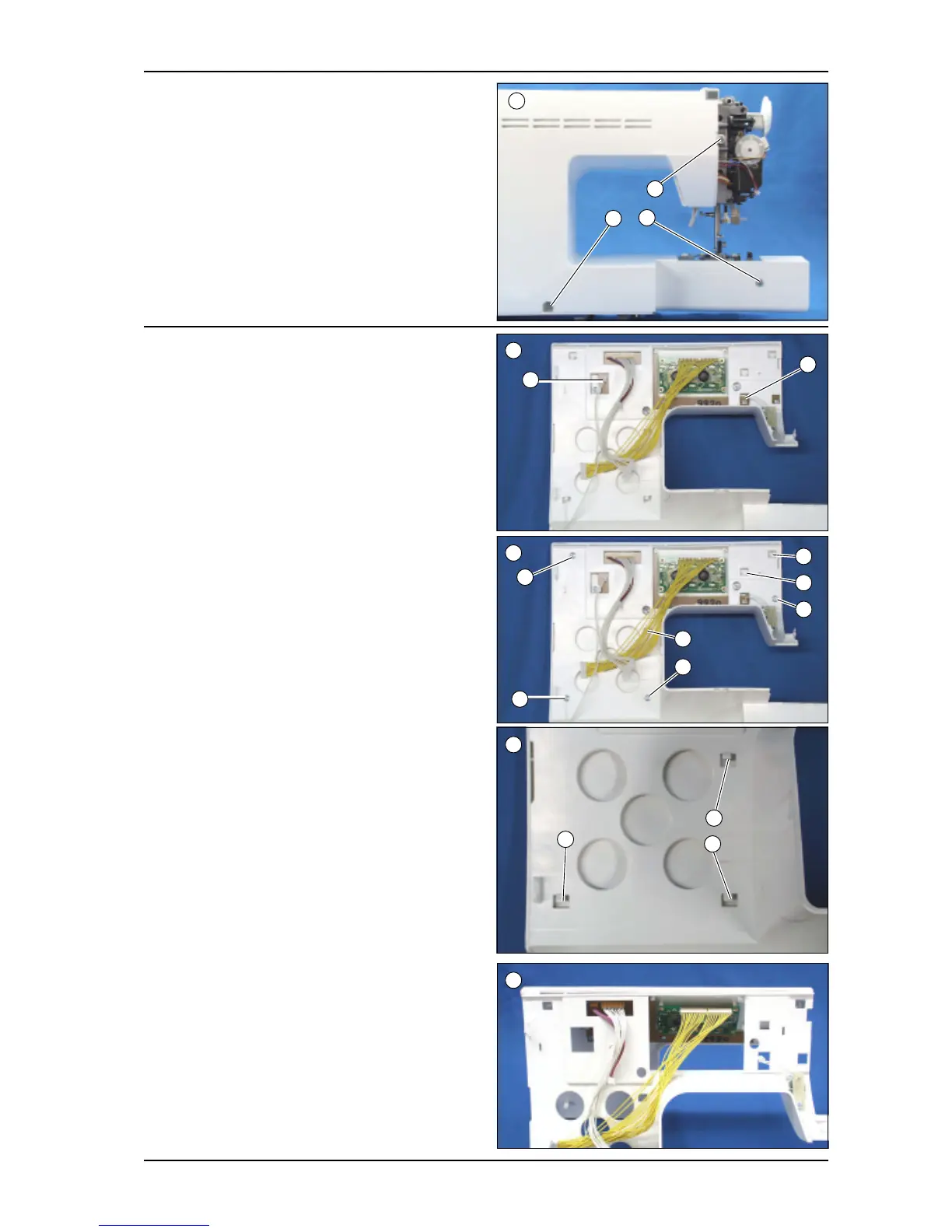
J. Rear Enclosure
1. Lower the presser foot lifter.
2. Remove the 3 screws (a, b, c).
(screw-c is longer than others.)
3. Pull the rear enclosure backward and remove it.
K. Front panel (from Front Enclosure)
1. Disconnect the 2 connectors from the front panel (a:
Reverse switch board) (b: Controller jack assy.)
TYPE B (Locked by hooks)
2. Push the lower 3 hooks (j, k, l) downward to come off
them.
3. Push the upper 3 hooks upward to come off them.
4. Pull up the front panel backward and remove it. (3
hooks on front panel will come off)
2
c
b
a
1
b
a
4
2
TYPE A (Secured by 4 screws)
2. Remove the 4 screws (c, d, e, f ).
3. Push the lower hook (g) downward and push the
upper hooks (h, i) upward to come off.
c
d
e
f
g
i
h
2
j
l
k


 To Next Page